


A support ticket escalation process is simply the formal path you create for a customer's problem when the first person they talk to can't solve it. It’s your playbook for moving an issue to a more specialized or senior team member. This ensures the trickiest problems get the right eyes on them quickly, preventing customer frustration and keeping your support engine running smoothly.
A well-oiled process is the absolute backbone of a reliable customer service operation.
Why a Solid Escalation Process Is Non-Negotiable

Let's be blunt: a messy escalation process doesn't just create delays—it actively hurts your business. When there are no clear rules, tickets get bounced around like a hot potato. This frustrates your customers and burns out your support agents. This isn't just an internal workflow problem; it has a real, measurable impact on customer loyalty and your bottom line.
Think about it from the customer's perspective. When someone with a critical issue has to explain their problem to three different people, their trust in your brand evaporates. This is where the line between a good escalation path and key business metrics like Customer Satisfaction (CSAT) and Net Promoter Score (NPS) becomes incredibly clear. A smooth handover shows you're competent and that you respect the customer's time.
The Real Cost of a Broken System
A broken process creates bottlenecks that send ripples through your entire company. The immediate fallout is easy to spot:
- Higher Customer Churn: People leave when they feel their problems are being ignored or mishandled. It's that simple.
- Agent Burnout: Your frontline agents get demoralized when they don't have a clear way to get help on tough issues, which leads to higher turnover.
- Lost Insights: Escalated tickets are a goldmine of data. A chaotic system makes it impossible to spot recurring product bugs, service gaps, or opportunities for better agent training.
Over the years, I've seen a clear shift toward more structured frameworks to handle the growing complexity of customer support. In fact, companies that formalize their escalation workflows, especially with some smart automation, have seen resolution times drop by as much as 30%.
A great escalation process should be invisible to the customer. All they experience is a fast, seamless resolution—they don't care who on your team ultimately fixed it.
What Modern Escalation Looks Like
An effective, modern escalation process is built on three things: clarity, ownership, and smart triggers. It’s not about just bumping a ticket up the chain of command. It’s about intelligently routing it to the right person with the right expertise, the first time. You can see these principles in action by checking out this detailed sample escalation procedure.
To give you a clear roadmap of what a strong framework entails, I've put together a quick summary of the core pillars we'll be diving into.
Core Pillars of an Effective Escalation Process
| Pillar | What It Is | Why It Matters |
|---|---|---|
| Clear Tiers | A structured hierarchy of support levels (e.g., Tier 1, Tier 2, Tier 3) with defined responsibilities for each. | Prevents confusion by ensuring everyone knows their role and when to hand off a ticket. No more "hot potato." |
| Defined Triggers | Specific, pre-set conditions that automatically signal a ticket needs to be escalated (e.g., time elapsed, issue severity). | Removes guesswork and subjectivity, guaranteeing that critical issues are addressed promptly and consistently. |
| SLAs & Ownership | Service Level Agreements that set time-based targets for response and resolution at each tier, with clear ticket ownership. | Creates accountability and manages customer expectations. It ensures tickets don't get lost in a queue. |
| Communication | Standardized templates and protocols for internal handoffs and external customer updates during an escalation. | Keeps everyone in the loop. The customer feels informed and valued, and internal teams have the context they need to act fast. |
These pillars are the foundation of a system that not only solves problems efficiently but also builds customer trust along the way. Let's break down how to build each one.
Defining Clear Escalation Tiers and Ownership
Without a clear structure, any escalation process is doomed to fail. I've seen it happen time and time again: agents are unsure who to send a ticket to, customers get furious, and what started as a simple question snowballs into a major headache. The solution is building a hierarchy where everyone knows their exact role and what they're responsible for.
This isn't just about drawing a flowchart. It's about eliminating ambiguity, which is the single biggest killer of an efficient help desk. A solid structure means a routine billing question won't end up on a senior engineer's plate, and a critical system bug won't get stuck with a frontline agent who doesn't have the permissions to fix it.
Structuring Your Support Tiers
Most experienced support teams I've worked with use a tiered model. You can tweak it to fit your needs, but a three-tiered system is a classic for a reason—it just works. Each level has a specific purpose and a clear owner, which is the bedrock of a good escalation plan.
-
Level 1 (L1) Frontline Support: Think of these folks as your first line of defense. They handle the high-volume, low-complexity stuff: password resets, basic "how-to" questions, and initial information gathering. Their job is to solve what they can quickly and, just as importantly, to accurately document issues that need a specialist's eye.
-
Level 2 (L2) Technical Specialists: When a problem is too tricky for L1, it comes here. Your L2 agents have deeper product knowledge and access to more advanced tools. They’re the ones who can replicate bugs, walk a customer through a complicated configuration, or troubleshoot issues that require a look at the back end.
-
Level 3 (L3) Expert & Engineering Support: This is the final stop, reserved for the toughest problems. L3 is usually made up of senior engineers, product developers, or the ultimate subject matter experts. They step in for critical bugs, system-wide failures, or any issue that requires a change to the code.
This image really helps visualize how these levels connect to create a clear path for resolving any issue that comes your way.
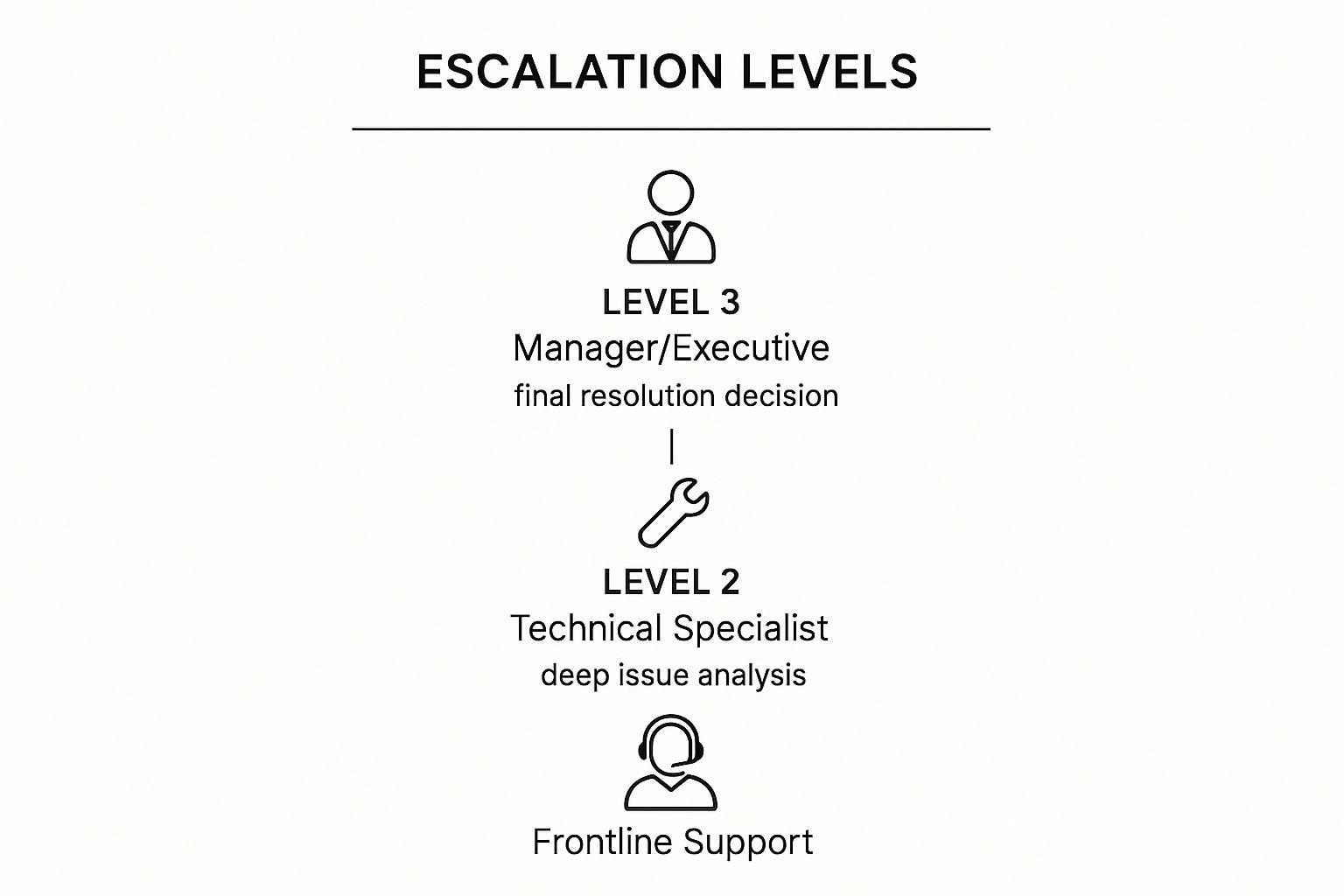
As you can see, the flow is logical. Issues move from initial triage at the frontline to deep analysis and, finally, to a definitive fix. This is how you prevent bottlenecks and keep things moving.
Ownership in Action
Let's look at this with a couple of real-world scenarios.
A customer writes in about an incorrect invoice. The L1 agent pulls up the account, cross-references it with their usage, spots the error, and processes a credit. Simple. The ticket is resolved in one touch—the perfect outcome.
Now, consider a different ticket. A customer reports that a key feature is crashing for their entire team. The L1 agent immediately knows this is beyond their scope. They confirm the basics, gather browser logs and user IDs, and escalate to L2. The L2 specialist digs in, manages to replicate the bug, and confirms it's a code-level problem. They then pass it to the L3 engineering team to deploy a hotfix. Each handoff is clean and purposeful.
Your escalation tiers aren't just a flowchart; they represent a promise to your customer. It’s a promise that no matter how complex their problem is, there’s a clear path to the person who can actually solve it.
This structure directly impacts your escalation rate—the percentage of tickets that L1 can't solve on their own. Industry benchmarks show this rate often sits between 10-15% for smaller teams and can get below 7% for large enterprise teams.
In my experience, a well-defined tiered system with empowered L1 agents should help you aim for a rate under 5%. You can learn more by exploring some benchmarks for the ticket escalation process.
Setting Up Smart Escalation Triggers and SLAs

If your support tiers are the skeleton of your escalation process, then your triggers and Service Level Agreements (SLAs) are the nervous system. These are the rules that automatically tell you when a ticket needs to be kicked upstairs—long before it blows up into a crisis.
Leaving it up to agents to decide when to escalate is a recipe for disaster. It leads to inconsistent service, missed deadlines, and seriously unhappy customers. The real goal is to build a system that can spot at-risk tickets on its own, using smart, data-driven rules instead of just simple timers.
Thinking Beyond the Ticking Clock
Time is obviously a big factor, but it can't be the only one. A truly effective escalation process understands context. A ticket from your biggest enterprise client reporting a total system outage is a different beast than a minor feature question from a free-tier user.
You need a more sophisticated set of triggers that can weigh different variables. I've found that a multi-layered approach works best.
- Priority-Based Triggers: This is the most straightforward. Tickets marked “Urgent” or “High” should have a much shorter fuse. You can set them to escalate automatically if a Level 2 agent doesn't grab them within minutes, not hours.
- Keyword-Based Triggers: This is where you can get really smart. Set up automation to scan incoming tickets for specific words. Think about phrases like “outage,” “cannot log in,” or “security breach.” Even words like “legal” or “billing error” can instantly route a ticket to the right specialized team, bypassing Level 1 entirely.
- Customer-Based Triggers: Let's be honest, not all customers are created equal in terms of business impact. You can—and should—create rules that fast-track escalations for high-value accounts, strategic partners, or even customers with a long history of critical issues. They get the white-glove service they pay for.
When you blend these triggers, you create a system that reacts to genuine business impact, not just a countdown timer.
Defining Realistic Service Level Agreements
Service Level Agreements (SLAs) are simply the promises you make to your customers. They set clear expectations for how quickly you'll respond and resolve their issues. But a one-size-fits-all SLA just doesn’t work in the real world.
A much better approach is to create tiered SLAs that match your escalation levels. For each tier, you should define two core promises:
- Time to First Response: How quickly will a customer hear from a human at that level?
- Time to Resolution: What’s the target for fully solving the problem?
Here’s a practical example of how this could look.
| Support Tier | Priority | Time to First Response | Time to Resolution |
|---|---|---|---|
| Level 1 | Low | 24 hours | 72 hours |
| Level 1 | High | 1 hour | 24 hours |
| Level 2 | High | 30 minutes | 8 hours |
| Level 3 | Urgent | 15 minutes | 4 hours |
This table immediately clarifies expectations for everyone involved—your team knows their deadlines, and your customers know what to expect.
A great SLA isn’t just an internal metric; it's a public commitment to your customer. It tells them, "We value your time, and here is our promise for how we will handle your problem."
Ultimately, your triggers and SLAs are your safety net. The triggers flag the tickets that need immediate help, and the SLAs define the speed at which that help must arrive. Getting this combination right is the bedrock of a support operation people can actually rely on.
Mastering Communication During an Escalation
When a ticket gets escalated, the technical fix is only half the battle. How you talk to the customer during this stressful period is just as critical—it can turn a frustrated user into a surprisingly loyal one. The secret is managing expectations with proactive, crystal-clear updates.
Silence is your worst enemy. Seriously. A customer left wondering what’s happening is a customer who is getting more and more annoyed. Even a quick note to say, "Hey, we're still on this," can work wonders. It shows you haven't forgotten them and keeps them from flooding your inbox with "any updates?" emails. You want to project confidence and control, not chaos.
This same idea applies to your internal handoffs. When a ticket moves from Level 1 support to a Level 2 specialist, that transition needs to be buttery smooth. The L2 agent must have all the information they need to hit the ground running without ever making the customer repeat their story. Nothing sours an experience faster than having to explain the problem all over again.
Keeping Customers in the Loop
Your updates should be empathetic and to the point. Acknowledge the user's frustration, tell them what’s happening, and provide a realistic timeframe for the next update. A well-worded message can completely reframe a negative situation into a moment that builds genuine trust.
Getting this right has a ripple effect on your other support metrics. In fact, strong communication is a core skill if you want to learn how to improve first contact resolution and prevent escalations from happening in the first place.
A customer who is informed about a delay is often understanding. A customer who is left in the dark about a delay becomes angry. The difference isn't the problem; it's the communication.
Your messaging should also change depending on where you are in the process. At the start, it's all about acknowledging the problem and setting expectations. In the middle, it's about progress updates. And at the end, it’s a clear summary of the fix and confirmation that everything is working again.
Sample Escalation Communication Templates
To make sure your team’s communication is always consistent, professional, and empathetic, it helps to have some pre-written templates. This takes the pressure off agents and empowers them to communicate with confidence.
Here are a few practical examples you can adapt for your own help desk.
| Scenario | Audience | Template Snippet |
|---|---|---|
| Initial Escalation | Customer | "Hi [Name], thanks for your patience. I've escalated your issue to our specialist team who has the right tools to investigate this further. We'll be back in touch within [Timeframe]." |
| Internal Handoff | L2 Agent | "Escalating ticket #[Number] to L2. Customer is experiencing [Issue]. I've gathered logs and confirmed [Details]. Customer is on the [Plan Type] plan. Please take ownership." |
| Progress Update | Customer | "Quick update on your ticket: Our team is still actively working on a fix for [Issue]. We don't have a final timeline yet, but we'll let you know as soon as we do. We appreciate your patience." |
| Resolution Summary | Customer | "Good news! We've resolved the issue with [Feature]. You should now be able to [Action] without any trouble. Please let us know if you run into any more problems." |
These templates provide a solid foundation. Encourage your team to personalize them so they feel less like a script and more like a helpful, human conversation.
Using Metrics to Analyze and Improve Your Process

A ticket escalation process isn’t something you can just set up and walk away from. It's a living, breathing part of your support operations. It has to evolve right along with your company, your products, and your customers. The only way to steer that evolution is with data. After all, you can't improve what you don't measure.
When you start tracking the right metrics, you stop guessing and start making informed decisions. This is how you find the real friction points in your workflow, whether it's a bottleneck with your Level 2 experts or a knowledge gap on the frontline team.
Identifying Your Core Escalation KPIs
Look, there are a million metrics you could track. The trick is to focus on the handful of Key Performance Indicators (KPIs) that give you the most bang for your buck without drowning your team in data. A simple, clean dashboard monitoring the health of your escalations is all you need to get started.
Here are the essentials I always recommend focusing on first:
- Escalation Rate: What percentage of your total tickets can't be solved by Level 1 support? If this rate is high or creeping upward, it's a huge red flag that your frontline team might need more training, better documentation, or clearer guidelines.
- Resolution Time for Escalated Tickets: Once a ticket gets bumped up, how long does it sit there until it’s finally resolved? A long resolution time often points to slow handoffs between teams or an overloaded specialist.
- Touches Per Escalated Ticket: How many different people have to handle a ticket before it’s closed? If a ticket is bouncing between three, four, or more agents, it’s a classic sign of a confusing escalation path where no one has clear ownership.
Don’t just track the metrics—question them. A low escalation rate looks great on paper, but not if it’s because agents are burning time on tickets they should have escalated hours ago. You always have to dig into the story behind the numbers.
Turning Data Into Actionable Improvements
Collecting the data is just step one. The real magic happens when you use that information to make meaningful changes. You want to create a feedback loop: analyze the numbers, spot a problem, implement a fix, and then measure again to see if your fix actually worked.
Let's say you notice the resolution time for escalated tickets about billing is sky-high. You dig in and find out they’re all going to the general L2 queue instead of directly to the finance team, where they belong. The fix is simple: you create a new automation rule to route them correctly. Problem solved.
Reviewing your data on a regular schedule is what helps you find these opportunities. To get a more complete picture, you can explore a broader set of customer support metrics with these 10 key indicators of success.
This cycle of analysis and refinement is what separates a merely adequate support system from an exceptional one. By setting aside time for quarterly KPI reviews, you can systematically uncover recurring product bugs, pinpoint specific training needs, and continuously improve your entire support ticket escalation process. The result? Better efficiency and much happier customers.
Common Questions About Escalation Processes
Even the most well-thought-out plan will hit a few bumps when you start putting it into practice. As you build your support ticket escalation process, you'll inevitably run into some real-world questions and unique challenges.
Let's walk through some of the most common strategic questions I’ve seen teams wrestle with. Getting these right can be the difference between a process that just looks good on paper and one that actually works for your team and your customers.
What Is the Biggest Mistake to Avoid?
By far, the most common pitfall I see is not clearly defining the rules of engagement for each support tier. When the lines are blurry, you create a "hot potato" scenario where tickets get tossed back and forth with no one taking real ownership. The result is pure chaos, and it leaves both your customers and your agents incredibly frustrated.
A successful process leaves zero room for ambiguity. You need crystal-clear, explicit rules that spell out exactly which team handles which types of issues and under what specific conditions a ticket moves up the chain. Without that clarity, accountability evaporates, and your resolution times will skyrocket.
How Can We Reduce Our Escalation Rate?
If you want to see fewer escalations, the answer is to empower your frontline team. The key is giving your Level 1 agents the knowledge and tools they need to solve more problems right then and there.
- Build a Great Knowledge Base: Your agents need a comprehensive, easily searchable library of solutions. This lets them find answers on their own instead of having to tap a senior person on the shoulder for every little thing.
- Provide Continuous Training: Don't just train new hires and call it a day. Hold regular sessions on new features and common problems. A great pro-tip is to analyze your past escalations—look for trends and then create training to fill those specific knowledge gaps.
- Encourage First Contact Resolution: Arming your L1 team with better tools and deeper knowledge is the fastest way to help them resolve more issues on the first try. This doesn't just lower escalation rates; it also gives your customer satisfaction a massive boost.
The goal isn’t to eliminate escalations entirely—some issues will always need an expert. The goal is to ensure that only the truly complex tickets are the ones that get escalated.
Should Every Customer Have the Same Escalation Path?
Not necessarily. While a standard process is crucial for consistency, it's often a smart business decision to create a faster, more direct escalation path for your highest-value customers. This can even be a major selling point in their Service Level Agreement (SLA).
So, what does that look like in the real world? For an enterprise client, an expedited path might include:
- Shorter Time-Based Triggers: Their tickets might escalate after 30 minutes of inactivity, not 4 hours.
- Direct Access to Level 2: For certain technical issues, they might be able to bypass the initial frontline triage altogether.
- A Dedicated Point of Contact: An account manager or a senior specialist could be assigned to personally oversee their escalated issues from start to finish.
Segmenting your escalation paths based on customer value or contract terms is a strategic way to make sure your most experienced people are focused on your most critical accounts.
Ready to stop tickets from getting lost in the shuffle? Screendesk replaces endless back-and-forth emails with crystal-clear video communication. Empower your agents to resolve issues faster and give your customers the seamless support they deserve by visiting Screendesk's official site.
