


Let's be honest, "service delivery optimization" sounds a bit like corporate jargon.Let's be honest, "service delivery optimization" sounds a bit like corporate jargon. But what it really boils down to is simple: making your service operations smarter, faster, and more focused on what your customers actually need.
It’s about evolving past the old-school, reactive "fix-it" mentality. Instead, you build a forward-thinking, data-backed strategy that not only makes customers happier but also seriously helps your bottom line.
Why Service Delivery Optimization Matters Now

In a marketplace this crowded, just having a service isn't going to cut it anymore. Customers today have high expectations. They want their problems solved quickly, with a personal touch, and without a lot of hassle. This shift means businesses have to get serious about how they operate, making service delivery a core part of their strategy, not just an afterthought.
This isn't just about solving problems as they pop up; it’s about getting ahead of them and making every single customer interaction as smooth as possible. When you fine-tune your processes, you're not just boosting efficiency—you're directly influencing customer loyalty and your own profitability. Every minute your team saves on a support ticket and every issue they solve on the first try adds up, building a much stronger, more resilient business.
From Reactive Fixes to Proactive Strategy
The traditional "break-fix" model is quickly becoming a relic. Making customers wait until something breaks to report it just creates frustration and keeps your team permanently on the back foot. A modern approach to service delivery flips this entire script.
The new focus is on using data and the right tools to really understand the customer journey and improve it from end to end. This means you need to get good at:
- Finding Friction: Pinpointing exactly where customers get stuck or slowed down.
- Sharpening Communication: Cutting down the endless back-and-forth between your agents and customers.
- Learning from Every Interaction: Digging into support data to stop the same problems from happening over and over again.
This isn't just a niche idea; it’s a massive market shift. The global network optimization services market hit USD 5.9 Billion in 2024 and is expected to skyrocket to USD 19.3 Billion by 2033. This growth is fueled by a relentless demand for operational excellence. You can read more about these market trends and what's driving them.
To truly excel, businesses need to build their strategy around a few key pillars. These components work together to create a service model that is both efficient for the business and effective for the customer.
The Pillars of Modern Service Delivery
This table breaks down the core components of a successful service delivery optimization strategy and their primary business impact.
| Pillar | Focus Area | Key Business Impact |
|---|---|---|
| Visibility | Understanding the exact user experience through visual context (screen recordings, live calls). | Reduces agent guesswork, leading to faster resolutions and fewer repeat tickets. |
| Efficiency | Streamlining agent workflows and reducing time spent on each interaction. | Lowers operational costs and increases the capacity of the support team. |
| Proactivity | Using data and analytics to identify trends and prevent future issues from occurring. | Improves customer satisfaction and loyalty by solving problems before they arise. |
| Collaboration | Enabling real-time communication between customers, agents, and internal teams. | Breaks down silos, allowing for quicker, more comprehensive problem-solving. |
By building your service operations on these pillars, you create a system that doesn't just react to problems but actively works to improve the entire customer experience.
By focusing on optimization, you’re not just managing tickets—you’re managing the entire customer experience. This is how you turn a cost center into a powerful engine for customer retention and growth.
This is where tools like Screendesk become indispensable. They provide the visual proof and real-time collaboration that your team needs to understand problems on a deeper level and solve them in a fraction of the time. With this foundation, you can build a service model that doesn’t just meet expectations but consistently leaves them in the dust, keeping you well ahead of the competition.
Get the Full Story with Asynchronous Video
We’ve all been there. The endless email chain with a customer that goes nowhere. You ask for more detail, they send back a vague description, and you’re stuck in a loop. It’s a huge time-waster and, frankly, a frustrating experience for everyone.
True service delivery optimization is about stopping that cycle before it starts. The trick is to get the full context of an issue from the very beginning. This is where asynchronous screen recordings completely change the game. Instead of asking customers to tell you what’s wrong, you can finally let them show you.
Eliminate Guesswork with Visual Evidence
Let’s say a customer reports a bug in your app. They say a feature “isn’t working,” but what does that actually mean? A dozen things could be wrong. Is a button dead? Is the page timing out? Did an error message pop up?
Instead of guessing, you can use a tool like Screendesk to send the customer a simple recording link. With one click, they can capture their screen and walk you through their exact process—what they clicked, the steps they took, and precisely where things went wrong. Suddenly, you have crystal-clear visual proof, and all the guesswork is gone.
When you can see a user’s exact actions, you’re no longer dealing with vague descriptions. You have concrete, actionable evidence. That’s the fastest way to find and fix the root cause.
This is a lifesaver for technical troubleshooting. When a customer makes a recording, Screendesk quietly grabs all the crucial diagnostic data in the background—details they would never know how to find on their own.
- Console Logs: It captures all the browser errors and warnings happening behind the scenes.
- Network Data: You can see failed requests or other technical hiccups invisible to the user.
- Browser Information: The browser type, version, and operating system are logged automatically.
Think about it: a single screen recording gives your team more useful data than a dozen emails ever could. Your engineers can stop asking questions and get straight to solving the problem.
Reclaim Time and Boost Your Metrics
When you replace those long email threads with clear, context-rich screen recordings, the impact on your team’s performance is immediate. First Contact Resolution (FCR) rates go up because agents have what they need to solve the issue on the first try. Average Handle Time (AHT) plummets because you’ve cut the back-and-forth diagnosis from hours to minutes.
But it’s not just about efficiency. This shift makes for a much better customer experience. People feel heard because they can easily show you their problem without needing to be tech-savvy. You’ve turned a potential headache into a quick, painless fix. And the result? Happier agents, more loyal customers, and a support operation that just runs better.
Solve Complex Issues Faster with Live Calls

While screen recordings are fantastic for getting a first look at a problem, some issues just can't wait. When you're stuck in a long back-and-forth email chain, that's when a live video call becomes your most powerful tool for service delivery optimization.
Knowing the right moment to suggest a call is a skill you develop over time. You don’t need it for every ticket, but for those tricky, high-stakes situations, it’s a game-changer. Hesitate too long, and you risk a frustrated customer walking away for good.
Knowing When to Go Live
Think of a live call as your express lane to a solution. It's the perfect move when a problem is too tangled for text or when you can sense a customer's patience is wearing thin. A quick face-to-face chat can instantly lower the temperature and show them you're all-in on finding a fix.
Here are a few moments when I’ve seen live calls work wonders:
- Intricate Tech Troubleshooting: The user is describing a bug that depends on multiple factors, and you need to guide them through advanced settings. A live call with co-browsing lets you see exactly what they see and take control if needed.
- High-Touch Onboarding: A new, high-value client just signed up. A personal video call offers a warm welcome, helps you walk them through the most important features, and makes them feel valued right from the start.
- Urgent Escalations: The customer is at their wit's end, and the issue is impacting their entire business. Jumping on a call demonstrates that you’re treating their problem with the urgency it deserves.
I’ve found that a single 15-minute live call can resolve what might have taken a week of emails. It’s not just about fixing the issue; it’s about choosing the right tool to strengthen the customer relationship at a critical moment.
This shift toward proactive, high-touch support is something we're seeing across the industry. As you can discover in more detail about this service transition, smart companies are using data and better tools to get ahead of problems instead of just reacting to them.
Making the Switch to Live Support Effortless
Here’s the secret: for live support to work, it has to be dead simple.
With a tool like Screendesk, you can start a video call straight from the support ticket in Zendesk or Intercom. The best part? The customer doesn’t need to download anything or install a clunky plugin. They just click a link and join.
This tight integration means your agent keeps all the history and context from the ticket, while the customer gets immediate, personal help without any friction. Moving from a text-based chat to a live video call without a single hiccup—that's what modern support looks like in the real world.
Turn Support Data into Actionable Insights
Great service isn't just about closing tickets faster. It’s about learning from every single interaction so that, over time, fewer tickets get created in the first place. Think of your support data as a goldmine—it tells you not just what problems users are running into, but why they're happening.
When you move beyond surface-level metrics like response times, you start to see the real picture. With analytics from a tool like Screendesk, you can finally connect the dots between a support request and an underlying issue in your product. This is how a support team goes from being a reactive crew to a proactive force for genuine improvement.
It's all about creating a powerful feedback loop.
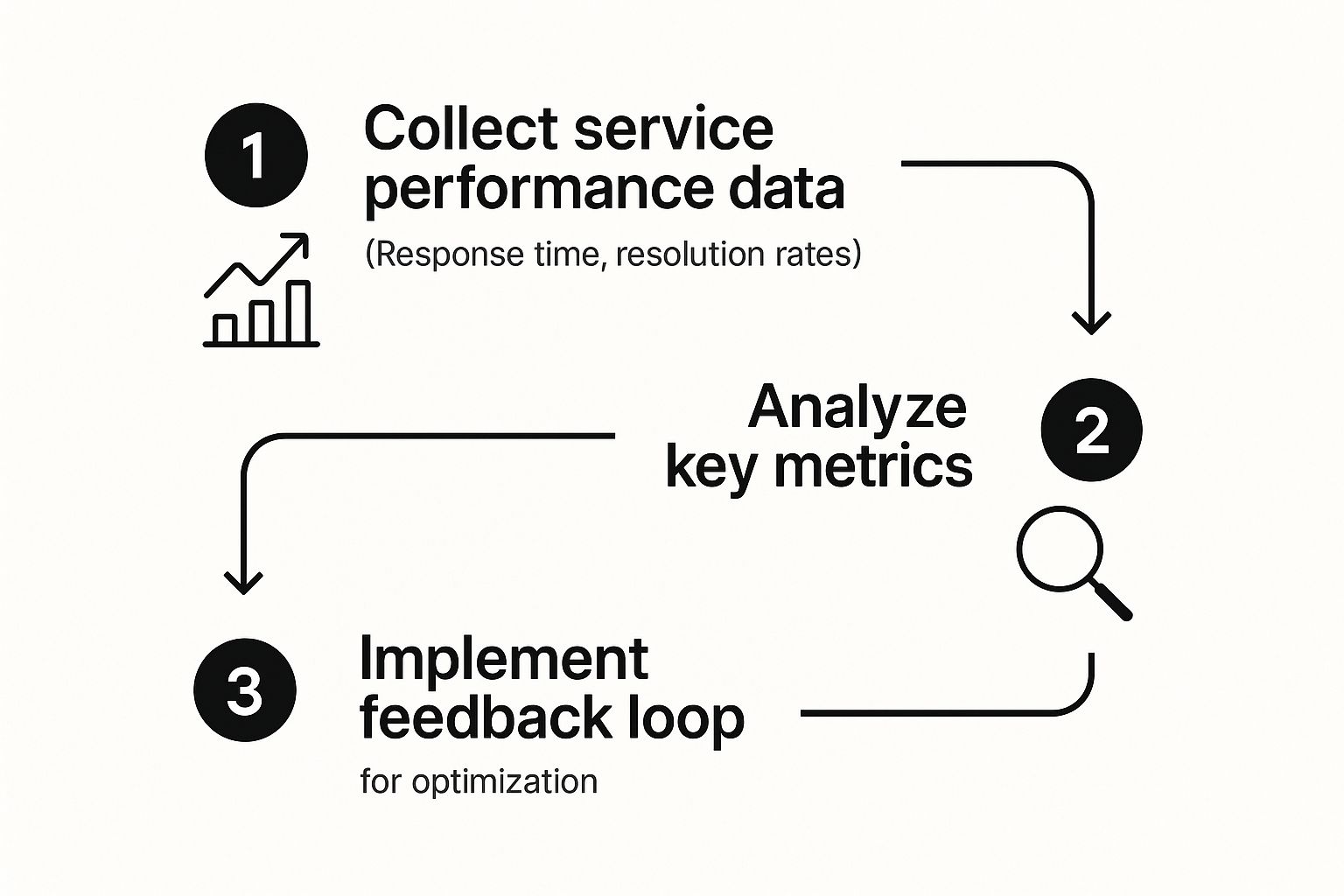
As you can see, the flow is straightforward: you gather data from support interactions, analyze it for patterns, and then use what you learn to make meaningful changes.
Uncovering Hidden Trends in Your Data
The first move is to get smart about how you categorize interactions. "Bug report" is too generic. You need more detail. Is it a "login failure," a "payment processing error," or a "dashboard glitch"? That level of specificity is what makes the data useful.
Once you start tagging conversations properly, you can ask much better questions:
- Frequency: Are we suddenly getting a lot of tickets about the new checkout page?
- User Segment: Why do users on our free plan keep getting stuck on the same onboarding step?
- Timing: Are certain errors popping up more often right after our weekly deployments?
Spotting these patterns helps you catch usability flaws and recurring pain points before they snowball into bigger problems. This is how you build a solid feedback loop that directly connects your support specialists with your product and engineering teams.
You're no longer just putting out fires. You're finding the source of the sparks and removing it for good. This shift is what sustainable service improvement is all about.
From Data Point to Action Plan
Okay, so you've found a trend. That's great, but it's only half the job. The real magic happens when you turn that insight into a concrete plan.
Here's a practical guide to transforming raw support data into concrete improvement strategies for your product and processes.
From Data Point to Action Plan
| Data Point | Potential Insight | Actionable Step |
|---|---|---|
| 20% of all tickets are simple password reset requests. | The "Forgot Password" link is probably too hard to find. | Let's A/B test a more prominent placement for the link on the main login page. |
| Multiple screen recordings show users clicking everywhere but the save button. | The "Save" button's design might be confusing or just blends in too much. | Time to redesign that button with a clearer label and better color contrast. We'll loop in the product team. |
| A specific error code keeps appearing in tickets right after our last feature launch. | There's likely a bug in the new feature's code. | Escalate the video recordings and console logs directly to engineering for an immediate hotfix. |
This kind of methodical approach ensures the priceless information your support team gathers doesn't just sit in a spreadsheet. It becomes a critical driver for making the product better and the customer experience smoother.
To get a better handle on what you should be tracking, take a look at our guide on the essential customer service quality metrics.
Weaving Optimization Into Your Daily Workflow

Let's be honest: bringing in new tools for service delivery optimization can feel like a massive chore. But the goal here isn't to rip up your current processes and start from scratch. It's about making your team's life easier by plugging powerful new features right into the systems they already live in, whether that's Zendesk, Jira, or Intercom.
Success comes down to connection. You want your team to be able to ask for a screen recording or hop on a video call without ever leaving their helpdesk. When the tools feel like a natural part of their day—not just another login to remember—that's when you see real adoption and immediate results.
Building a Truly Unified Support Stack
True integration is more than just having a bunch of apps open in different tabs. It's about making them talk to each other. With a tool like Screendesk, you can drop video call links and screen recording requests right into your ticket macros or saved replies.
This creates one clean, central place for every ticket. All the visual proof, from a customer's recording to the transcript of a support call, gets automatically attached to the right ticket. No more frantic tab-switching or manual copy-pasting. This simple change saves a ton of time and stops important details from falling through the cracks. As you dial in these tools, it's a good idea to borrow some proven sales process optimization tips to sharpen your entire customer experience.
Getting Your Team On Board
Even the most amazing tool is just shelfware if nobody uses it. A smart rollout is the key to making these new methods stick.
The secret to high adoption is framing it as a solution to your team's biggest frustrations. Show them how it kills those endless back-and-forth emails and gives them the clarity they need to solve problems on the first touch.
Here’s how I've seen teams successfully launch new tools:
- Find Your Champions: Before a full launch, pick a few agents who are excited about new tech. Let them pilot the new workflow, find the cool tricks, and become your internal experts. Their success stories will do more to convince their peers than any top-down mandate.
- Focus on the "WIIFM": When you do train the whole team, make sure it’s all about "What's In It For Me?" Talk less about features and more about how this makes their job less frustrating. Highlight the joy of closing a tricky ticket in minutes, not days.
- Embed It in Their Habits: Show them exactly where the new features fit into their existing process. For example, you could create a macro in your helpdesk that automatically sends a Screendesk recording request whenever a ticket is tagged as a "technical bug."
By making these tools a seamless part of the daily grind, you make sure they actually get used. Once that's running smoothly, you can take the next step and look for ways to automate customer support for the simple, repetitive stuff. This frees up your agents to focus on the complex problems where these visual tools can really shine.
Common Questions About Service Delivery Optimization
Diving into service delivery optimization can feel like a massive undertaking, but it doesn't have to be. Most teams I talk to have the same initial questions—where do we even start, and how do we prove it's working?
Let's break it down. Think of this as a journey of continuous improvement, not a one-time, all-out sprint. The secret is to start small, build momentum, and create real, lasting change in how you support your customers.
Where Do I Even Begin with Service Delivery Optimization?
The best place to start is by figuring out where things are really breaking down for your customers. Before you can fix anything, you need to understand the current state of affairs. Start by tracking your core metrics, like First Contact Resolution (FCR) and your overall customer satisfaction scores. This gives you a baseline.
Once you have that data, bring in asynchronous screen recordings. Instead of asking customers to describe their problem, ask them to show you where they get stuck. This simple shift replaces guesswork with concrete evidence. You'll immediately get a data-backed starting point that shines a light on the most critical issues to tackle first.
The goal here isn't to solve everything at once. It's to gain clarity. Seeing a user's struggle firsthand in a screen recording is the fastest way to understand what's actually going on.
This initial discovery phase is everything. It ensures you're spending your time on problems that genuinely matter to your customers, not just the ones you assume are the biggest pain points.
How Do I Get My Team to Actually Use New Tools?
Team buy-in is never about top-down commands. It’s about answering the "what's in it for me?" question for your agents. You have to frame new tools as a solution to their daily headaches. This is how they can finally stop asking the same repetitive questions, cut down on those long, confusing email threads, and close tickets way faster.
A fantastic strategy is to run a small pilot with a few of your most enthusiastic agents. Let them be the champions. When they start telling their colleagues how they closed a tricky ticket in five minutes instead of two days, others will naturally want in on the action.
Ultimately, people will use tools that make their jobs easier. For instance, if you integrate visual tools directly into your existing helpdesk, you’re not adding another step to their workflow. When asking for a screen recording is as simple as firing off a macro, it just becomes the new, smarter way to solve problems.
How Can I Measure the ROI of These Changes?
Measuring the return on investment (ROI) is a mix of hard numbers and softer, but equally important, qualitative improvements. For the hard data, you can track a few key metrics:
- Average Handle Time (AHT): How much time are agents saving now that they have visual context from the start? Watch this number drop.
- Ticket Escalations: Are fewer tickets getting passed up to senior staff or engineers? This is a huge win for efficiency.
- Recurring Ticket Volume: When support insights lead to actual product fixes, you should see a drop in tickets about those known issues.
For the qualitative side, keep a close eye on your Customer Satisfaction (CSAT) scores. As you make the support experience smoother and less frustrating, you'll naturally learn how to increase customer satisfaction and see those scores climb.
The most compelling ROI story you can tell is connecting support-driven insights directly to product improvements that prevent future tickets from ever being created. That's a direct, powerful impact on the bottom line.
Ready to stop guessing and start seeing? Screendesk gives your team the visual tools they need to resolve issues faster and deliver an exceptional customer experience. Start your free trial today and see the difference for yourself.
