


Let's be honest, long email chains are a drag. A quick video message is often a much better way to get your point across, and it's fast becoming a secret weapon for top-tier customer support teams. With a tool like Screendesk, you can send video messages right from your help desk. This means you can solve tricky problems in minutes, not days, and build real trust with your customers along the way.
Why Video Is Changing the Customer Support Game
We've all been there. The endless back-and-forth of support emails can feel cold and painfully slow. Customers struggle to describe a weird technical glitch, and agents have to guess what's happening from a wall of text. Asynchronous video messages completely sidestep this problem, bringing a much-needed human connection back into the conversation.
This isn't just a fleeting trend. It’s a fundamental shift in how we communicate. The market for video tools has exploded, jumping from $7.0 billion in 2022 with a projection to hit $21.0 billion by 2032. This shows just how much video is becoming a standard part of how we work.
Adding a Human Touch to Resolutions
When a support agent hits "record" and shares their screen, they’re doing more than just showing a fix. They are personally walking the customer through the solution. The customer sees a real person who took the time to address their specific problem, which instantly builds rapport.
Think about it. A customer can't find a certain feature in your software. An email might say, "Go to Settings, then click the Advanced tab." But a video? A video shows the agent’s cursor moving to the exact spot, clicking the icon, and pointing out the feature, all with a friendly voice guiding them. That simple, personal touch turns a boring support ticket into a memorable, positive experience.
A great video message doesn't just solve a problem—it shows the customer you genuinely care. This is how you turn a simple support interaction into a moment that builds lasting loyalty.
Drastically Improving Clarity and Efficiency
The single biggest win with video support is how it vaporizes confusion. What might take five paragraphs of careful writing can be shown perfectly in a 30-second clip. This clarity is a game-changer for everyone involved.
- For Customers: They see the exact steps, which kills frustration and means they don't have to ask for more help.
- For Agents: They spend way less time typing out detailed instructions and more time actually closing tickets. It’s a huge productivity boost.
This direct, show-don't-tell approach is at the heart of effective https://blog.screendesk.io/video-customer-support/, slashing resolution times. When you start personalizing these interactions, the impact multiplies. Exploring different personalized video marketing strategies can even give you more ideas. By bringing video into your workflow, you’re not just improving metrics; you’re creating a more empathetic and efficient support system.
Recording Your First Support Video with Screendesk
Alright, let's talk about hitting that red record button for the first time. I get it, it can feel a little strange. But trust me, making a video message with Screendesk is way easier than you think. The trick is to forget about being perfect.
Your goal isn't to create a Hollywood masterpiece. It's simply to be clear, friendly, and genuinely helpful. You're there to solve a customer's problem in a way that feels personal and efficient. So, let’s go over the basics to get you recording with confidence.
Choosing Your Recording Setup
When you fire up the Screendesk recorder, you'll see a few different modes. Don't overthink it. The right choice just comes down to what you need to show the customer to solve their problem.
Here are your main options:
- Screen Only: This is your bread and butter for most tech support tickets. It's perfect when you need to walk someone through software, point to a specific feature, or show them exactly how to troubleshoot an error message.
- Camera Only: Think of this as the video equivalent of a friendly wave. It's great for quick, personal check-ins, welcoming a new user, or delivering a message where showing your screen isn't necessary. It puts a friendly face to the name.
- Screen and Camera: This is where the magic happens. Honestly, it’s the one I use most often. You get the best of both worlds: the personal touch of seeing your face in a small bubble, combined with a crystal-clear view of your screen.
For the vast majority of support issues, Screen and Camera is the way to go. It builds a ton of trust and makes your instructions incredibly easy to follow.
Preparing Your Digital Workspace
Before you even think about recording, take 10 seconds to tidy up your screen. This is a small thing that makes a massive difference. A clean workspace looks professional and keeps the customer focused squarely on the solution, not on your hundred open browser tabs.
Close any apps or tabs that aren't directly related to the ticket you're solving. You really don't want a Slack notification or a personal email popping up mid-explanation. A clean desktop signals to the customer that they have your undivided attention.
Pro Tip: I keep a separate Chrome profile just for recordings. It has a neutral background and zero distracting bookmarks. It’s my go-to for a professional look every single time, with no last-minute cleanup needed.
Next, give your audio a quick check. You don’t need a podcasting microphone—the one on your headset will do the job just fine. Just make sure your voice is coming through clearly and you don't have a lot of background noise. Clear audio is non-negotiable for a helpful video.
Making Your Recording Clear and Actionable
Now for the main event. Start your video with a simple, warm greeting. Using the customer's name makes an immediate connection. Something like, "Hey Alex, I made this quick video to walk you through resetting your password," is perfect.
As you move your cursor, talk through what you're doing. Use Screendesk’s built-in tools, like the highlighter or click animations, to draw their eye to exactly what you're talking about. Say it out loud: "First, you'll click on the 'Account Settings' button right here."
This one-two punch of showing and telling eliminates any chance of confusion. Keep your video short, stick to solving the one specific problem, and wrap it up with a friendly closing. That's it. You've just created a support interaction that the customer will remember.
Getting Your Videos in Front of Customers
You’ve just recorded a crystal-clear video that solves your customer’s problem. Great! But that’s only half the job. A brilliant video is useless if you can't get it to the customer quickly and easily. This is where Screendesk really shines—it’s built to send video messages directly into the support channels you’re already using.
The whole point is to make sharing feel like a natural part of the conversation, not another chore. Whether you need to generate a quick link, embed a video in a help desk ticket, or send it in an email, the best method really just depends on the situation and how your team works.
This image gives you a bird's-eye view of how straightforward the sharing process is.
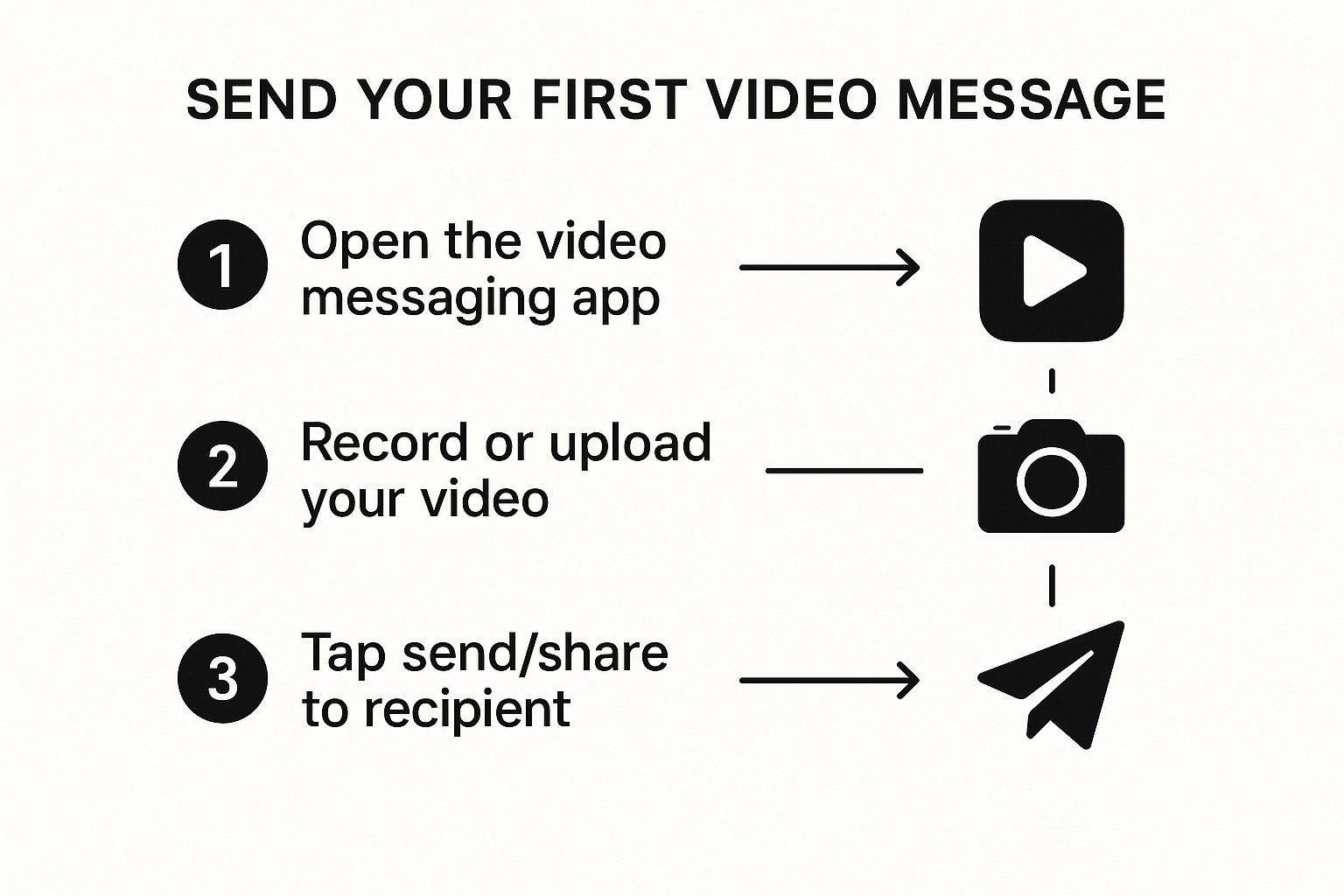
As you can see, it's designed to be completely intuitive. We're talking just a few clicks from recording to sharing, which removes all the friction.
Choosing the Right Way to Share
Screendesk offers a few different ways to get your video out there, and each has its place. There isn't a single "best" option; the right choice is all about the context of your customer conversation.
Let’s look at the primary methods for getting your video message to your customer and figure out which one is right for different situations.
Video Message Delivery Methods in Screendesk
| Delivery Method | Best For | Key Benefit |
|---|---|---|
| Shareable Link | Live chat, social media DMs, quick emails | Maximum versatility. Paste it anywhere for instant access. |
| Direct Help Desk Embed | All support tickets (e.g., Zendesk, Intercom) | Seamless experience. The customer watches without leaving the ticket. |
| Email Attachment | Formal onboarding, detailed tutorials, offline viewing | Permanent file. Good for official communication or when internet is spotty. |
For most support teams I've worked with, embedding videos directly into help desk tickets is the go-to. It just makes sense. The entire conversation, including your video solution, is neatly documented in one place.
Pro Tip: By keeping the video inside the ticket, you create a permanent, easy-to-find record of the solution. This is a game-changer for QA and for quickly referencing past interactions if the same customer writes in again.
Tying It All Together with Help Desk Integrations
The real magic happens when Screendesk connects directly with the tools your team lives in every day. When your video tool can "talk" to your help desk, agents don't have to constantly jump between different apps. That smooth workflow is what keeps your team fast and focused.
Imagine an agent recording, editing, and sending a video message without ever leaving their Zendesk or Intercom dashboard. This doesn't just shave precious seconds off each ticket—it also cuts down on the mental drain of context switching.
This tight integration is a direct response to a massive shift in how people communicate. It's predicted that by 2025, video will account for a staggering 82% of all internet traffic. This trend is driven by users who simply prefer getting their information from quick, visual content.
As you start sharing support videos, it's also smart to think about the bigger picture. Learning the ropes of mastering video marketing for social media can give you insights that make your support content even more effective, no matter where you share it.
Crafting Support Videos That Actually Solve Problems
So, you know how to hit the record button. But what separates a decent support video from one that genuinely makes a customer's day? It’s all about the human touch—those little details that show you're not just closing a ticket, but building a real connection.
It starts with something incredibly simple: using their name. A quick, "Hi, Sarah," before you dive in instantly changes the dynamic. It tells the customer they're not just another number in the queue. Your tone matters just as much. Imagine you’re sitting right there with them, calmly guiding them through the fix. That kind of empathy builds trust and lets them know you’ve got their back.
Keep It Short, Sweet, and to the Point
I’ve seen this mistake a thousand times: agents trying to cram solutions for three different problems into one long video. Don't do it. The best support videos are short and focused. Seriously, aim for under two minutes and stick to solving one single issue.
If a customer hits you with multiple, unrelated questions, your best bet is to record a separate, short video for each one. Here’s why that works so much better:
- It’s way easier to follow. Your customer can focus on one solution at a time without feeling overwhelmed.
- Your videos become reusable. A video on resetting a password is a golden asset you can use again and again. A video that also covers billing questions? Not so much.
- It shows you respect their time. Getting straight to the point is a small but powerful gesture.
This "clarity over complexity" approach is fundamental. It's the same principle we follow when we learn how to create training videos, where the goal is always to make learning as frictionless as possible.
Talk Through Your Clicks and Guide Them to the Finish Line
As you move your mouse, talk it out. Don't just click silently in a corner of the screen. Say what you're doing as you do it. "Okay, first I'm going to head over to the 'Settings' menu in the top-right corner…" This combination of seeing and hearing the instruction makes it crystal clear.
Your goal is to eliminate any and all guesswork. When the video ends, the customer should feel empowered, not confused. They should know exactly what their next step is.
This is where video truly shines. Think about this: viewers tend to retain 95% of a message they see in a video, compared to a mere 10% when they read it in text. With a staggering 91% of businesses already using video as a key tool, it’s no longer a novelty—it’s the standard for clear communication. You can explore more of these powerful video marketing statistics to see just how impactful it is.
Finally, always wrap up with a clear next step. It doesn't have to be complicated. Something as simple as, "Give that a try and let me know how it goes!" or, "If you're still stuck, just reply to this message and I'll jump right back in." This closes the loop and reassures them that you’re there until the problem is truly solved.
Measuring Your Video Support Performance

So, you're sending video messages to your customers. That's a fantastic start, but how do you know if they're actually working? Sending a video is one thing, but the real magic happens when you understand how customers engage with them. This is how you move from just doing video support to truly optimizing it.
Without data, you’re just guessing. You could be creating brilliant, helpful videos, but you'll have no idea which ones hit the mark or where you could do better. Screendesk’s analytics dashboard gives you the hard data you need to measure what matters, show the value of your work, and sharpen your strategy.
Get Organized for Better Insights
Before you can measure anything, you've got to get organized. The best move you can make is building a video library of reusable answers for common questions. As your team works through tickets, you'll start to see patterns—password resets, feature walk-throughs, and billing questions pop up all the time.
Instead of recording a new explanation every single time, create a polished "master" version and save it. Use Screendesk's tagging feature to keep things tidy.
- Tag:
password-reset - Tag:
billing-invoice-explained - Tag:
feature-setup-guide
This simple habit creates a powerful, searchable library that saves your team an incredible amount of time. An agent can find and send a ready-made video in seconds, ensuring every customer gets consistent, high-quality support.
When you build a tagged video library, you're not just closing one ticket. You're creating an asset that can solve hundreds of future tickets. This is how you scale personal support without burning out your team.
Dive into Key Video Metrics
Once your videos are neatly tagged and organized, you can jump into the Screendesk analytics dashboard to see what’s going on. Don't let all the numbers overwhelm you; focus on the metrics that give you clear, actionable feedback.
View Count and Watch Time
These are your bread-and-butter metrics. Seeing a high view count on a video explaining a specific feature could be a sign that the in-app instructions for that feature are confusing. Watch time tells an even more interesting story. If people are dropping off after 30 seconds, your video might be too long or just isn't getting to the point fast enough.
Customer Engagement and Re-Watches
Screendesk shows you exactly which parts of your videos customers are watching over and over. This is pure gold. If you see a cluster of re-watches around the 45-second mark, that’s a massive clue that a particular step is tripping people up. Now you know exactly which section to re-record for clarity.
To get even more granular data on where your viewers are coming from, you'll want to efficiently track video engagement with UTM tags. This helps you see which channels are sending the most engaged viewers your way.
This data-first approach shifts your video support from reactive to proactive. You’re no longer just solving one-off problems. You're using customer behavior to spot and fix bigger issues in your product, leading to a better experience for everyone.
Got Questions About Using Video for Support?
Jumping into video support can feel like a big shift. It's totally normal to have a few questions before you and your team dive in headfirst. We hear the same handful of queries from support teams all the time, so let's get them answered right now.
Think of this as your quick-start guide to feeling confident and ready to send video messages as a core part of how you help customers.
Will Customers Actually Watch My Videos?
This is probably the number one question we get. The answer is a big, emphatic yes.
Think about it from your customer's perspective. They're busy, maybe a little frustrated, and just want their problem solved. A quick video is a shortcut to that solution. Instead of trying to follow a long, text-heavy email, they can watch a two-minute clip that shows them exactly what to do. It’s simply faster and easier for them.
Plus, a video message feels personal. It shows a real human took the time to address their specific issue, which builds instant trust and makes them much more likely to engage with the solution.
How Long Should My Support Videos Be?
The golden rule is to keep it short and sweet. The sweet spot for a great support video is under two minutes.
Your goal is to solve one specific problem, and one problem only. If a customer writes in with three different questions, fight the temptation to make one long, rambling video.
Instead, record a separate, focused video for each question. Here’s why that works so much better:
- It’s easier for the customer to follow. They can tackle one solution at a time without feeling overwhelmed.
- You create reusable content. That short video explaining how to reset a password can be used again and again.
- It boosts your First Call Resolution. Solving issues cleanly the first time is a huge win. You can learn more in our guide to FCR best practices.
What if I Make a Mistake While Recording?
Don't sweat it. Seriously. A little "um," a cough, or a misclick doesn't ruin the video—it makes it more human. It reminds the customer that a real person is on the other end helping them out, not some faceless corporation.
If you make a really big mistake, just pause for a second, take a breath, and start that sentence or step over. No need to scrap the whole thing.
Your authenticity is your biggest strength here. Customers aren't expecting a polished marketing video. They just want a clear, helpful answer from someone who gets it. A genuine, slightly imperfect video is always better than one that feels stiff and scripted.
The goal isn't Hollywood-level perfection; it's to be helpful and clear. The more you send video messages, the more you'll find your own natural rhythm. Just focus on being clear and empathetic, and you'll be a pro in no time.
Ready to see how seamless video support can be? Screendesk integrates directly into your help desk, empowering your team to solve tickets faster with personal, clear, and effective video messages. Start your free trial at https://screendesk.io.
