


Secure video conferencing is all about using the right tools to keep your virtual meetings private. It means choosing platforms built with strong security, like encryption and access controls, to shield your conversations from prying eyes and data theft.
Think of it this way: an ordinary video call is like having a conversation in a crowded public square. A secure one, on the other hand, is like moving that same conversation into a private, soundproof room where your ideas and data stay completely confidential.
Why Secure Video Conferencing Is Non-Negotiable
In today's world of remote and hybrid work, video calls have become our boardrooms, client offices, and project huddles. Leaving a meeting unsecured is like leaving the door to these critical spaces wide open. The risks aren't just hypothetical—they have real-world consequences that can damage your business, your reputation, and the trust your clients place in you.
Without the right protections, your meetings are exposed to a whole host of threats. We’ve all heard of "Zoombombing," but the dangers run much deeper. The more subtle, and frankly more sinister, threats involve things like corporate espionage, data theft, and someone silently listening in on your most sensitive discussions.
The Real Risks of Unsecured Calls
Every time you hop on a call, you're handling valuable information. It's your responsibility to protect it, just as you would your physical office or your company's financial records. The main risks of not using secure video conferencing are serious:
- Data Breaches: Sensitive documents, financial forecasts, or personal client data shared on screen can be intercepted and stolen.
- Reputational Damage: A security incident that becomes public can shatter client trust and tarnish your professional image.
- Compliance Violations: Industries like healthcare (HIPAA) and finance have strict data privacy rules. A breach can result in crippling fines and legal trouble.
- Loss of Intellectual Property: Imagine a competitor gaining access to your trade secrets, product roadmaps, or confidential strategies discussed in a "private" meeting.
By putting security first, you’re not just adding a feature—you’re building a foundation of trust. It sends a clear message to clients, partners, and employees that you respect and protect their privacy.
The Growing Demand for Secure Communication
Our reliance on virtual collaboration is only getting stronger. The video conferencing market in the United States alone was valued at USD 10.8 billion in 2024 and is expected to more than double, reaching USD 26.14 billion by 2030. A huge part of that growth is driven by the demand for rock-solid security to protect sensitive business talks.
This trend makes one thing crystal clear: security is no longer a "nice-to-have." It's a dealbreaker for users and companies. Concerns around screen sharing, for instance, have grown as teams work together on confidential projects from different locations. For a closer look at this specific risk, check out our guide on whether screen sharing is safe.
Ultimately, knowing how to lock down your virtual meetings has become a fundamental skill for everyone in today’s workforce, from support agents all the way up to the C-suite.
Decoding the Tech Behind Secure Meetings
To really understand what makes video conferencing secure, we need to pop the hood and look at the technology that keeps your conversations private. And this isn't just for the IT folks. Knowing these concepts gives you the power to tell if a platform is genuinely protecting your data.
Let's break down the technical side of things in plain English. This will help you go from just using a tool to confidently choosing one that truly meets your security needs, whether you're discussing sensitive client info or hashing out internal strategy.
The Gold Standard: End-to-End Encryption
At the very heart of any secure communication is End-to-End Encryption (E2EE). You’ll hear it mentioned all the time as the ultimate in digital privacy, and for very good reason.
Think of it this way: you're sending a top-secret document through a courier. With E2EE, you seal that document inside a special lockbox. Only you have the key to lock it, and only the person you're sending it to has the one-and-only key to open it. No one else can peek inside—not even the courier company handling the box.
In the digital world, E2EE works exactly the same way. It scrambles your video and audio on your device, and it can only be unscrambled on the recipients' devices. The service provider, just like our courier, can't access the contents of your conversation.
This is a critical difference from what's known as encryption in transit. With that standard type of encryption, your data is secure between you and the company's servers, and then again from their servers to the recipient. The catch? The provider holds the keys and could, in theory, access your data on their servers. It’s like a mail service that can open your letters if it really wants to.
Adding Another Layer of Defense with MFA
Encryption protects the meeting's content, but what about protecting access to the meeting in the first place? That's where Multi-Factor Authentication (MFA) comes in. It’s a surprisingly simple yet incredibly powerful way to make sure only the right people can log into their accounts to host or join calls.
Think of MFA as needing two different forms of ID to get into a high-security building. Your password is the first form—it's something you know. The second factor is usually something you have, like your phone.
How MFA Works in Practice
- First, you enter your username and password, just like you always do.
- Then, the system asks for a second proof of identity.
- This could be a one-time code sent to your phone, a quick "approve" tap on an authenticator app, or even a fingerprint scan.
By demanding this second step, MFA makes it astronomically harder for an attacker to get in, even if they somehow steal your password. It's a non-negotiable security layer for any truly secure video conferencing platform.
Controlling the Virtual Room with Access Controls
Finally, let's talk about access controls. If E2EE is the lockbox for your data and MFA is the key to your account, then access controls are the digital bouncer standing at the door of your virtual meeting room.
These are the features that give the host total command over who gets in and what they can do once they're there. They're your first line of defense against uninvited guests and disruptions, often called "Zoombombing."
- Waiting Rooms: This feature is like a virtual lobby. Everyone who joins is held in a separate space until the host manually admits them, one by one. No more surprise attendees.
- Meeting Passwords: It's a simple but effective barrier. Requiring a password ensures that only people who have both the link and the code can get in.
- Host-Specific Privileges: These are your in-meeting tools for keeping things orderly. Think of the ability to mute participants, turn off screen sharing for others, or remove a disruptive person from the call entirely.
Together, these technologies—E2EE, MFA, and access controls—form the pillars of secure video conferencing, creating a multi-layered defense. This growing focus on security is a huge reason the market is expanding so quickly as organizations move to cloud-based tools. In fact, the global video conferencing market was valued at around USD 11.65 billion in 2024 and is expected to more than double to USD 24.46 billion by 2033. You can discover more insights about this global market shift and what's driving it.
7 Must-Have Secure Video Conferencing Features
It’s one thing to understand the tech behind secure communication, but it’s another thing entirely to know what to look for when you’re actually choosing a platform. When you're on the hook for picking the right tool, certain features are simply non-negotiable. These are the practical tools that take security from a buzzword on a marketing page to a real, protective shield around your conversations.
Think of this as your personal checklist. These are the specific controls that stop common threats before they start, giving you the confidence that your meetings are truly private. We need to look past the sales pitch and focus on the functions that actually deliver on the promise of secure video conferencing.
This diagram breaks down the core pillars of a secure platform. You can see how everything from encryption (protecting the data itself) to access controls (managing who gets in) work together.
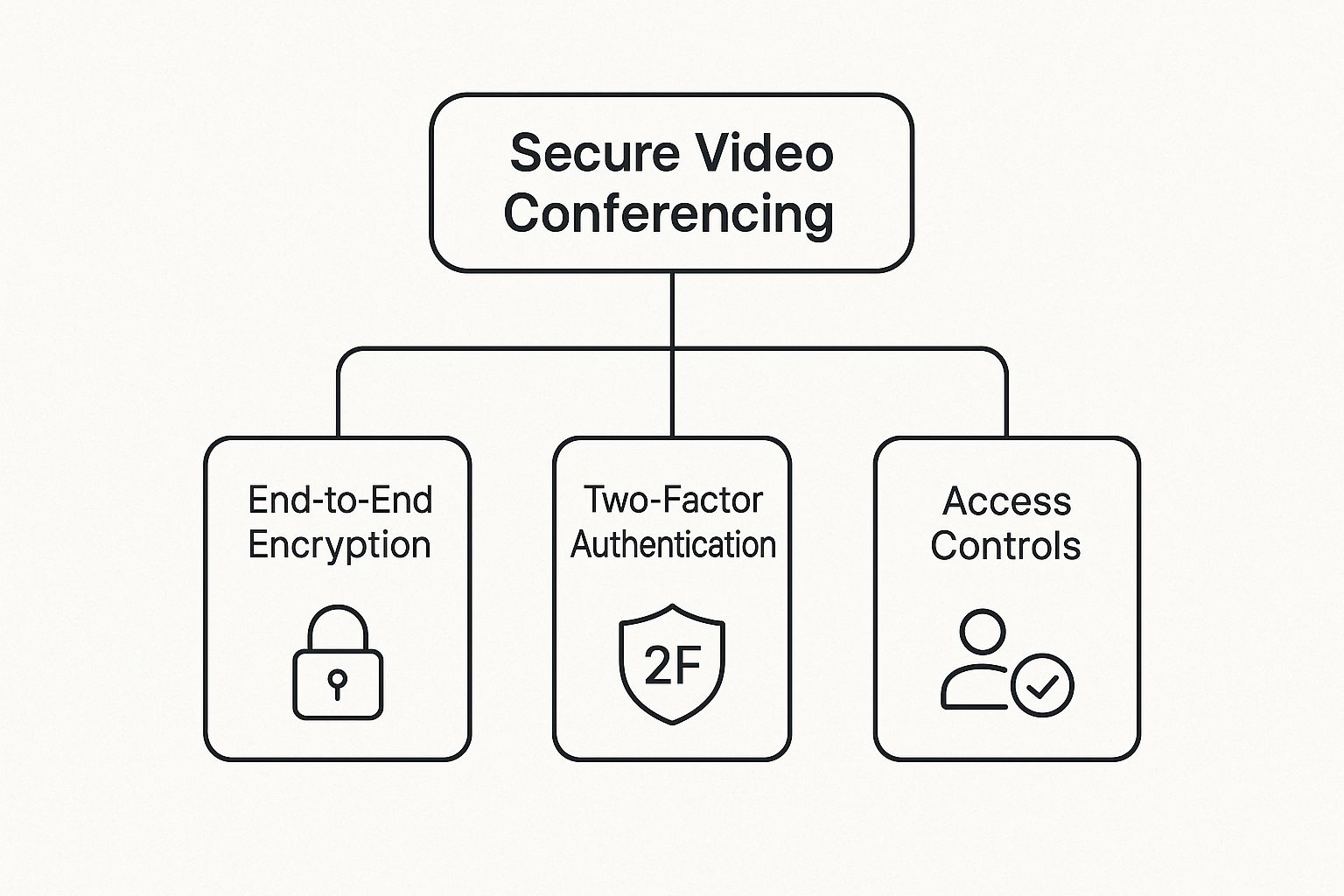
As the image shows, a truly secure system isn't about one single feature; it's about multiple layers of protection all working in concert.
1. The Virtual Lobby or Waiting Room
One of the simplest yet most powerful tools for stopping unwanted guests is the Waiting Room, sometimes called a virtual lobby. It’s like having a digital bouncer for your meeting. Everyone who tries to join is held in a separate virtual space until the host manually clicks a button to let them in.
This one feature is what puts an end to "Zoombombing." Since no one gets into the main room without your direct approval, you have total control over who is present. It gives you a moment to see who's trying to join and verify they belong there before they can hear a single word or see a shared screen.
The Waiting Room turns meeting entry from an open-door policy into an invitation-only event. It is your first and most powerful line of defense against intruders.
2. Robust Password Protection
Meeting passwords are a basic security step, but how a platform handles them makes all the difference. A secure tool must let you set a unique, strong password for every single meeting you create. If you're forced to use the same password for a recurring meeting series, you're opening up a huge security hole.
Think of it this way: the meeting link gets someone to the door, but the password is the key. This simple step ensures that even if a meeting link gets forwarded or shared accidentally, only people with the password can get in. This is absolutely critical for calls where sensitive financial, client, or personal information is on the table.
3. Granular Host Controls
Security doesn’t end once everyone has joined the call. The host needs a solid toolkit to manage the session as it happens. These granular host controls are your command center for keeping the meeting secure and on track.
You need to be able to manage participants and control the flow of information. Here's a quick rundown of what to look for:
- Mute All and Disable Unmuting: This gives the host control over the audio, preventing random interruptions and ensuring everyone can hear the main speaker.
- Participant Removal: If an intruder does get in, the host needs the power to kick them out immediately and make sure they can't get back in.
- Lock the Meeting: Once all your expected attendees are in, you should be able to "lock" the door. This prevents anyone else from joining, even if they have both the link and the password.
- Control Over Screen Sharing: This is one of the most important in-meeting controls. Someone sharing the wrong screen can expose sensitive data or inappropriate content in a flash. The host must be able to restrict screen sharing to just themselves or grant permission to specific people when needed. For a deeper dive, our guide on how to achieve secure screen sharing covers this in detail.
To give you a clearer picture, I've put these essential features into a simple checklist.
Essential Security Feature Checklist
This table breaks down the must-have security features you should look for in any video conferencing platform. It explains what each feature does and, more importantly, why it’s critical for protecting your virtual meetings.
| Security Feature | What It Does | Why It's Important |
|---|---|---|
| End-to-End Encryption | Secures the data from your device to the recipient's, making it unreadable to the provider. | Prevents eavesdropping from the platform provider or any third parties. |
| Waiting Room | Holds participants in a virtual lobby until the host manually admits them. | Gives you complete control over who enters the meeting, stopping "Zoombombing." |
| Unique Meeting Passwords | Requires a distinct password for each meeting instance. | Stops unauthorized access even if a meeting link is exposed. |
| Lock Meeting | Prevents anyone else from joining once the meeting has started. | Secures the meeting after all legitimate attendees have arrived. |
| Host-Controlled Muting | Allows the host to mute all participants and prevent them from unmuting themselves. | Manages audio flow, prevents disruptions, and maintains order. |
| Participant Removal | Gives the host the ability to instantly remove someone from the call permanently. | Provides an immediate solution for ejecting unwanted or disruptive attendees. |
| Restricted Screen Sharing | Lets the host decide who can share their screen (host-only or specific users). | Prevents accidental or malicious sharing of sensitive data or inappropriate content. |
By insisting on these features—waiting rooms, strong passwords, and detailed host controls—you're not just buying software; you're building a secure environment. These are the practical tools that turn a standard video call into a protected, private conversation you can trust.
How to Choose the Right Secure Platform
Knowing the theory behind security features is a great start, but the real work begins when you have to pick the right tool for your team. The market for secure video conferencing is packed with options, and there's no single "best" platform that works for everyone. The needs of a small startup are worlds apart from those of a global corporation.
Think of it like choosing a vehicle. You wouldn't buy a two-seater sports car to haul construction materials. In the same way, a simple, streamlined video tool might be perfect for quick chats but will fall short if your enterprise needs strict, granular security controls. The goal is to find the platform that fits your company's security culture, risk tolerance, and day-to-day workflow like a glove.
The demand for these tools is exploding. The video conferencing market was valued at USD 8.88 billion in 2024 and is expected to climb to an incredible USD 28.26 billion by 2034. This isn't just a passing trend; it's a direct response to the demands of hybrid work for reliable, secure communication. You can read the full research about this market expansion to get a deeper look at the numbers.
Assess Your Organization's Unique Needs
Before you even start browsing platform websites, you need to look inward. The very first step is to get crystal clear on what "secure" actually means for your organization. This comes down to understanding the kind of information you'll be sharing and what would happen if that data landed in the wrong hands.
A marketing team brainstorming new slogans has a completely different risk profile than a law firm discussing a high-stakes case. The more sensitive the conversation, the tighter your security needs to be. This is why an honest self-assessment is the most critical part of the process.
To start building your security profile, ask yourself these questions:
- What kind of data are you discussing? Is it just general project updates, or are you sharing intellectual property, financial numbers, or sensitive client details?
- Who are you meeting with? Are they mostly internal team huddles, or are you regularly meeting with external clients, partners, or even patients?
- What industry are you in? If you're in a regulated field like healthcare (HIPAA) or finance, you'll need to look for platforms with specific, mandatory compliance certifications.
Compare Major Platform Security Philosophies
Once you have a clear picture of your own needs, you can start sizing up the big players. But instead of just comparing endless lists of features, it’s much more helpful to understand their core philosophies on security. Platforms like Zoom, Microsoft Teams, and Google Meet all take security seriously, but they each come at it from a slightly different angle.
A Quick Comparison of Approaches
| Platform | Core Security Strength | Best For |
|---|---|---|
| Zoom | Fine-grained host controls and optional E2EE | Organizations needing maximum in-meeting control and the flexibility to handle different types of meetings. |
| Microsoft Teams | Deep integration with Microsoft 365 security | Businesses already running on the Microsoft ecosystem who want unified security policies. |
| Google Meet | Simplicity and secure-by-default infrastructure | Teams that want a tool that's easy to use and is backed by Google’s powerful cloud security. |
The right choice often comes down to your existing tech stack and workflow. A company heavily invested in Microsoft 365 will find Teams a natural and secure extension of its environment, while a Google Workspace user will benefit from Meet's seamless integration.
Scrutinize Privacy Policies and Compliance
Finally, don't just take a company’s marketing claims at face value. A platform’s real commitment to security is spelled out in its legal documents. It pays to actually spend some time with the privacy policy and terms of service. You’re looking for clear, straightforward language about how your data is collected, used, and stored.
Then, check for compliance certifications that matter to your industry. If you handle patient information, HIPAA compliance is a must. If you do business in Europe, GDPR compliance is non-negotiable. These certifications are proof that a third party has verified the provider meets high security and privacy standards. This is especially vital when using video for customer-facing roles, where trust is everything. In fact, our team has put together a useful guide on how to integrate video into your customer support strategy that highlights these trust factors.
It’s easy to get caught up in the technical side of security—things like encryption and complex settings. But even the most secure platform is vulnerable if the people using it aren't careful. Think of it this way: the technology provides the locks and alarms, but it’s our everyday habits that make sure the doors are actually shut.
Building a truly secure environment is a team sport. Both the everyday users and the platform administrators have a part to play. After all, the human element is often the weakest link in the security chain. The good news is that a few simple, consistent habits can make all the difference, turning a technically secure tool into a genuinely protected space.
Everyday Security for Meeting Hosts and Attendees
As someone who hosts or joins meetings, you have more power than you might realize to keep things secure. We're not talking about complicated technical configurations here. Instead, it’s about small, conscious actions that, over time, become second nature.
It’s just like locking your front door when you leave the house. You do it automatically because it’s a simple habit that offers huge protection. The same principle applies to your virtual meetings.
Here are a few powerful habits everyone should get into:
- Use Unique Meeting IDs: Avoid using your personal meeting room for anything important. Always generate a fresh meeting ID and password for each session. This stops old attendees or uninvited guests from dropping into a new call.
- Never Use Public Wi-Fi for Sensitive Calls: That free Wi-Fi at the coffee shop or airport is a major risk. These networks are often unsecured, making it much easier for someone to snoop on your connection. If you have to join a call from a public place, use a VPN or your phone's hotspot for a safer connection.
- Be Mindful of Your Surroundings: Take a quick look at what’s in your camera’s view. Are there whiteboards with confidential notes, sensitive documents on your desk, or family members wandering in the background? A blurred or virtual background is a great, simple fix for this.
- Verify Guests Before Starting: Don't just hit "start" and dive in. Take a moment to check the participant list. If you're using a waiting room, make sure you recognize everyone before letting them in.
The best security isn't a single feature—it's layered. When people combine smart habits with the platform's built-in tools, they create a powerful defense against most common threats.
Critical Strategies for Platform Administrators
While users are the first line of defense, administrators are the ones who build the fortress. It’s an admin’s job to set up the platform so that security is the default, not an optional extra. The goal is to make it easy for people to do the right thing and difficult to do the wrong one.
This means creating a secure framework that naturally guides user behavior and protects the entire organization.
Enforce Strong Security Settings by Default
Security shouldn't be left to individual choice. Administrators need to configure the platform’s global settings to create a strong security baseline for everyone.
- Mandate Waiting Rooms: Set waiting rooms to be “on” by default for every meeting across the company. This small step ensures no meeting can begin until the host personally admits each participant.
- Require Meeting Passwords: Make password protection a non-negotiable for all scheduled meetings. It’s a simple requirement that adds a critical layer of access control.
- Disable Risky Features: Does your organization really need in-meeting file transfers or other features that could be exploited? If not, turn them off at the admin level to shrink your attack surface.
Establish Clear Usage Policies and Training
Handing someone a secure tool isn't enough; they need to understand why the rules exist. A clear, straightforward usage policy is key. It should spell out the dos and don'ts for using the company’s video conferencing platform in plain language.
Pair this policy with regular, engaging training. Skip the dry security lectures and use real-world examples to show what can go wrong and how simple habits can prevent it. A well-informed user is a secure user, and fostering this awareness helps everyone play their part in maintaining a secure video conferencing environment.
Still Have Questions? Let's Clear Things Up
Even after you've got a handle on the key features and best practices for secure video conferencing, a few common questions always seem to surface. It's completely normal. This is where we bridge the gap between theory and day-to-day reality.
Let's walk through some of the most practical, real-world concerns people have. My goal here is to make sure you feel totally confident hitting that "start meeting" button.
Do I Really Need End-to-End Encryption for Every Meeting?
That's a great question, and the short answer is no, you don't. It really comes down to balancing security with practicality. While End-to-End Encryption (E2EE) provides the ultimate level of privacy, it's not always necessary.
Think of it this way: E2EE is like booking a classified, soundproof room for a top-secret discussion. You use it when the information is so sensitive that you can't risk anyone—not even the building owner—listening in.
For a routine team stand-up or a casual project update, standard transport-level encryption is more than enough. This type of security protects your data on its way to the provider's server and is like having a private conversation in a conference room. It's secure enough for most business.
But, for any meeting where you're discussing highly confidential information—think proprietary business strategy, sensitive legal cases, or personal health information (PHI) under HIPAA—E2EE becomes non-negotiable. It's the only way to guarantee that not even the service provider can access the content of your call.
Just be aware that enabling E2EE on some platforms might disable features like cloud recording or live transcription. Why? Because the service can't process data it can't decrypt. The key is to assess the sensitivity of each meeting and flip the E2EE switch when the content truly demands it.
How Do I Stop Unwanted Guests from Crashing My Meeting?
Preventing "Zoombombing" or any kind of unauthorized entry is probably one of the most important skills a host can have. Thankfully, you can build a solid defense with just a few simple, built-in features. When you use them together, you make your meeting a much tougher target for troublemakers.
Here are the essential steps to lock down your virtual room:
- Never post meeting links publicly. This is rule number one. Don't put them on social media or public websites. Share them directly with attendees through email or a secure calendar invite.
- Always use a password. Every single meeting should have a strong, unique password. This creates a simple two-factor entry: someone needs both the link and the password to get in.
- Enable the Waiting Room. This feature is your virtual bouncer. It places everyone in a digital lobby until you, the host, personally let them in. It's a fantastic way to screen attendees and make sure you recognize everyone.
- Know your host controls. Take a minute to learn how to mute people, turn off their video, or—if things get out of hand—remove someone from the meeting for good. Acting fast is key.
Are Cloud Solutions Less Secure Than On-Premise Systems?
This is a common question that stems from an older way of thinking about IT security. A decade ago, the belief was that the only way to truly secure something was to have it physically in your building. Today, for most companies, the exact opposite is often true.
A top-tier cloud provider's security is often light-years ahead of what a single company could build and maintain on its own.
Here's an analogy: an on-premise system is like a high-quality safe you keep in your office. It gives you direct physical control. A major cloud platform, on the other hand, is like a specialized bank vault. The bank has teams of security experts, round-the-clock monitoring, and sophisticated defenses that are just not feasible for most businesses to replicate.
Here's why cloud platforms usually win out in secure video conferencing:
- Dedicated Cybersecurity Teams: Major providers like Zoom or Microsoft Teams employ hundreds of experts whose only job is to hunt for threats and defend the platform.
- Instant Security Updates: When a vulnerability is discovered, a cloud provider can patch it across its entire global network almost instantly. This can take weeks for an internal IT team managing on-premise servers.
- Robust Compliance: Cloud platforms invest millions to get and maintain certifications like HIPAA, GDPR, and SOC 2, which require intense, ongoing security audits.
- Advanced Threat Detection: They use powerful, AI-driven systems to spot and stop threats in real-time—a capability far beyond the reach of most in-house teams.
So, while on-premise gives you physical control, a trusted cloud vendor typically offers a much more dynamic, expertly managed security posture that's always evolving to counter the latest threats.
Ready to secure your customer support interactions with crystal-clear video? Screendesk offers a robust, secure video solution that integrates directly into your helpdesk, eliminating friction and resolving issues faster. With features designed for privacy and efficiency, you can build trust and deliver exceptional support. Discover how Screendesk can transform your support experience.
