


Improving workplace efficiency isn't about working harder; it's about working smarter. The real goal is to focus on three core areas: clear communication, smart technology, and streamlined processes. When you get these right, you empower your team to do their best work with the least amount of friction.
Moving Beyond the Busywork
'Efficiency' often gets a bad rap. It can sound like just another corporate buzzword for 'do more with less.' But that's not what it's really about.
True efficiency means removing the obstacles that cause frustration, waste time, and ultimately lead to burnout. In my experience, the biggest culprits slowing teams down are almost always communication bottlenecks, endless manual tasks, and the sheer exhaustion that comes from juggling too many digital tools.
When processes are unclear and communication is scattered across different apps, people spend more time figuring out what they're supposed to be doing than actually doing it. This kind of environment is a breeding ground for disengagement, which hits the bottom line hard.
The Real Cost of Inefficiency
Disengaged employees aren't just unhappy; they're a massive drain on company resources. It's a sobering thought, but only 21% of the global workforce feels engaged at work.
This has fueled the "quiet quitting" trend, where employees just do the bare minimum. The result? An estimated loss of $438 billion in productivity worldwide. These aren't just numbers on a page; they represent a huge opportunity. Improving workplace efficiency isn't just an operational goal—it's a critical strategy for keeping your best people and staying competitive.
The ultimate goal is to create an environment where your team can focus on high-value, meaningful work instead of getting bogged down by repetitive busywork and administrative hurdles.
Your Path to a More Productive Workplace
This guide is designed to give you a clear path forward. We'll dig into actionable strategies that tackle the root causes of inefficiency, from building better communication channels to implementing technology that actually makes work simpler.
We'll use practical examples, like how a tool like Screendesk can transform collaborative support by turning slow email chains into quick, interactive resolutions.
Just remember, this is a journey, not a one-time project. It’s about building a culture of continuous improvement. If you're ready to get started, you can find more great tips on how to improve operational efficiency.
To give you a quick snapshot of what we'll cover, here are the core pillars of a modern, efficient workplace.
Key Pillars of Modern Workplace Efficiency
| Strategy Area | Primary Goal | Example Action |
|---|---|---|
| Communication | Reduce misunderstandings and delays. | Adopting a central platform for team conversations instead of relying on email. |
| Technology | Automate repetitive tasks and provide clarity. | Using a tool like Screendesk for visual, interactive customer support sessions. |
| Processes | Create clear, repeatable workflows. | Documenting a standard operating procedure (SOP) for onboarding new clients. |
By focusing on these three areas, you can start building a more productive and engaging environment for everyone.
Set Up Clear Communication Channels
Nothing kills productivity faster than a communication breakdown. When people don't know where to find information or who to ask, they start digging through old emails, sending repeat messages, or tapping a colleague on the shoulder who's deep in focus. The goal isn't more communication; it's smarter, more predictable communication.

This isn't about adding more meetings to the calendar. In fact, it's usually the opposite. It's about creating simple "rules of the road" for how your team talks, creating a system everyone understands and can count on.
When you do this, you reduce the mental energy your team spends just figuring out how to share an update or ask a question. That alone is a huge step forward.
Define Your Channels
First things first: give every communication tool a job. This one simple move can bring instant clarity and cut down on the chaos of having information scattered everywhere. A well-defined system stops important updates from vanishing into a sea of casual chatter.
Here’s a real-world example of how this might look:
- Slack or Teams: This is for quick, informal questions. Think things that need a fast answer but aren't important enough to interrupt someone's workflow.
- Asana or Trello: All conversations about a specific task—updates, questions, files—should live directly on that task's card. This keeps the entire history of a project organized and in one spot.
- Email: Save this for more formal communication. Think company-wide announcements, talking to clients, or sending detailed weekly summaries that need a permanent home.
This kind of structure means everyone knows exactly where to look for what they need, which cuts out a ton of frustrating searches and follow-up DMs. If you want to dig deeper, our guide on how to improve team communication has even more tips.
Lean into Asynchronous and Visual Tools
One of the biggest time-wasters I see is the expectation that every question deserves an instant reply. Pushing for more asynchronous communication gives your team the freedom to respond when it makes sense for them, protecting those precious blocks of deep, uninterrupted work.
Visual tools are another game-changer for getting things done quickly and clearly. A customer support agent, for example, can solve a tricky technical bug much faster with one interactive call than with a dozen back-and-forth emails.
Think about a tool like Screendesk. It lets a support agent see exactly what the customer is seeing, draw on their screen to guide them, and solve the problem right then and there. This doesn't just cut down on resolution time; it makes for a much better customer experience.
This shift toward more direct, effective collaboration is backed by data. A global survey found that time spent working with others in person is on the rise, while solo work time is declining. You can read more about these trends in Gensler's 2025 Global Workplace Survey. Making that collaborative time count starts with having clear channels to communicate through.
Using Technology to Make Work Easier
Let's be honest: technology should be a helper, not another headache. The best tools are the ones you barely notice—they just work, simplifying complex tasks and giving your team back their most valuable resource: time. The real goal is to find software that eliminates friction, not just adds another icon to your desktop.

This means we need to ditch the "more is better" mindset. Instead of jumping on every shiny new app, the smart move is to pick technology that solves a specific, nagging problem. Think about those soul-crushing repetitive tasks that drain your team's energy. Manual data entry? Compiling weekly reports? Chasing down approvals? Those are the perfect jobs to hand over to automation.
Choose Your Tools Wisely
Before you bring any new software into the fold, you have to play detective. A tool might look fantastic on its landing page, but if it doesn't solve a real problem for your team, it’s just expensive shelfware. This evaluation is a massive part of getting efficiency right for the long haul.
Start by asking a couple of tough questions:
- Does this fix a real pain point? Don’t get distracted by a tool that claims to do everything. Look for one that does one thing exceptionally well and targets a known bottleneck in your workflow.
- Will it play nice with our existing systems? If a new tool doesn't connect with the software you already use, it just creates more manual work. That completely defeats the purpose.
This approach helps you pick tech that actually delivers. Beyond just managing tasks, good digital planning for peak productivity can supercharge your efforts by automating reminders and connecting important resources right where you need them.
A Real-World Example of Smart Tech
Think about the classic frustration of remote customer support. A single technical glitch can spiral into a long, confusing email chain cluttered with screenshots and vague descriptions like "the button isn't working." It's a painfully slow process for the customer and a huge time-waster for the support agent.
This is exactly where a purpose-built tool makes all the difference.
Screendesk was built to solve this exact problem. It allows for instant, collaborative screen sharing and video calls directly from a helpdesk ticket. Instead of playing a guessing game, an agent can see the customer's issue live, guide them visually, and solve the problem in a single session.
This is what it looks like when technology truly makes work easier. It takes a clear pain point—slow, text-based support—and offers a direct, efficient fix that makes life better for both the employee and the customer.
The Shift to Smarter Automation
The move toward more intelligent tools is happening fast. New data shows that AI tool adoption is soaring, with 58% of employees now using them—a massive 107% jump since 2022. This tech is changing how we work, helping with everything from drafting emails to organizing schedules.
But while these tools can be a huge help, they need to be managed correctly to prevent them from stretching out the workday or killing focus. When you choose the right tools, you free up your team to concentrate on the work that actually matters.
Creating Workflows That Actually Flow
Few things drain a team’s energy faster than inconsistent processes. When everyone is left to figure out how to do the same routine task their own way, you're not just wasting time—you're burning through valuable mental bandwidth. Establishing clear, predictable workflows is one of the most powerful things you can do to boost efficiency.
First, you have to see what you're working with. Take a hard look at your most common, repeatable tasks. I'm talking about things like onboarding a new client, getting a blog post approved, or handling an IT support ticket. Try mapping out every single step. Actually drawing it out on a whiteboard or using a simple tool can be eye-opening. You'll almost immediately spot the bottlenecks, redundant steps, and frustrating loops that are slowing everyone down.
Once you’ve identified the friction points, you can build simple Standard Operating Procedures (SOPs). The goal here is clarity, not complexity. Forget those dense, 20-page documents nobody ever reads. Think checklists, visual flowcharts, or short videos.
A great SOP isn't about creating rigid rules; it's about building a reliable foundation. This frees up your team's brainpower for strategic thinking instead of trying to remember process steps.
A Real-World Example: Taming the Campaign Launch Chaos
I once worked with a marketing team whose campaign launches were pure chaos. Approvals were buried in endless email chains, creative assets were scattered across different shared drives, and nobody ever knew if they had the final version. The whole process was slow, stressful, and riddled with mistakes.
By mapping out and standardizing their process, they completely turned things around.
- One Source of Truth: They built a project template in their task manager, laying out every single step from the initial creative brief all the way to the final performance report.
- Crystal-Clear Ownership: Every task in that template was assigned to one person with a firm deadline. No more guessing games.
- A Smooth Handoff: Instead of messy email threads, approvals were handled directly within the assigned task. Once one person signed off, the next person in line was automatically notified.
The result? They cut approval delays by 50%. But just as important, the new clarity lowered everyone's stress levels and gave them back the time to actually think strategically about the campaign itself. If you want to dive deeper into finding and fixing these kinds of operational snags, we've got more tips on how to increase efficiency in the workplace.
This simple flowchart shows a basic three-step approach for using time-management tools to build better personal workflows.
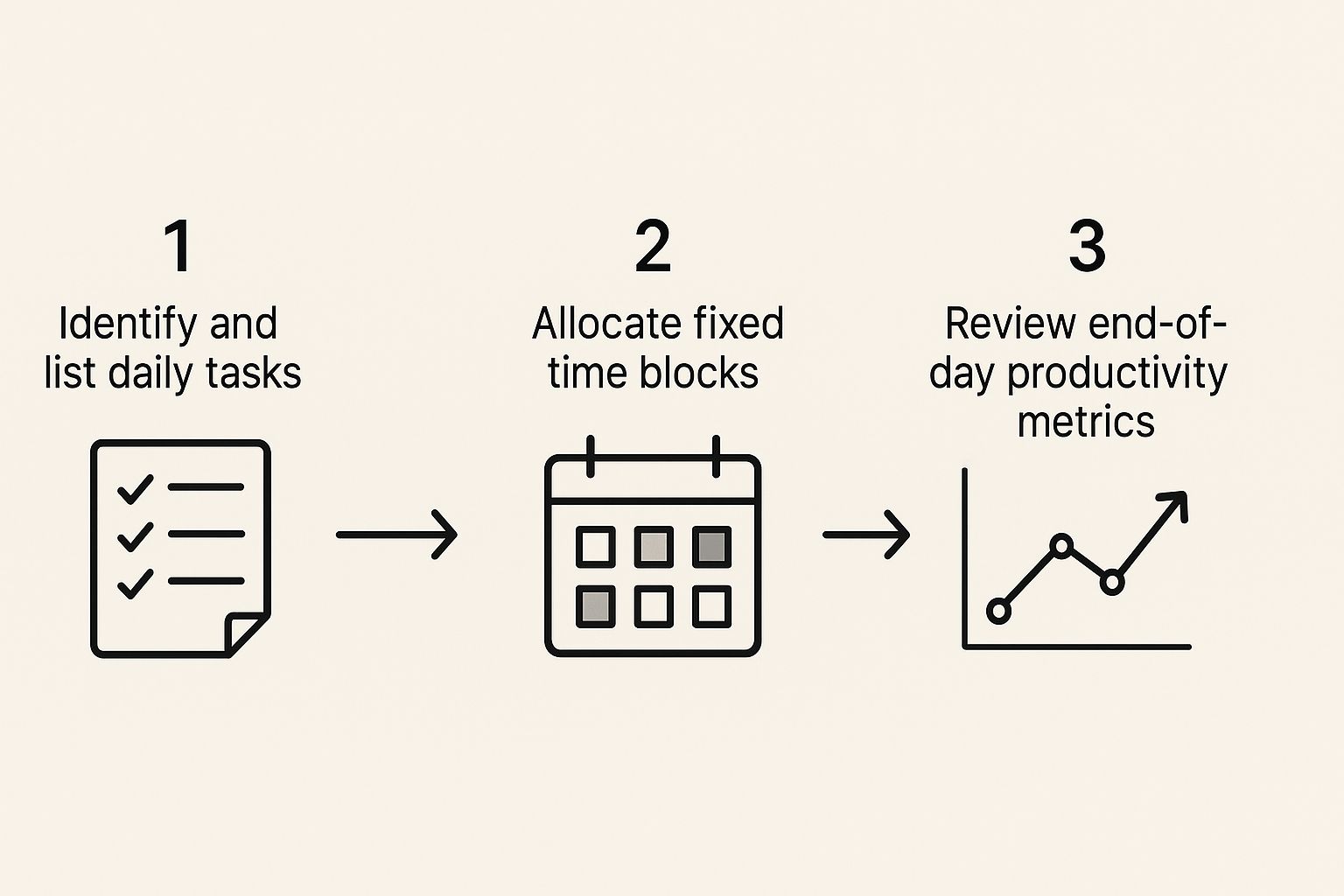
It’s a great reminder that effective workflow management really comes down to three core actions: identifying what needs to be done, dedicating specific time to do it, and then reviewing your process to see how you can make it even better next time.
Cultivate an Efficiency-First Mindset
You can have all the best tools and processes in the world, but they won't make a dent if your team's mindset isn't right. The biggest leaps in workplace efficiency come from building a culture where getting better isn't a one-time project—it's just how you operate. It's about creating an environment where everyone feels empowered to fix what's broken and find smarter ways to work.

This all starts with psychological safety. It's a simple idea: when people feel safe, they speak up. They'll point out a clunky process or suggest a better workflow without worrying about getting blamed. That open feedback loop is the real engine of an efficient team.
Make Small Improvements a Habit
Big, dramatic changes often feel overwhelming and rarely stick. A much better approach is to chase small, consistent wins. This makes the whole idea of "getting more efficient" feel less like a corporate mandate and more like a shared team habit.
A great way to put this into practice is with short, regular retrospective meetings. Don't overcomplicate them. The goal is to be quick and action-oriented.
- Ask one simple question: "What's one thing we can do 10% better next week?" This simple framing makes improvement feel manageable.
- Focus on what's actionable: You're not trying to solve every problem at once. Just find one or two tiny tweaks the team can make right away.
- Assign clear ownership: Who’s going to take the lead on this small change? Make it clear so it actually happens.
This approach gives people control over the processes they use every day. It builds a powerful sense of ownership and shared responsibility for making things work better.
The real goal is to create a culture where everyone feels like they are part of the solution. When people are invested in the process, they actively look for ways to work smarter, which benefits the entire organization.
Leaders Have to Walk the Walk
A culture of efficiency has to start from the top. When leaders model the behaviors they expect, it sends a clear signal that efficiency is a shared value, not just another KPI. This has a massive impact on team engagement and job satisfaction.
Here are a few leadership behaviors that make a real difference:
- End meetings on time. Every time. It shows you respect everyone's schedule and value focus.
- Give clear, direct feedback. Actionable feedback saves people from wasting time guessing or redoing work. It also helps in overcoming communication barriers that are notorious for slowing projects down.
- Protect "deep work" time. Champion an async-first culture where you can. Fewer interruptions mean more time for people to actually concentrate and get meaningful work done.
When efficiency becomes part of your company’s DNA, it stops feeling like a chore. It turns into a source of collective pride. You end up with a workplace where people aren't just more productive—they're happier and more engaged because their contributions truly matter. This foundation is what makes any effort to improve workplace efficiency actually stick for the long haul.
Answering Your Efficiency Questions
Even with the best plan in hand, you're bound to run into a few questions as you start tuning up your team's efficiency. Let's tackle some of the most common ones I hear from leaders trying to create a more productive workplace.
What Is the First Step to Improve Workplace Efficiency?
Before you do anything else, you need to find your biggest bottleneck. Don't try to boil the ocean by fixing everything at once. Instead, get your team together and do a quick, informal audit.
Ask them a simple question: "What's the one thing that eats up most of your time for the least amount of return?" Or maybe, "Where do we drop the ball most often on communication?" Their answers will point you directly to a specific pain point, whether it’s a clunky client approval process or a messy internal IT request system.
When you focus all your energy on solving one significant problem first, you score a quick, tangible win. That success builds momentum and makes it a whole lot easier to get everyone on board for the next improvement.
How Can I Improve Efficiency Without Buying New Software?
You can make huge strides in efficiency without spending a single dollar on new tools. It’s all about getting more out of the processes and software you already have.
A great place to start is by simply standardizing how your team communicates. Set clear, simple guidelines for when to use email versus a quick chat message. You'd be amazed how much confusion and wasted time this one small change can eliminate.
Another high-impact, no-cost tactic is to declutter your shared digital workspaces. Think of it as digital spring cleaning.
- Cloud Drives: Agree on a simple, logical folder structure and file naming convention. Suddenly, everyone can find what they need without having to ask.
- Project Boards: Get ruthless about archiving old projects and clearing out stale tasks. This keeps everyone focused on what actually matters right now.
- Meeting Audits: Make agendas and a clear "what's the point?" outcome mandatory for every single meeting. And just as importantly, empower your team to decline invites if they aren’t truly needed.
Honestly, these kinds of process tweaks often do more for efficiency than any fancy new software ever could.
How Do You Measure Improvements in Workplace Efficiency?
To really know if your changes are working, you need to look at both the hard numbers and the human feedback. You can't just track one without the other.
On the numbers side, find the metrics that actually matter for your team's work.
- Task Completion Time: How long does it really take to get a standard task done, from start to finish?
- Project Turnaround: What’s the average time from when a project kicks off to when it's delivered?
- Support Tickets Resolved: How many issues is your support team closing out per day or per week?
But numbers don't tell the whole story. You also need to check in with your team. This doesn't have to be a formal, scary survey. Just ask them directly in a one-on-one or a team chat: "On a scale of 1 to 10, how much of a headache was it to get your work done this week?" or "Did you find yourself waiting on anyone for information?"
When you see a real drop in frustration and people seem generally happier and less stressed, you know you’re on the right track. That's one of the best signs that your efforts are truly paying off.
Ready to eliminate the biggest bottleneck in your support workflow? With Screendesk, you can resolve customer issues faster with instant, collaborative screen sharing and video calls directly from your helpdesk. See how it works.
