


To really nail customer onboarding, you have to make that first experience feel both effortless and valuable. A great way to do this is by swapping out those dense help docs for short, focused video guides. This simple change gets right to the heart of user frustration, helps them find that "aha!" moment faster, and shows off your product's real value right from the start.
Why Your Onboarding Process Is Losing Customers
That first week with a new user is everything. When someone signs up, they’re hopeful, but they're also a little skeptical. They’re looking for a sign they made the right choice. Any friction—a confusing interface, unclear instructions, or just feeling overwhelmed—can sour that hope and lead them straight to the exit.
This isn't just about making a bad first impression. It’s a complete failure to show them why they should stick around.
A classic mistake I see all the time is what I call "feature-dumping." Companies get so excited about everything their product can do that they throw it all at the new user at once. It creates this wall of complexity that just pushes people away. Remember, users didn't sign up for a lecture; they signed up for a solution to their problem.
The Real Cost of a Poor Welcome
That initial drop-off is a bigger deal than you might think. I've seen data showing that a staggering 75% of users will ditch a new piece of software within the first week if the onboarding is a struggle. This just goes to show how critical it is to have a simple, effective process that stops frustration from turning into churn.
Often, the root cause is just a breakdown in communication. Applying effective corporate communication best practices can make a world of difference here, ensuring your welcome messages are clear, empathetic, and focused entirely on the user's needs.
The core problem is that users feel abandoned. They are left alone to navigate a new system, and without immediate, clear guidance, they will simply leave.
Shifting from Information Overload to Guided Success
So, what’s the alternative? Instead of burying users in features, you need to create a guided path to their first "win." Figure out the key actions that deliver that initial moment of value and focus everything on getting them there.
This is where video support truly shines.
Short videos cut through the noise and solve the biggest onboarding problems by:
- Showing, Not Telling: A 90-second video walking through a key feature is so much more powerful than pages of text.
- Building Confidence: When a user watches a quick tutorial and then successfully completes that task, it gives them a real sense of accomplishment. It makes them want to see what else they can do.
- Reducing Support Tickets: Proactive video guides answer the most common questions before your customers even think to ask them. That's a huge win for your support team.
By focusing on these ideas, you can stop watching new users leak out of your funnel and start building a powerful engine for customer retention. For a deeper dive, take a look at our guide on essential customer onboarding best practices that help build that long-term loyalty.
Map Your Customer Journey Before You Press Record

Before you hit the record button, you need a plan. So many companies jump straight into creating videos, trying to explain every single feature. But that’s a recipe for overwhelming your new customers. The real goal is to guide them to value as quickly as possible, and that starts with understanding their journey.
I always recommend starting with a simple user path. Sketch it out chronologically, from the second a customer signs up to the moment they experience that first big win with your product. This simple exercise is incredibly powerful because it forces you to see your product through their eyes, not your own.
Identify Key Moments and Friction Points
As you map out this journey, you’ll start to see two things pop out: the “aha!” moments and the friction points.
The “aha!” moments are those little sparks of magic where a user truly gets why your product is so valuable. For a project management tool, maybe it’s when they successfully assign a task to a team member for the first time. It clicks.
Then you have the friction points. These are the roadblocks where users get stuck, confused, or just plain frustrated. It could be a complicated setup process or some confusing industry jargon. These are the exact spots where you risk losing them for good.
Your goal is to create videos that get users to the "aha!" moments faster and smooth over those bumps in the road. Think of your videos as helpful guides, pointing the way and building bridges over confusing parts of the process.
Define What Success Means for Your User
It’s easy to fall into the trap of defining success by our own internal metrics, like daily active users or total sign-ups. Those numbers matter to us, but they don't mean anything to the customer. To create an onboarding experience that actually works, you have to define success from their perspective.
What does a real “win” look like for them?
- For an analytics tool: Is it building their first custom dashboard and seeing meaningful data?
- For a design platform: Is it exporting their first professional-looking graphic?
- For a communication app: Is it having their first seamless video call with their team?
When you know what your user is trying to accomplish, you can build a video strategy specifically designed to get them there. Your videos stop being a random collection of tutorials and become a clear, strategic path to success for every new customer. Honestly, this prep work is the most important part of the whole process.
Making Onboarding Videos People Actually Want to Watch
Alright, let's get to the good part: making videos that don't just feel like another corporate tutorial people are desperate to skip. I've learned that a great video onboarding experience has very little to do with a big budget. It’s all about being clear, delivering the right information at the right time, and respecting your new user's attention.
The best strategy I've found is to build a library of short, focused videos. Forget those long, rambling "getting started" epics. A tight, 90-second video showing exactly how to set up a specific integration is infinitely more useful than a 10-minute overview someone has to scrub through just to find that one tiny detail.
Think of that first welcome as the front door to your product. It sets the tone for everything that follows.
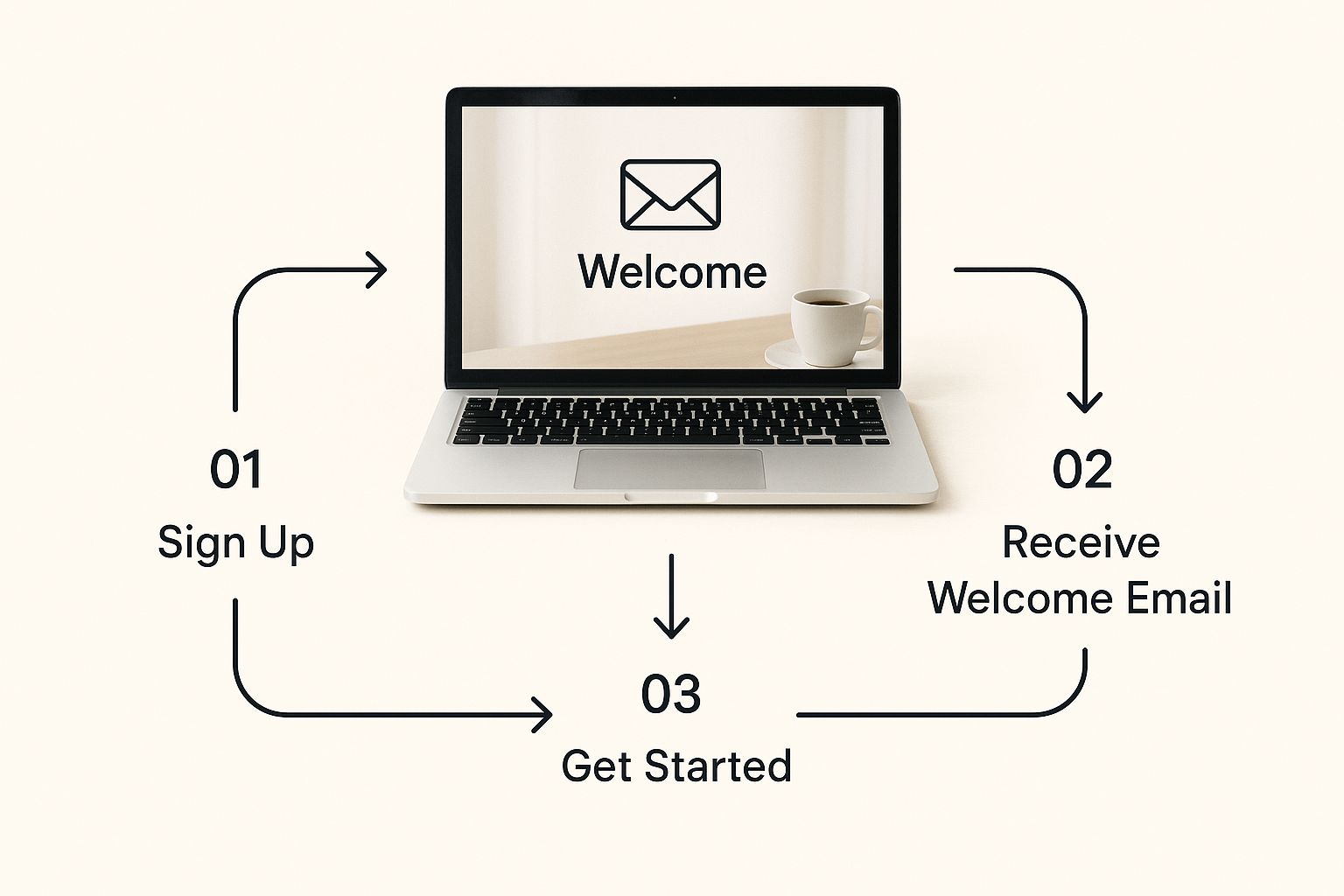
As you can see, that initial touchpoint, whether it's an email or an in-app message, should be the start of a guided journey—not an information avalanche.
Write for Clarity, Not the Boardroom
Your script is everything. Seriously. This is where you need to ditch the corporate jargon and stiff, formal language. Just write like you're explaining it to a friend. Be direct, use simple words, and get right to the point.
Here's a tip: read your script out loud before you even think about recording. Does it sound natural? Is it easy to follow? If you find yourself stumbling over words or getting bored, you can bet your audience will feel the same way.
A great script has one job: solve the user's immediate problem as fast as possible. Every single word should either guide an action or build their confidence. If a word doesn't do one of those two things, cut it.
Don't underestimate the impact of getting this right. Solid customer onboarding builds trust and fuels growth. In fact, a study from Userguiding found that 63% of customers see the onboarding experience as a major factor when deciding whether to stick with a product.
Get the Audio and Visuals Right
You don’t need a Hollywood setup, but you absolutely have to nail two things: clean audio and clear visuals.
- Crystal-Clear Audio: Bad audio is the number one reason people click away. A decent USB microphone is the single best investment you can make. Find a quiet room and kill any background noise before you hit record.
- Simple Visual Cues: Use visual aids to guide your viewer's eyes. A quick zoom-in on the button they need to click or highlighting a specific text field makes a world of difference. Keep your screen tidy and free of distractions.
- Pacing Matters: Slow down. Don't fly through the steps. Pause for a beat after explaining a key concept to let it sink in. And try to match your mouse movements to what you're saying—erratic, jerky movements are super distracting.
These same principles apply just as much to internal training. We've put together a whole guide on this, which you can check out for more tips on creating effective customer service training videos.
Matching the Video Type to the User's Need
Not all videos are created equal, and different moments in the onboarding journey call for different approaches. Thinking about what your user needs right now is the key to making content that truly helps.
Here’s a quick breakdown of the different video formats I like to use and where they fit best.
Onboarding Video Types and Their Impact
| Video Type | Primary Goal | Best For |
|---|---|---|
| Welcome Overview | Set a friendly tone and show the big-picture value. | The very first interaction, often in a welcome email or on the first login. |
| Single-Feature Tutorial | Teach one specific task quickly and clearly. | Triggering contextually when a user first encounters a new feature. |
| Best Practice Tip | Show users a smarter or more efficient way to use a feature. | Nurturing existing users to deepen their product knowledge and adoption. |
When you combine a warm, welcoming tone with crystal-clear instructions and targeted delivery, your videos become more than just a help-desk tool. They become a powerful engine for building user confidence and driving real product adoption.
Scale Your Welcome with Automation and a Personal Touch
A great onboarding experience feels like a one-on-one conversation, even when you're welcoming thousands of new users. The real magic happens when you can scale that personal feeling, making every customer feel like they're your only one. This isn't just a nice-to-have; it's what modern customers expect.
The data backs this up. Over 40% of organizations say their customers are asking for a more tailored welcome. Add to that, 64% of consumers now expect you to engage with them in real time. The message is clear: generic, one-size-fits-all onboarding is dead. For more insight, check out these top strategies for faster customer onboarding.
This is where video-based support, powered by smart automation, becomes your secret weapon. You can deliver the perfect video at the perfect time, automatically.
Trigger Help Based on What Users Actually Do
Instead of throwing a library of tutorials at every new user, why not offer help right when they need it? Using behavioral triggers lets you serve up contextual video support the moment someone seems stuck or confused. It feels less like an interruption and more like you're reading their mind.
Here’s how this plays out in the real world:
- The Hesitation Trigger: A user’s cursor hovers over the "Advanced Settings" button for more than 10 seconds. A small tooltip pops up with a quick video explaining what those settings do. No searching, no guessing.
- The Error Trigger: A user tries to set up an integration and gets an error message. Instead of a frustrating dead end, a video appears instantly, walking them through the most common fixes.
- The Milestone Trigger: Someone just created their first report—awesome! A small, celebratory message appears with a video showing them how to share it with their team, guiding them to the next logical step.
Workflows like these do more than just solve problems; they anticipate them. This proactive approach makes your customers feel supported and dramatically cuts down the number of tickets your support team has to handle. To learn more about this, see our guide on how to automate customer support and manage common questions with ease.
Create Personalized Welcome Videos Without the Heavy Lifting
Automation gets the timing right, but personalization is what builds the relationship. New tools now make it surprisingly easy to create welcome videos that address customers by name or mention their company. It’s a small detail that has a massive impact on building loyalty from day one.
A personalized video doesn’t just say, "Welcome to our product." It says, "We see you, and we're here to help you succeed." This simple shift in framing turns a standard onboarding flow into a relationship-building opportunity.
By blending intelligent automation with these kinds of thoughtful, personal touches, you can build an onboarding process that's both efficient and genuinely human. It’s how you deliver a premium welcome that keeps customers around, all while freeing up your team to tackle the bigger, more complex challenges.
How to Measure and Refine Your Onboarding Process
A great onboarding process is never really finished. It should evolve right alongside your product and your users. The only way to know what to improve is to stop guessing and start measuring. Creating a tight feedback loop is how you turn raw data into actionable insights, making sure your video guides stay sharp and genuinely helpful.
But what data actually matters? It’s easy to get lost in vanity metrics. Instead, focus on the numbers that directly link your videos to user success. This means moving beyond simple view counts and digging into engagement that shows people truly understand your product.
Tracking the Metrics That Truly Matter
To get a clear picture of how your video onboarding is performing, you really only need to zero in on a few key performance indicators. These are the metrics that will tell you if your videos are just being watched or if they’re actually helping users succeed.
Here’s what I recommend keeping a close eye on:
- Video Engagement Rates: Don't just look at view counts. Pay close attention to average watch time and where people are dropping off. If you see a huge drop-off rate just 30 seconds into a tutorial, that's a massive red flag. It’s a clear signal that the content is confusing, boring, or irrelevant, and it’s your cue to reshoot it.
- Feature Adoption Lift: This one is incredibly powerful. Measure the adoption rate of a specific feature before and after a user watches its tutorial. A significant jump tells you there's a direct connection between your video and the actions users are taking.
- Support Ticket Reduction: Are you seeing fewer support tickets about "getting started" topics? Track the number of tickets related to the initial setup or features you’ve covered in your videos. A drop in those tickets is a great sign that your videos are successfully answering questions before they're even asked.
- Time-to-Value (TTV): How quickly do new users hit their first “aha!” moment after watching your welcome videos? A shorter TTV is one of the strongest indicators of an effective onboarding experience.
Turning User Feedback into Your Next Big Improvement
Numbers tell you what is happening, but it's the qualitative feedback that tells you why. You absolutely need both to create a cycle of continuous improvement. Gathering direct feedback from the people using your product is often simpler than you'd think, and the context it provides is invaluable.
The goal is to make data-driven decisions, not data-obsessed ones. Use metrics to identify a problem area, then use user feedback to understand the human reason behind it.
For example, you can add short, non-intrusive ways to ask users what they think. A simple in-app survey asking, “On a scale of 1-5, how helpful was this video?” can give you immediate insight right in the moment.
Another powerful technique is to analyze session recordings. I’ve learned so much by watching how real users interact with a product before and after they watch a tutorial. It can reveal moments of hesitation or confusion that numbers alone would never capture.
This data-first mindset ensures your strategy for improving the customer onboarding process stays agile, effective, and always centered on what your users truly need.
Of course, even with the best-laid plans, you're bound to have questions as you start weaving video into your onboarding. That’s a good thing—it means you’re thinking critically about what will actually work.
Let’s walk through some of the most common questions that pop up when teams first start using video for new customers.
How Long Should My Onboarding Videos Be?
This is the classic question, and the honest answer is: it depends on the job the video needs to do.
If you're showing someone how to use a single feature or solve a specific, common problem, keep it incredibly focused. Aim for 60 to 90 seconds, max. Think of these as quick wins. They’re easy for a new user to watch and immediately put into practice, respecting their time and attention span.
For a broader welcome video that sets the stage or gives a high-level product tour, you can push that to two or three minutes.
The real rule of thumb is to make every second count. If a part of the video doesn't directly help the user understand something or take an action, it’s probably just noise. Cut it.
Clarity and purpose always trump length.
What’s the Biggest Mistake I Should Avoid?
The single biggest mistake I see companies make is what I call "the firehose." It’s the tendency to throw every single feature at a new user right out of the gate. This approach almost never works. It just creates a wall of information that leads to instant overload and frustration.
Instead of trying to teach them everything at once, your goal should be to guide them to that first "aha!" moment. What's one small thing they can accomplish in their first session that makes them feel successful? Focus your videos on that. A quick, early win is infinitely more powerful than a comprehensive but overwhelming tutorial.
Do I Really Need Professional Equipment to Make These Videos?
Nope, not at all. Today, authenticity and clarity are what matter most, not a slick, big-budget production. Your users will always choose a simple screen recording with clear, crisp audio over a flashy video that’s hard to understand.
If you're working with a tight budget, put your money into a good USB microphone first. Bad audio is the number one reason people click away from a video. It instantly kills credibility and makes your helpful content feel unprofessional.
How Will I Know If My Videos Are Actually Working?
You'll know they're working when you see a change in your users' behavior and your support team's workload. Success isn't about vanity metrics like view counts; it’s about real-world impact.
Here’s what to look for:
- Higher adoption rates for the features you create tutorials for.
- A measurable drop in support tickets asking about those early, common questions.
- Better user retention among customers who go through your video-guided onboarding.
Beyond that, dig into your video analytics. Pay close attention to things like average watch time and where people tend to drop off. This data is gold—it tells you exactly which videos are resonating and which ones might need a little tweaking or a complete reshoot to be more effective.
Ready to make your onboarding process something customers actually enjoy? Screendesk is built to help you create screen recordings, jump on live video calls, and manage a video knowledge base without ever leaving your helpdesk. Start solving problems faster and create a fantastic first impression. Learn more at Screendesk.
