


Customer service video training is all about using visual media to get your agents up to speed. Think of it as moving beyond dusty, static manuals to teach everything from handling tough customer conversations to mastering new software. It’s a smart way to build a confident, effective team that delivers amazing support, whether they're in the office or scattered across the globe.
Why Video Training Is a Game Changer for Service Teams
Let's be real: traditional training manuals are where good intentions go to die. They’re often dense, a pain to update, and completely miss the nuances of real customer interactions. This is where a dynamic approach like video training comes in—not just as a passing trend, but as a core tool for building a world-class support team.
The biggest advantage is rooted in how we actually learn. When we see and hear something, it just sticks better. Imagine trying to teach a new agent how to de-escalate a call with a frustrated customer using only a written script. Now, picture them watching a video of a seasoned pro navigating that exact scenario with empathy and skill. The video gives them context, tone, and body language that text just can't capture.
Driving Consistency and Confidence
One of the toughest parts of managing a large or remote team is making sure everyone is on the same page. Video training nails this by creating a single source of truth. Every agent, no matter when or where they start, gets the same high-quality instruction on product updates, policy changes, or service standards. That consistency is gold for building customer trust and protecting your brand.
This data shows the real-world improvements teams often see after switching to a video-first training approach.
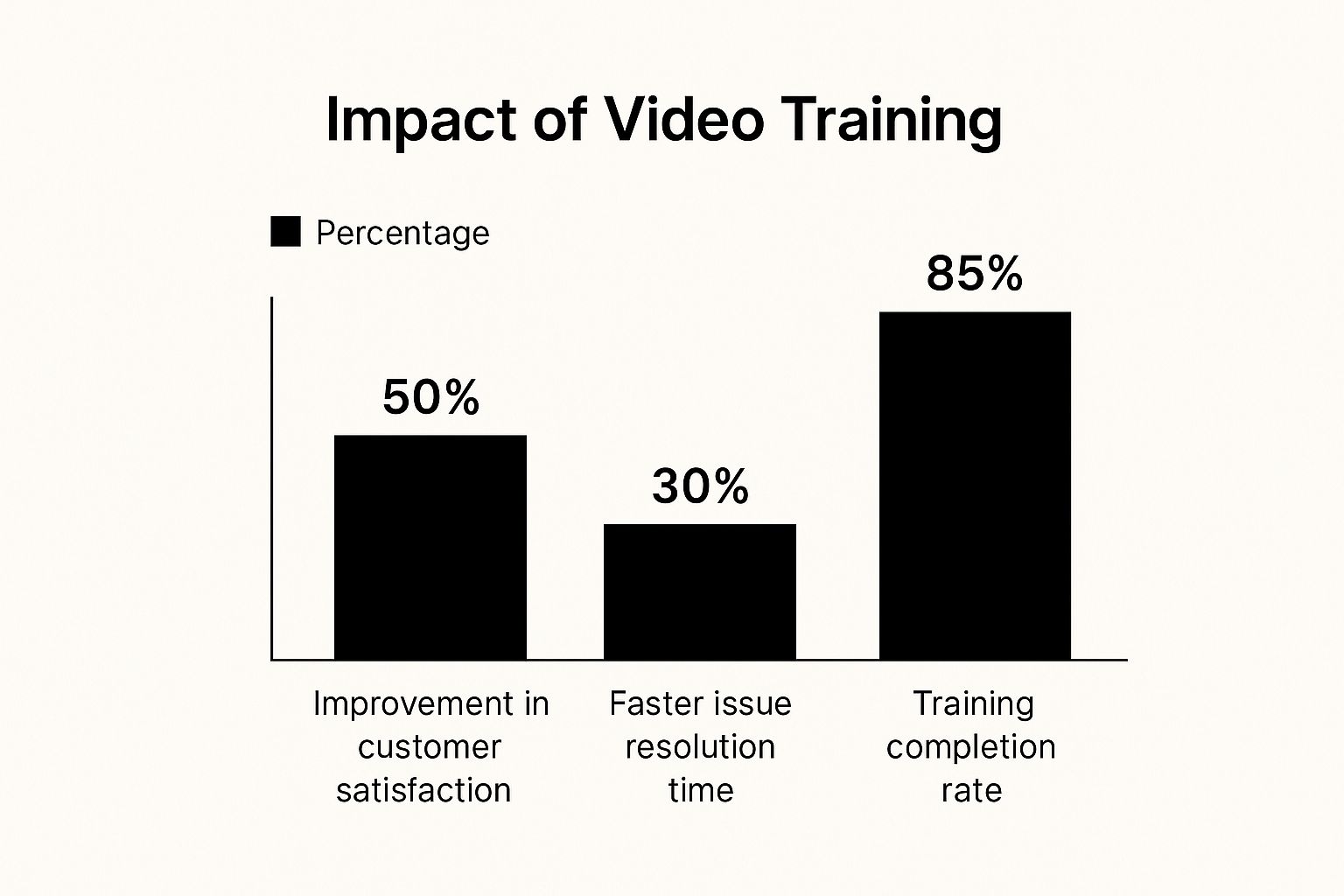
You can see a direct line connecting video-based learning to better customer satisfaction, quicker resolutions, and even higher engagement with the training material itself.
Boosting Engagement and Knowledge Retention
Beyond just consistency, video training gets people genuinely engaged. By using storytelling and real-world simulations, you turn passive learning into an active experience, which helps agents actually remember what they’ve learned. You can find more great insights into video training's impact from the team at The DVI Group.
The shift from boring manuals to engaging videos has a clear, positive impact. Here's a quick breakdown of how video stacks up against the old-school methods.
Video Training vs. Traditional Methods
| Feature | Video Training | Traditional Methods |
|---|---|---|
| Engagement | High – uses visuals, sound, and real-life scenarios. | Low – often passive reading or listening. |
| Retention | Excellent – appeals to multiple learning styles. | Poor – easy to forget text-based information. |
| Accessibility | On-demand, available anytime, anywhere. | Limited to specific times and locations. |
| Consistency | Perfect – every team member gets the same message. | Varies by instructor and session. |
| Scalability | Easy to distribute to a growing global team. | Costly and time-consuming to scale up. |
| Updates | Quick to re-record and share a single module. | Requires reprinting and redistributing entire manuals. |
As you can see, video just offers a more flexible, effective, and modern way to train your team for success.
When agents feel confident in their knowledge and skills, it translates directly into the quality of their customer interactions. They are better equipped to solve problems creatively and represent your brand positively, ultimately turning customers into loyal fans. This shift from rote memorization to confident application is the true power of video.
Planning Training Videos That Actually Work
A fantastic training video doesn't just happen when you hit the record button. The real magic happens in the planning phase. If you skip this, even the most polished video will fall flat, creating content that’s irrelevant, confusing, or just plain ignored by your team.
Your first move is to figure out what success actually looks like. Vague goals like "improve customer service" are useless. You need to tie your video objectives to specific, measurable business outcomes.
For example, a solid goal would be to reduce call escalations by 20% in the next quarter. Another great one is aiming to boost your first-contact resolution (FCR) rate by 10 points. These kinds of targets give your video a clear purpose and make it much easier to prove its value down the road.
Define Your Audience and Their Needs
With your goals locked in, it's time to think about the people who will actually be watching these videos: your customer service agents. What are their biggest headaches? Where do they consistently get stuck? The answers are usually hiding in plain sight—in support tickets, call recordings, or even just a quick chat with your team.
Maybe you find that new hires are always getting lost on a specific screen in your CRM. A quick screen-share video would be the perfect fix. Or perhaps your veteran agents could use a refresher on handling frustrated customers. In that case, a role-playing video showing specific de-escalation tactics would be far more effective.
The most impactful training content directly solves a real problem for your team. It addresses a specific need, making their job easier and helping them perform better.
To keep everything organized, it helps to establish a robust video production workflow for enterprise teams. This ensures your project stays on track from the initial idea all the way to the final cut.
Scripting for Real-World Scenarios
Now you can start scripting, but remember the golden rule: keep it natural. Ditch the corporate jargon and stiff language nobody actually uses. Your script should sound less like a manual and more like a helpful coworker sharing their best tips.
Here’s how to make your scripts shine:
- Use Real Examples: Pull situations from actual customer interactions. Just be sure to anonymize the details. Keeping the core problem and solution authentic makes the training feel instantly relatable.
- Focus on One Topic: Don't try to cram an encyclopedia's worth of information into one video. Create short, focused videos that tackle a single skill or process. This makes the content easier to digest and find later on.
- Write for the Ear: Read your script out loud. Seriously. Does it sound clunky or are the sentences a mile long? Tweak it until it flows like a natural conversation.
This is the kind of thoughtful planning that turns a one-and-done video into a go-to resource your team will use over and over.
For a deeper dive, check out our complete guide to creating excellent https://blog.screendesk.io/customer-service-training-videos/.
Your Toolkit for Creating Professional Videos on a Budget

Creating high-quality training content for your customer service team might sound like a major expense, but you really don't need a Hollywood-sized budget. The truth is, you can produce polished, effective videos with simple tools you probably already have or can get for a song. It’s all about focusing on clarity and value, not flashy special effects.
The most important tool in your kit, especially for software or process training, is a solid screen recording app. This is the foundation for creating clear, step-by-step tutorials that show your agents exactly what to do. Modern tools like Screendesk are incredibly intuitive, letting you capture your screen, record your voice, and even overlay your webcam feed with just a few clicks.
Mastering the Essentials: Audio and Lighting
You could film the most beautiful video in the world, but if the audio is terrible, nobody will watch it. Poor sound quality is distracting and immediately makes your content feel amateurish. The good news? You don't need a professional recording studio to get crisp, clean audio.
Your smartphone is a surprisingly powerful microphone. Seriously. Just find a quiet, small room—a walk-in closet is perfect—to cut down on echo and background noise. Prop your phone up nearby, hit record, and you’ll capture audio that’s miles ahead of what your laptop's built-in mic can do.
In the same vein, good lighting is about working smart, not spending a ton of money.
- Natural Light is Your Best Friend: Always try to sit facing a window. This gives you soft, even light that's flattering and gets rid of harsh shadows.
- Grab a Simple Ring Light: For just a few dollars, a small ring light can be a game-changer. It gives you consistent lighting no matter the time of day.
- Watch Out for Backlighting: Never, ever sit with a bright window or lamp behind you. You’ll end up as a dark silhouette, and no one will be able to see your face.
The goal isn't cinematic perfection; it's clarity. Clean audio and clear visuals ensure your team can focus on the training content itself, not get distracted by poor production quality.
Simple Editing for a Professional Polish
Once your recording is done, a few simple editing tricks can take your video from good to great. Most screen recording tools have basic editing features built right in, so you won’t need to learn complicated software.
Just focus on a few key edits:
- Trim the Ends: Snip off any awkward silence or fumbling at the beginning and end of your recording. It’s a small change that makes a huge difference.
- Add Simple Text Overlays: Use text to highlight key steps, point out keyboard shortcuts, or drop in important reminders right on the screen.
- Zoom and Pan: Gently zoom in on important details to guide the viewer’s eye and keep them locked in on the action.
These little touches add a layer of professionalism that really makes your videos stand out. If you find your team is stretched thin, exploring professional content creation services can be a great way to get high-quality content without the internal overhead. And for those who want to build these skills in-house, we've laid out the entire process in our guide on how to create video tutorials.
How to Measure the Real-World Impact of Your Training
Creating a great set of training videos is a fantastic first step, but the real work begins when you have to prove it was worth the effort. Let's be honest, your leadership team cares about one thing: results. They need to see how your new video program directly impacts the business, not just how many views a video got.
This is where you have to put on your analyst hat. The key is to move past vanity metrics and tie your training directly to key performance indicators (KPIs).
Before you even think about launching the videos, you need to capture a baseline. What’s your team's current Customer Satisfaction (CSAT) score? How long does it take to resolve a typical ticket? Knowing where you started is the only way you’ll be able to show how far you’ve come.
Pinpointing the Right Metrics to Track
The metrics you track should be a direct reflection of the goals you set in the planning stage. It's all about connecting the dots.
For instance, if you created a video to walk agents through a tricky refund process, you should be looking for a drop in escalations for that exact issue. It’s that simple. You're drawing a straight line from the training content to a measurable business outcome.
I've found it's best to track a mix of efficiency and quality metrics.
-
First-Call Resolution (FCR): Are agents solving issues on the first contact more often? A rising FCR is a huge win—it means happier customers and a more effective team.
-
Average Handling Time (AHT): Is the time it takes to handle a call or ticket going down? Shaving even a few seconds off AHT can add up to massive cost savings over a year.
-
Ticket Volume: A drop here is a great sign. It often means your training is empowering agents to resolve issues so thoroughly that customers don't need to reach out again.
Don't just present a spreadsheet of numbers. Tell the story behind them. Frame your results like this: "After we rolled out the new troubleshooting video series, we saw a 15% decrease in escalations to the Tier 2 team. That saved our senior agents an estimated 40 hours last month alone."
To give you a clearer picture, here are some of the most critical KPIs you should be watching.
Key Performance Indicators to Track
| Metric (KPI) | What It Measures | Target Outcome |
|---|---|---|
| First-Call Resolution (FCR) | Percentage of issues resolved in the first interaction. | Increase. Shows training is improving agent knowledge and problem-solving skills. |
| Average Handling Time (AHT) | The average duration of a single customer interaction. | Decrease. Indicates agents are finding information and resolving issues faster. |
| Customer Satisfaction (CSAT) | Customer happiness with a specific interaction. | Increase. Directly links training quality to the customer's experience. |
| Net Promoter Score (NPS) | Overall customer loyalty and willingness to recommend your company. | Increase. Reflects long-term improvements in service quality. |
| Ticket Escalation Rate | Percentage of tickets that need to be passed to a higher support tier. | Decrease. Means agents are better equipped to handle complex issues themselves. |
Tracking these KPIs helps you build a rock-solid business case for your training program, showing exactly how it's contributing to the company's success.
Linking Training to Customer Happiness
Ultimately, the most important measure of your training’s success is how your customers feel. The good news is that companies that lean into video-based support have seen incredible results. We're talking about a 32% reduction in support tickets and a 27% increase in customer satisfaction. Those numbers, highlighted in a study on customer service videos at edesk.com, really show how powerful this medium can be.
So, how do you capture this on your own team? Keep a close watch on your CSAT and Net Promoter Score (NPS) surveys. Don't just look at the overall score; dig into the comments. Are customers mentioning how knowledgeable or helpful an agent was?
You can even add a custom question to your post-interaction surveys, something like, "Was the solution you received clear and easy to follow?" This gives you another data point to connect your customer service videos training directly to what matters most: a happy customer.
Weaving Videos into Your Team's Daily Workflow

You can create the most polished, helpful training videos in the world, but they won't make a dent if your team never actually watches them. The real secret to making training stick isn't just about production value; it’s about weaving those videos into the fabric of your team's day-to-day work.
This means ditching the old "annual training day" mindset. Instead, we need to build a culture where learning is constant, on-demand, and just a normal part of the job.
Making Training an Onboarding Staple
Your new hire onboarding process is the perfect place to start. Forget handing someone a dusty, three-inch binder on their first day. A curated playlist of short, focused videos is a much more effective (and less intimidating) way to get them up to speed.
Picture a new agent's first week. They can watch a quick tutorial on navigating your CRM, another showing how to process their first refund, and a third that walks them through handling a common customer complaint. This approach builds confidence fast. It also guarantees every new person gets the exact same core training, which is a huge win for consistency.
The most effective training programs aren't events; they are ongoing processes. By integrating video into daily operations, you create a living resource that helps your team adapt and improve in real-time, right when they need it most.
If you're looking for more advanced tips on creating these videos, our guide on mastering training videos production is a great next step.
Building a Just-in-Time Video Library
For your seasoned agents, training needs shift from learning the basics to solving problems on the fly. This is where a searchable, well-organized video library becomes an absolute game-changer. Think of it as your team’s internal, super-focused YouTube.
An agent in the middle of a tough call about a brand-new feature doesn't have time to sift through a long-winded PDF. They need to find a two-minute screen recording that shows them exactly what to do, right now.
This "just-in-time" learning is powerful because it delivers answers at the moment of need, reinforcing the lesson immediately through real-world application. To make a library like this actually work, it needs to be:
- Easily Searchable: Use clear, descriptive titles and tags. Think about the exact words an agent would type when they're stuck.
- Organized Logically: Group videos by topic, product, or common issues (e.g., "Billing Inquiries," "Software Glitches").
- Instantly Accessible: The golden rule? It must be faster to find the video than to tap a colleague on the shoulder.
Investing in this kind of structure pays off—literally. Companies with comprehensive training programs see a 218% higher income per employee compared to those that don't formally train. On top of that, businesses that invest in training report a 17% boost in productivity and 21% higher profitability. The numbers don't lie; a well-used video library is a smart business move.
Got Questions About Video Training? We've Got Answers
Jumping into video production can feel like a huge undertaking, especially if you've never done it before. It’s completely normal to have questions about where to start, how much time it will really take, and what actually makes a training video effective.
Let's walk through some of the most common worries I hear from managers building out their customer service videos training program.
A lot of leaders think they need a Hollywood budget and a full production crew. The good news? You absolutely don’t. Your team isn't expecting a blockbuster movie. They just want clear, helpful information that makes their jobs less stressful. Authenticity and clarity will always win over slick, overproduced content.
Another big question is about length. My rule of thumb is that shorter is almost always better. Keep your videos focused and concise, aiming for that microlearning sweet spot of between two and five minutes long. This respects your agents' time and lets them find a quick answer to a specific problem without having to scrub through a 30-minute webinar.
How Do We Keep Our Videos Up to Date?
This is a fantastic and critical question. In a world of constant software updates and policy tweaks, the last thing you want is a library of obsolete videos. The trick is to plan for updates from the very beginning.
Here’s how we tackle this:
- Think in Modules: Don't record one massive video to cover an entire workflow. Break it down into smaller, bite-sized clips. When one small part of the process changes, you only need to re-record that one tiny video, not the whole thing.
- Teach the "Why," Not Just the "How": When you can, focus on the core concepts and principles behind a task. A video explaining your company's philosophy on handling escalations will stay relevant far longer than a click-by-click tutorial of a user interface that’s going to be redesigned next quarter.
- Use the Right Tools: This is where a tool like Screendesk becomes a lifesaver. It makes the process of recording, editing, and swapping out a video so fast that keeping things current is no longer a major project.
Your video library should be a living, breathing resource, not a dusty archive. A simple quarterly check-in is usually all it takes to spot what needs a quick refresh. This ensures your team always has the right information when they need it.
What If My Team Doesn't Watch the Videos?
If your team isn't engaging, it usually boils down to two things: relevance and accessibility.
First, the content has to solve a real, immediate problem for them. Before you even think about hitting record, go talk to your agents. Ask them: "What’s the most frustrating task you do? Where do you get stuck?" Build your first videos around those pain points.
Second, make the videos impossible to ignore. Put them right where the work happens. Embed them in your help desk articles, drop them into your team's Slack or Teams channel, and make them a core part of your onboarding checklist. When the right answer is just one click away at the moment of need, your team will use it. It's all about making the training a natural part of their daily workflow, not another task to check off.
Ready to transform your support with crystal-clear, easy-to-create videos? Screendesk gives your team the tools to record, share, and manage a powerful video library directly within your existing help desk. Learn more and start your free trial at Screendesk.
