


At its core, customer service video chat is a way for your support agents and customers to connect face-to-face, in real time. Instead of a standard phone call or live chat, you're having a direct video conversation, much like a FaceTime or Zoom call. It’s often built right into a company's website or app, making it incredibly easy for customers to get help.
This shift from audio-only or text-based support to a visual, interactive session creates a much more personal and effective experience.
The Power of Seeing the Problem
Have you ever tried to describe a weird rattling sound in a new appliance over the phone? Or explain a confusing software bug through text chat? It quickly turns into a frustrating game of 20 questions.
This is exactly where customer service video chat shines. It completely changes the game by letting an agent see precisely what the customer is seeing.
That direct visual link gets rid of the guesswork. Instead of relying on a customer's description—which can be vague or confusing—an agent can visually diagnose the problem in moments. This isn't just about convenience; it fundamentally transforms the entire support process from a slow, reactive Q&A into immediate, proactive problem-solving.
Beyond a Simple Video Call
A modern video chat platform is so much more than just a two-way camera. It's a complete toolkit designed from the ground up to help your team resolve issues faster and more thoroughly. All the components work together to create a smooth, productive support session.
This infographic highlights some of the key benefits businesses report after implementing this technology.
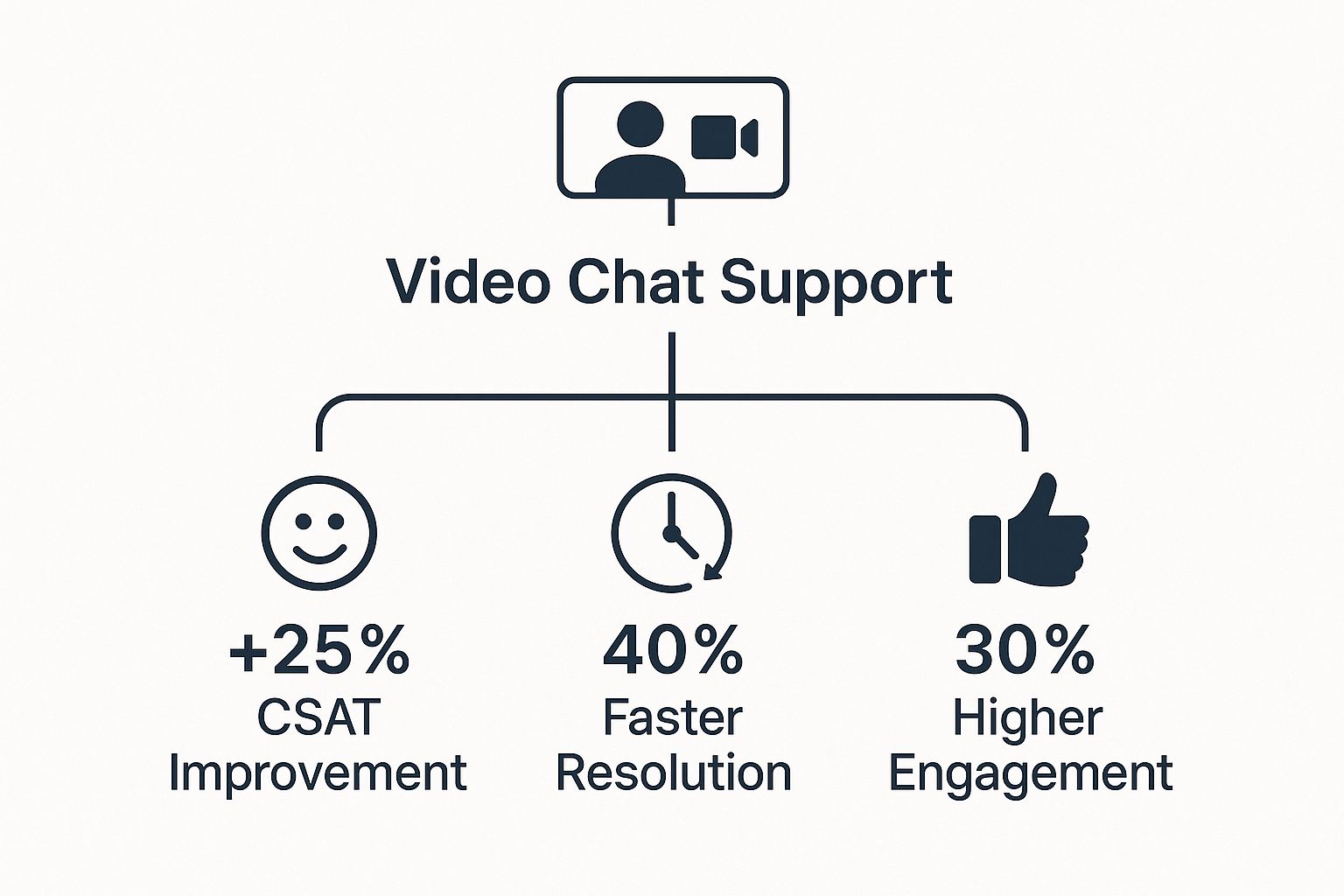
As you can see, the numbers speak for themselves. Adding that visual element leads to dramatically faster resolutions, higher customer satisfaction, and a much deeper connection with your audience. These aren't just small tweaks; they represent a major leap forward in support performance.
To deliver these kinds of results, video support platforms bundle several key features into one cohesive experience.
A truly effective video support experience isn't just about seeing the customer. It's about giving your team the tools to guide, annotate, and resolve the issue on the very first interaction.
These integrated tools turn a simple video call into a collaborative problem-solving workspace. To help you understand what makes these platforms so powerful, here’s a breakdown of their essential features.
Core Features of Modern Video Chat Support
This table breaks down the essential functions that define customer service video chat platforms, helping you quickly understand their capabilities and benefits.
| Feature | What It Does | Main Customer Benefit |
|---|---|---|
| Screen Sharing | Lets the customer broadcast their screen to the agent, ideal for software issues or website navigation help. | Quickly shows the exact problem without needing to describe it. |
| Co-Browsing | Allows an agent to securely interact with the customer's web browser tab to guide them in real time. | Gets hands-on help with online forms, checkouts, or navigating complex pages. |
| Real-Time Annotation | Enables agents to draw or place arrows directly on the screen during a video call to highlight details. | Provides crystal-clear visual instructions, like "click this button right here." |
By bringing these tools together, a simple conversation becomes a hands-on, collaborative session. This approach not only solves problems more accurately but also builds customer confidence and trust in your brand.
Why Video Chat Is a Game Changer for Support

Think about the last time a text message was misunderstood. Without seeing someone’s face or hearing their tone, so much meaning gets lost. For too long, customer support has been stuck in that same world of emails and live chat, often leading to confusion and frustration on both sides.
Customer service video chat is the solution. It brings the missing human element back into digital conversations. When your support agent can actually see a customer's expression and hear the nuance in their voice, they get a much clearer picture of what's happening.
This isn't just about being friendly; it fundamentally changes the support experience. Agents can build real rapport and show empathy, turning a stressful situation into a reassuring one. That personal connection can make all the difference.
Seeing Is Believing—and Resolving
The most obvious win for video chat is seeing a problem in real time. No more trying to guess what a customer means by a “funny clicking sound” or a “thingamajig that fell off.” They can just show you. This instantly cuts through the confusion and eliminates the endless back-and-forth questions.
Imagine a customer struggling to set up their new smart thermostat. Instead of reading a manual over the phone, they can just point their camera at the device. The agent can immediately spot that a wire is in the wrong place and guide them to a fix in minutes. This is why companies using video support see a huge jump in their First Contact Resolution (FCR) rates.
When an agent gets a clear visual, they can understand complex issues faster, diagnose the problem, and guide the customer to a solution right then and there. This dramatically reduces the need for follow-up calls or emails.
Driving Efficiency and Customer Loyalty
Fixing problems faster and more accurately is good for everyone. Video chat is one of the Top Technologies Transforming Customer Service Today because it creates a win-win: a smoother process for your team and a better experience for your customers.
- Slash Resolution Times: When agents can see the issue, they solve it faster. This brings down the average handle time for tricky support tickets, freeing up your team to help more people.
- Boost Customer Satisfaction: A quick, personal, and effective fix leaves a great impression. In fact, 80% of customers say they are more likely to do business with a company again after a positive service experience.
- Build Lasting Trust: A face-to-face chat, even a virtual one, creates a much stronger bond. It turns a simple support call into a genuine opportunity to strengthen brand loyalty.
At the end of the day, adding customer service video chat is more than just opening another channel. It’s a smart move to create more personal, efficient, and memorable experiences that keep your customers happy and loyal.
Powerful Use Cases for Video Chat Support

It’s one thing to talk about the benefits of customer service video chat in theory, but its real value clicks when you see it solve actual problems. This tool isn't just a flashy add-on; it's incredibly versatile and can turn a genuinely frustrating situation into a surprisingly positive one.
Let’s dive into a few real-world scenarios. These examples show how different businesses use video chat not just as a feature, but as a core part of their problem-solving toolkit.
Technical Support for Tangible Products
We’ve all been there. You buy a new smart home device, but for the life of you, you can't get it to connect to your Wi-Fi. On a typical support call, the agent has to walk you through a long, tedious checklist based on what you think you're seeing. "Is the light blinking blue or green? Now press and hold the button for three seconds…"
Now, imagine this with video chat. You just point your phone's camera at the device. Instantly, the agent sees the problem: a cable is slightly unplugged, or there's an error code on the screen you hadn't even noticed. They can even draw a circle on your screen, showing you exactly which port to use.
What could have been a painful 30-minute phone call becomes a quick, five-minute fix. It's faster, less frustrating, and leaves you feeling confident about the product you just bought.
High-Touch Retail and Virtual Demos
Let's say a customer is eyeing a high-end espresso machine online. It's a big purchase, and they’re hesitant to buy it sight unseen. They want to know how big it really is, see the features up close, and understand how the milk frother works.
This is where a retail specialist can jump on a customer service video chat for a live, one-on-one demo. They can show the machine from every angle, pull a shot of espresso, and demonstrate how to get that perfect foam. It’s a personal, high-touch experience that a static product page could never replicate.
This approach is fantastic because it bridges the gap between online browsing and an in-store visit. It provides the hands-on feel needed to close a high-value sale and make sure the customer is thrilled with their choice.
This kind of interactive support is a game-changer for anyone selling complex or expensive items, from luxury watches to specialized hobby equipment. For more great examples, check out this in-depth guide on video customer support.
SaaS Onboarding and Feature Guidance
A new user just signed up for your powerful project management software, but they're completely stuck. They’re trying to set up their first big project and feel overwhelmed by all the buttons and menus.
Instead of sending them a link to a dense knowledge base article, an onboarding specialist can hop on a video call and use screen sharing. The user shows their screen, and the specialist can guide them through the interface in real time. They can point out the exact features needed, clarify confusing workflows, and get the project set up for success right from the start.
This hands-on guidance dramatically flattens the learning curve. It helps prevent new users from getting frustrated and giving up, showing them the software's value almost immediately. It’s not just a support session; it’s the beginning of a strong, long-term customer relationship.
How to Weave Video into Your Omnichannel Strategy
https://www.youtube.com/embed/WmR9IMUD_CY
Adding customer service video chat to your support lineup isn't about just checking another box. To get real value, you have to weave it into the very fabric of your existing system. Think of it less like bolting on a new feature and more like connecting every part of the customer journey so it works as one cohesive whole.
The real aim is to create a totally fluid, frictionless experience for your customers. No one wants to end a text chat, hunt for a new support link, and then repeat their entire story just to get on a video call. That kind of siloed support is frustrating and completely undermines the reason you're offering better tools in the first place.
Instead, the switch should feel invisible. Picture a customer working through a tricky problem over live chat. With a single click, the agent can elevate that same conversation into a video call, bringing the entire chat history and context along with them. No starting over. No lost information. Just a smooth, continuous path to a solution.
Creating a Truly Connected System
Making this happen all comes down to one thing: integration. Your video chat tool has to talk to your other systems—your CRM, helpdesk software, and messaging platforms. This unified approach is the bedrock of a true omnichannel strategy, where every channel works in concert. If you want to dive deeper, you can explore the core ideas behind a true omnichannel customer experience.
A successful integration means the customer feels like they are having one continuous conversation with your brand, no matter how many times they switch from chat to video to email.
And the numbers don't lie. Omnichannel platforms that properly integrate video chat can drive customer satisfaction (CSAT) scores as high as 67%, a massive leap from the 28% seen in disconnected, multichannel setups. What's more, this connected strategy can lift company revenue by up to 15%, boost customer loyalty by 35%, and slash service costs by nearly 35%. You can dig into these stats and see how they drive business growth.
Key Steps for a Smooth Integration
Turning video into a core part of your support isn't just about flipping a switch. It's about picking the right technology and shaping your team's workflow to make the most of it.
Here are a few essential steps to get started:
- Pick a Unified Platform: Don't just look for a standalone video tool. Choose a customer service video chat solution that already has strong integrations with the software you rely on every day. Native connections with major helpdesks and CRMs are a must for seamless data flow.
- Map the Customer Journey: Think carefully about where video will make the biggest impact. Is it for walking a customer through a complex setup? Or maybe for high-touch sales consultations? Identifying these key moments will help you build clear guidelines for your team.
- Train for Seamless Handoffs: Your agents need to know more than just how to use the tool—they need to know when and why. Train them on the exact process for escalating a chat or email to video without making it feel clunky for the customer.
When you focus on deep integration instead of just isolated features, video chat transforms from a nice-to-have into a genuine strategic advantage. You’ll build a support system that not only makes your team more efficient but also earns lasting trust with your customers.
Best Practices for Launching Video Support

Getting customer service video chat up and running is about more than just flipping a switch. If you want this tool to truly add value and boost your brand's reputation—instead of creating new headaches—you need a thoughtful rollout. It all starts with your team, the people who will be face-to-face with your customers.
Without proper preparation, even the most impressive technology can fall flat.
Prepare Your Team for the Camera
Training your agents for video involves so much more than showing them which buttons to click. Being effective on camera is its own skill, and it requires a different kind of awareness than a phone call or a text chat.
Your training needs to cover the essentials of on-camera etiquette. This means teaching agents to maintain eye contact by looking at the camera, using positive body language, and simply presenting themselves professionally. It's also critical to set clear standards for their physical environment.
- Professional Backgrounds: Agents need a clean, non-distracting background. A neutral wall, a branded virtual background, or even just a tidy office space works perfectly.
- Audio Quality: A good headset with a noise-canceling microphone is non-negotiable. Nothing kills a video call faster than bad audio.
- Lighting: Make sure agents are well-lit from the front so they don't look like a silhouette. A simple, affordable ring light can make a world of difference.
A polished and professional agent appearance builds immediate trust and signals to the customer that they are in capable hands. This first impression sets the tone for the entire interaction.
Agents should also know when and how to record calls for training or quality assurance. To keep things transparent and compliant, you can dive into our detailed guide on how to record a video call and share the key takeaways with your team.
Establish Clear Guidelines for Offering Video
Video chat isn't the right tool for every single conversation. It shines when used strategically for specific types of problems. For instance, trying to use video for a simple question like an order status update is overkill and can even feel a bit intrusive to customers.
You'll want to develop a clear internal policy that spells out exactly when an agent should offer a video call. The sweet spots are usually:
- Complex Technical Troubleshooting: Perfect for when a customer needs to show you a piece of hardware or walk you through a weird software error on their screen.
- High-Value Consultations: Think product demos, sales assistance, or personalized onboarding where that face-to-face connection builds confidence.
- Sensitive or Escalated Issues: When empathy and visual reassurance can help calm down a frustrated customer, video is incredibly powerful.
This selective approach is key because not everyone wants to hop on a video call. We know that 41% of customers prefer live chat for its speed, a number that jumps to 60% among millennials. By offering video only in situations where it truly helps, you meet modern expectations without being pushy.
Ensure a Rock-Solid Technical Setup
Finally, your tech has to be flawless. A laggy video stream, dropped calls, or crackling audio will ruin the customer experience and make your support team look bad. Before you go live, you have to rigorously test your customer service video chat platform on different devices, browsers, and network speeds.
Make sure the solution you choose is browser-based, which means customers don't have to download a thing. The goal is to make joining a video call as easy as clicking a single link. A seamless technical experience isn't a bonus feature; it’s the price of entry.
The Real Financial Impact of Video Interactions
When you're thinking about adding a tool like customer service video chat, it's easy to see it as just another line item in the budget. But that’s a narrow view. This isn't just an expense; it's an investment that directly hits your bottom line. The real cost isn't in adding video chat—it's in sticking with subpar support channels that quietly drain your profits.
Let's talk numbers. The cost of poor support is staggering. In the United States alone, businesses are losing a massive $75 billion every year. This isn't just one thing; it's a combination of customers leaving, wasted time, and lower lifetime value, all stemming from bad experiences. When a customer feels ignored or their issue drags on, they don't just complain—they walk away. You can dig into the full story behind these customer service statistics to see just how big the problem is.
Video chat cuts right through this problem. It allows for quicker, clearer solutions, which means you're not wasting money on endless email threads or frustrating repeat calls. Every single problem you solve on that first video call is money back in your pocket.
Turning Support Costs into Revenue Drivers
A great customer service video chat tool doesn't just plug the leaks; it actually helps you bring in more money. When a support call feels personal and solves a problem efficiently, it builds a level of brand loyalty that a text chat or email could never hope to achieve.
Think of it this way: a negative support experience costs you a customer, while a positive video interaction can create a loyal advocate for your brand. This shift transforms your support center from a cost center into a powerful engine for customer retention.
These positive experiences have a direct effect on how customers spend their money. A happy customer is far more likely to buy from you again, upgrade their plan, or tell their friends about you. Here’s a quick breakdown of how video chat boosts your finances:
- Minimizes Customer Churn: When you can solve a tricky issue face-to-face in minutes, customers have no reason to shop around for your competitors.
- Increases Lifetime Value (LTV): That personal connection builds real loyalty, keeping customers with you for the long haul.
- Drives Upsell Opportunities: During a helpful video call, it's natural for an agent to spot a customer's need and suggest another product or an upgraded service that could genuinely help them.
When you start seeing video support as a key piece of your growth plan, the return on investment becomes crystal clear. It's not just about fixing today's problems; it's an investment in your company's future stability and success.
Frequently Asked Questions About Video Chat
Whenever you bring a new tool into your workflow, questions are bound to pop up. It’s smart to get the full picture before you commit. When it comes to customer service video chat, most of the concerns I hear are about security, customer friction, and how to actually measure its impact. Let’s tackle those head-on.
My aim here is to give you clear, no-fluff answers so you can feel confident about adding this powerful tool to your support lineup.
Is Video Chat Secure for Customer Interactions?
Yes, absolutely. Any modern video chat platform worth its salt is built with security at its core. They rely on end-to-end encryption, which basically scrambles the conversation so that only the agent and the customer can see or hear what's being shared. It’s completely private.
When you’re vetting a provider, make sure they comply with major data privacy standards like GDPR and SOC 2. It’s also just good practice to train your team never to ask for or show highly sensitive information—like a full credit card number—on screen. For things like that, many tools have features where customers can type into a secure field that the agent can’t see.
Do Customers Need to Download Any Software?
Thankfully, no. The best customer service video chat tools today are browser-based, thanks to a technology called WebRTC. All a customer has to do is click a link you send them via your website, email, or even a text message.
This is a total game-changer because it removes all the hassle. No apps to find, no software to install, no accounts to create. They can join a call almost instantly from a standard browser like Chrome, Safari, or Firefox on their computer or smartphone.
How Can I Measure the ROI of Video Support?
Figuring out the return on investment (ROI) for video support isn’t as complicated as it might sound. It's all about tracking a few key metrics and seeing how they stack up against your other support channels.
- First Contact Resolution (FCR): Keep an eye on how often a video call solves an issue in one go. You'll likely find this number is much higher for video.
- Customer Satisfaction (CSAT): After a call, send a quick survey. Compare the CSAT and Net Promoter Score (NPS) ratings from video chats to what you get from phone or email.
- Average Handling Time (AHT): A single video call might look longer on paper, but it often resolves a complex problem far quicker than a dozen back-and-forth emails. This actually saves a ton of agent time per ticket when you look at the big picture.
By tracking these numbers, you can easily build a business case that shows exactly how video chat makes your team more efficient and your customers happier.
Ready to see how seamless and effective video support can be? Screendesk offers a powerful, browser-based solution that integrates directly into your existing helpdesk, making it easy to launch video calls, share screens, and resolve issues faster. Explore Screendesk today and transform your customer interactions.
