


A good bug report template is simply a pre-made document that guides everyone to log issues the same way. The goal is to make sure developers get all the details they need to find, replicate, and squash a bug fast. It cuts out the guesswork and speeds up the entire development process.
Why a Great Bug Report Template Matters
Let's be real—a vague bug report is a productivity killer. It kicks off a chain of endless back-and-forth emails, frustrating developers and delaying important fixes. A standardized bug report template is the backbone of an efficient development cycle, creating a solid communication bridge between QA, developers, and product managers. This isn't just about listing problems; it's about building a system that actively helps solve them.
When everyone uses the same format, the process becomes predictable and repeatable. Developers know exactly where to look for the browser version, operating system, and the specific steps to reproduce the issue. No more hunting for information.
Building a Foundation of Clarity
Picture this: a QA tester submits a report that just says, "The payment button is broken." Without a template, the developer is immediately stuck. Which page? What browser? What were the exact steps? This simple issue could burn hours, or even days, as they try to pry the needed details out of the reporter.
Now, let's look at the same issue reported with a solid template:
- Title: Checkout – "Pay Now" Button Unresponsive on Safari 15.1
- Environment: macOS Monterey, Safari 15.1, Screen Resolution 1920×1080
- Steps to Reproduce:
- Add 'Product X' to the cart.
- Proceed to the checkout page.
- Fill in all required shipping and payment details.
- Click the "Pay Now" button.
- Actual Result: The button doesn't do anything when clicked.
- Expected Result: The payment should process, and I should be sent to the confirmation page.
This level of detail gives the developer everything they need to jump on the problem right away. What could have been a week-long delay turns into a fix that’s deployed in just a few hours.
The chart below shows why getting the length right for different fields is so important—a title needs to be brief, but the summary needs enough space for real context.
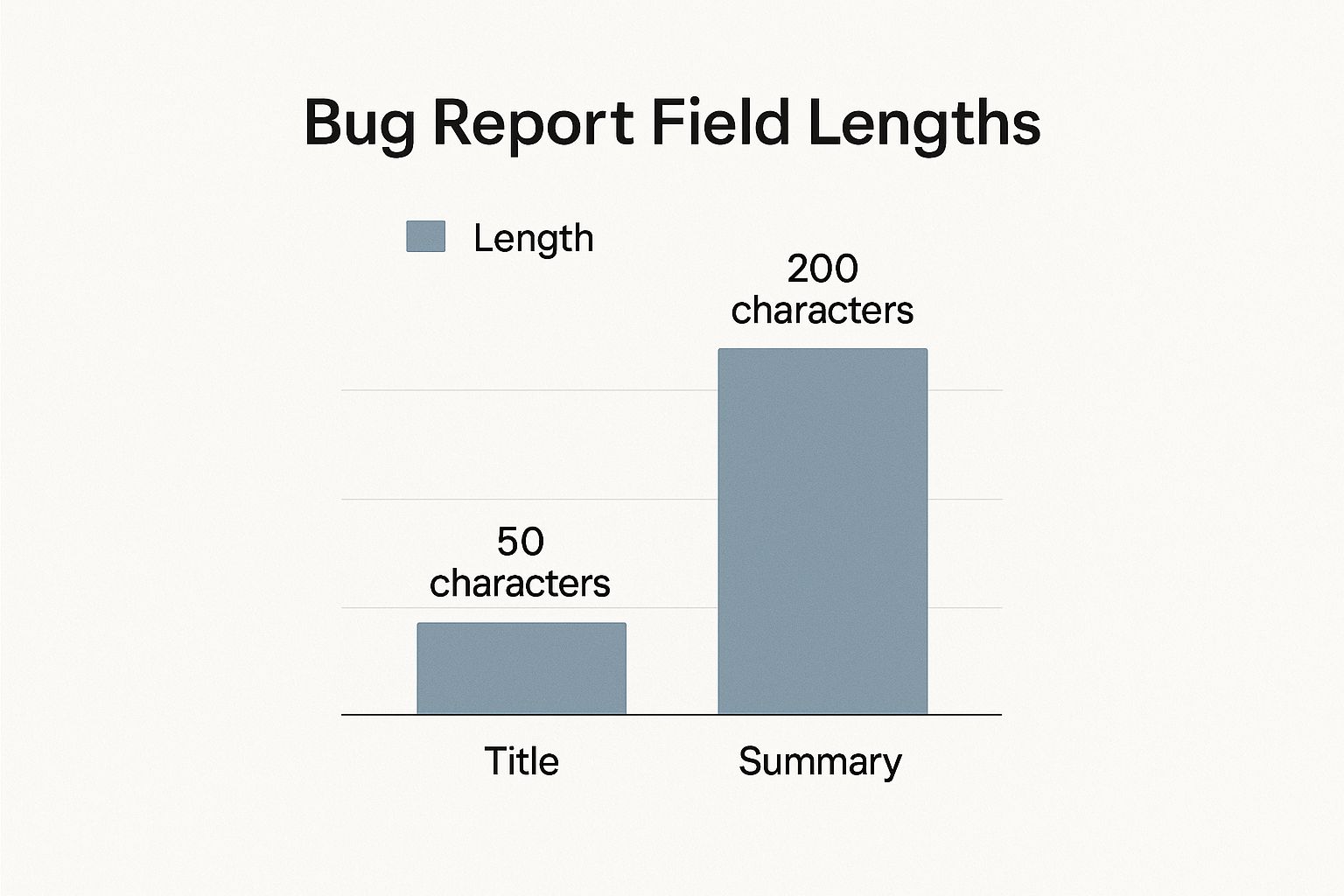
This visual guide reminds us that a punchy title gets attention, but the detailed summary is where the real work begins.
The Real Impact of a Standardized Bug Report Template
Here’s a quick comparison showing the practical differences between unstructured bug reporting and using a standardized template.
| Metric | Without a Template | With a Standardized Template |
|---|---|---|
| Time to Replicate | High (often requires back-and-forth) | Low (all steps and environment details are included) |
| Developer Frustration | High (missing key information) | Low (clarity from the start) |
| First-Time Fix Rate | Low (fixes might miss the root cause) | High (developers have the full context) |
| Resolution Time | Long (days or weeks) | Short (hours or a few days) |
| Team Communication | Inefficient (lots of follow-up questions) | Efficient (clear, consistent, and actionable) |
It's clear that a template isn't just about tidiness—it directly impacts your team's performance and sanity.
The Proven Impact of Standardization
The benefits of a well-designed template aren't just theoretical; they show up in the numbers. We’ve seen case studies where optimizing bug reports made a huge difference. For example, one financial services app boosted its first-time bug resolution rate from a mere 32% to an impressive 78% just by requiring detailed technical documentation in its templates.
In another case, a healthcare tech company slashed its average bug resolution time from 13 days down to just 4. You can find more insights about how optimized templates drive efficiency on fullscale.io. This kind of data proves that a solid template is a direct investment in your team’s productivity and your product's stability.
The Anatomy of a Great Bug Report Template

A killer bug report template isn't just a form with a bunch of fields—it's a conversation starter. It's designed to pull the exact information a developer needs to squash a bug without a frustrating back-and-forth. Think of each field as a deliberate question guiding the reporter to a clear, actionable answer.
When your template is well-structured, you cut through the noise. The quality of the information you get from the start directly determines how fast an issue gets identified, reproduced, and ultimately, fixed.
Core Identifying Information
First things first, every report needs a clear identity. These are the non-negotiable basics that keep your workflow from descending into chaos.
- Bug Title: This is your headline. It needs to be short, descriptive, and to the point. Ditch vague titles like "Login is broken." Instead, go for something like, "Login Fails with 500 Error for Google SSO Users." See the difference? A good title instantly tells the team where to look and what the impact is.
- Unique ID: An automatically generated ID, like BUG-1245, is your best friend for tracking. It stops any confusion and makes it simple to reference the ticket in Slack threads, commit messages, or team meetings.
- Reporter: You need to know who found the bug. It’s not about pointing fingers; it’s about having a contact for any follow-up questions. A simple name or email is all you need.
The Heart of the Report: What Actually Happened?
Now we get to the good stuff—the nitty-gritty details of what went wrong. Vague descriptions are a developer’s nightmare and a massive time-sink. Your template needs to demand precision here.
A simple "Steps to Reproduce" section is a start, but you can do better. Structure it as a numbered list where each step is a single, clear action a developer can follow.
Then, you need the Expected vs. Actual Results. This comparison is pure gold because it leaves zero room for misinterpretation.
Here’s an example:
- Expected Result: "Clicking 'Add to Cart' should add the product to the shopping cart and show a 'Item Added!' confirmation."
- Actual Result: "When I click 'Add to Cart,' nothing happens. The item doesn't get added, and no confirmation message appears."
This simple contrast shows the developer the intended behavior and exactly how the software is failing. No guesswork required.
Technical and Environmental Context
Bugs don't happen in a vacuum. A user's environment—their browser, OS, or device—can completely change how a bug behaves. Capturing this context is one of the most important parts of any bug report template.
A bug that only shows up on an old version of Chrome or a specific Android device can send a developer on a wild goose chase for days. Giving them the environmental data upfront is one of the easiest ways to slash debugging time.
Make sure your template asks for:
- Browser and Version (e.g., Chrome 108.0.5359.124)
- Operating System (OS) (e.g., Windows 11, macOS Ventura 13.1)
- Device Type (e.g., Desktop, iPhone 14, Samsung Galaxy S22)
- Screen Resolution (e.g., 1920×1080)
This info helps developers create the exact same setup to see the bug for themselves. If you want to see just how much structure matters, data from Mozilla’s BugsRepo project shows that standardized, complete reports are far more effective for software maintenance. For even more ideas, check out some other great bug report templates over at https://blog.screendesk.io/bug-report-templates/.
Finally, don't forget a section for Logs and Attachments. This is where the magic happens. A screenshot with an annotation, a quick screen recording, or a copy of the console logs can explain a problem better than a thousand words. A short video of the bug in action is often the single most helpful thing a reporter can provide.
Writing Each Section for Maximum Clarity

Having a solid bug reports template is a great start, but how you fill it out is what really makes the difference. This is where you bridge the gap between spotting a problem and actually getting it fixed. Every field in that template has a job to do, and your goal is to provide information so clear that a developer can get right to work.
Just imagine you're a developer sifting through dozens of bug tickets. If a report is vague and you have to ask a bunch of follow-up questions just to understand the basics, that ticket is going straight to the bottom of the pile. Let’s make sure yours gets to the top.
Crafting the Perfect Bug Title
The title is your first impression. It needs to be a punchy, at-a-glance summary of the problem, not a vague cry for help. The idea is to be so specific that someone understands the core issue without even opening the full report.
Let's look at a couple of examples.
- Vague: "Login fails." (Fails how? For whom? When?)
- Clear: "User gets 500 error on login with valid credentials on Chrome v108."
That second title is gold. It immediately tells the developer the error, the action, and the specific environment. This context is incredibly valuable and kicks off the investigation on the right foot. A clear title also makes it way easier to search for duplicate issues later on.
Detailing Steps to Reproduce with Precision
This section is the heart of the bug report. Think of it as giving the developer a foolproof recipe to see the bug with their own eyes. Any ambiguity here can stop a fix in its tracks.
Your steps should be a simple, numbered list of individual actions. Don't try to cram multiple actions into a single step.
For instance, lay it out like this:
- Navigate to the pricing page
/pricing. - Select the "Annual" billing toggle.
- Click the "Sign Up" button for the Pro plan.
- Observe the checkout page.
This sequence is dead simple to follow. A developer can replicate these exact actions, which is the first step in any debugging process. And if a bug is intermittent, be sure to mention it! Something like, "This happens roughly 3 out of 5 times," is incredibly helpful information.
The point of a bug report isn't just to say a problem exists; it's to give the developer the exact map to find it. The clearer your directions, the faster they'll get to the destination—and the fix.
Using Visuals to Tell the Story
Words are great, but sometimes a picture really is worth a thousand of them. A single screenshot or a short video can often explain a complex issue far better than a wall of text ever could. Visual evidence removes all doubt. If you want to go deeper, our guide on how to write good bug reports has even more great examples.
Here’s a quick rundown of what to use and when:
- Screenshots: These are your go-to for static UI problems—think misaligned text, wrong colors, or missing buttons. Use simple arrows or boxes to pinpoint the exact problem.
- Screen Recordings: Absolutely essential for bugs that involve an action or a sequence. If an animation is jerky, a workflow is broken, or a button just doesn't do anything, a quick recording is undeniable proof.
- Console Logs: When you hit an error on a web app, the browser's developer console is often full of clues. Snapping a screenshot of those red error messages or copying the text can hand a developer the smoking gun they need to find the root cause in the code.
Getting Your Template into the Daily Grind
A great bug report template is only half the battle. If it’s just a document sitting in a shared drive, it’s not doing much work. The real magic happens when you bake it directly into your team's everyday tools. Think of it this way: a template is a recipe, but embedding it in your project management tool is like having a fully-stocked, pre-measured meal kit ready to go.
Most modern platforms like Jira, Azure DevOps, or ClickUp let you build custom issue templates right into the "Create Issue" screen. This is a game-changer. Instead of asking your team to remember to copy and paste from a separate document, the correct format is the only option. Consistency becomes automatic, not an extra chore.
This push for integrated, standardized tools is a big reason why the global bug tracking software market is projected to reach $601.64 million by 2026. When your template lives inside your workflow, it’s no longer a static form. It becomes an interactive starting point for automated notifications, assignments, and more. For a deeper dive into how embedded templates are changing the game, check out the analysis on screendesk.io.
Make the Important Stuff Mandatory
One of the best perks of integrating your template is that you can finally enforce the rules. We’ve all been there—a vague bug report lands in the queue missing the most critical details, like how to actually reproduce the problem. The developer immediately has to drop what they're doing and hunt down the reporter for basic information. It's a huge time-waster.
Most tools let you designate certain fields from your template as mandatory. This means no one can even submit the bug report until those key pieces of information are filled in.
At a minimum, I always recommend making these fields required:
- Steps to Reproduce: This is the big one. If a developer can't follow the steps to see the bug for themselves, they're flying blind.
- Environment Details: Was this on Chrome or Safari? iOS or Android? Knowing the OS, browser, and device is crucial.
- Actual vs. Expected Results: This simple comparison gets right to the heart of the problem and eliminates any ambiguity.
Making these fields mandatory cuts out the frustrating back-and-forth. It’s a small tweak in your setup that can save your team countless hours and dramatically speed up the entire fix cycle.
Your template isn't just a guide; it's a contract. Making key fields mandatory ensures both sides—the reporter and the developer—have what they need to fulfill their part of the process efficiently.
Put Your Workflow on Autopilot with Automation
With your template properly integrated, you can start automating the initial triage process. Your bug tracking system can become a smart assistant, routing issues to the right people without anyone needing to lift a finger.
Think about setting up a few simple rules based on the fields in your template.
For instance, you could create automations like:
- If Priority is "Critical," automatically assign it to the on-call engineer and send an alert to the #dev-emergencies Slack channel.
- If the Component is "UI/UX," automatically add the
front-end-teamlabel to the ticket. - If the Bug Type is "Crash," automatically link it to the parent epic for improving system stability.
Automations like these take the mental load off your team leads and guarantee that the most urgent problems get seen immediately. Your bug report template is no longer just a form; it's the trigger for a slick, repeatable process that scales as your team grows.
A Pro's Guide to Next-Level Bug Reporting
Having a solid bug reports template is a great starting point, but truly mastering the craft of reporting makes you an indispensable part of the team. It’s not just about filling out a form. It’s about thinking like a detective to make a developer's job as painless as possible. When you get this right, bugs get fixed faster, and you help build a much stronger, more collaborative team.
To really level up, you need a small shift in mindset. Instead of simply documenting what went wrong, your new goal is to hand over a complete package of information that anticipates every question a developer might have. This is what separates a good bug report from a great one.
Become a Bug Isolation Expert
One of the most valuable skills you can learn is how to isolate a bug. What does that mean? It means you've done the legwork to find the absolute minimum set of steps required to make it happen again. Was it the five items in the cart that caused the crash, or the fact that one of them was on sale?
This takes a bit of methodical testing. If a checkout process fails, try it again with a different payment method. Try removing the discount code. When you can confidently walk over and say, "This bug only happens when a user pays with a Visa and has an active promo code," you’ve just saved a developer hours of frustrating guesswork.
Always Check for Duplicates First
Before you even think about writing a new report, pause. Take a moment to search your bug-tracking system, whether it's Jira, Linear, or something else. A quick search for keywords related to the feature or the exact error message often reveals that a teammate has already logged the issue. Filing a duplicate report just adds noise and creates cleanup work for everyone.
An effective duplicate check looks like this:
- Search for key terms related to the feature, like "login," "profile update," or "shopping cart."
- Look for specific error codes or messages you saw on the screen.
- Filter for recently filed bugs. Another tester might have found the exact same thing just minutes ago.
Making a habit of checking for duplicates is a hallmark of a mature QA process. It shows you respect your teammates' time and helps keep the backlog clean and focused on what matters.
Keep Your Tone Collaborative
Always remember: bug reporting is a team sport. The tone you use in your report can make all the difference. Ditch accusatory language like "You broke the login page." It just puts people on the defensive.
Instead, stick to neutral, objective descriptions that focus on the software's behavior, not the person who wrote the code. A professional and helpful tone builds trust and respect between QA and engineering, which makes the whole development cycle smoother.
This collaborative approach is a huge part of communicating effectively. To dig deeper into this and other powerful habits, check out our guide on bug reporting best practices. When you combine a great template with these pro techniques, your bug reports will become the catalyst for fast, high-quality fixes.
Common Bug Reporting Questions
Even with the perfect template, you're going to run into weird situations that don't fit neatly into a form. That’s just the nature of software development. Let's tackle some of the most common questions that pop up when you're in the trenches, trying to get a bug properly documented.
What if a Bug Is Hard to Reproduce?
We've all been there. You see a bug, it's glaringly obvious, and then… poof. It's gone. You can't make it happen again, no matter how hard you try. It’s tempting to just give up and not report it, but you absolutely should.
When a bug is intermittent, your report just needs a different approach. Instead of writing concrete steps to reproduce, you become more of a detective. Think back and document everything you can remember about the situation:
- What were you doing right before it happened?
- Had the app been running for a long time?
- Were you quickly switching between different browser tabs or other programs?
Little details that seem irrelevant can be the "aha!" moment for a developer. Be sure to flag the bug as intermittent right at the top of your report. This sets the right expectation and signals to the developer that they might be hunting for something complex, like a memory leak, instead of a simple coding mistake.
An unreproducible bug report is always better than no report at all. It gets the issue on the team's radar. Sooner or later, someone else will see it, add their own details, and help connect the dots.
How Much Detail Is Too Much?
This is a classic dilemma. You don't want to write a novel that no one has time to read, but a report with too little information is useless. Where's the sweet spot?
The best rule of thumb is to stick to the facts. Provide the "what," not your theory on the "why." It's the developer's job to figure out the root cause; your job is to give them a clear picture of the symptoms.
Err on the side of providing more objective data. Include every click, every environment detail (like your browser version or OS), and any error messages you saw. Just leave out the guesswork about what you think is wrong with the code.
Should I Adapt My Template for Different Projects?
Absolutely. A bug report template should never be a rigid, one-size-fits-all document. The context you need for a mobile app bug is completely different from what you'd need for a backend server issue.
Think about it: for a mobile app, you'll want to know things like:
- Network Type: Was the user on spotty Wi-Fi or a stable 5G connection?
- Device Orientation: Did the crash happen when they flipped from Portrait to Landscape?
- App Version: Is this happening on the latest release (v2.5.1) or an older one?
Customizing your template for each project is a small upfront effort that pays off big time. It guarantees you're collecting the right information from the start, which means developers can get to work faster and ship fixes sooner.
Ready to stop the back-and-forth and get crystal-clear bug reports every time? Screendesk integrates seamless screen recording and console log capture directly into your bug reporting workflow. See how you can resolve issues faster with Screendesk.
