


A great bug reporting format is more than just a template; it's a clear, detailed, and repeatable story that gives a developer everything they need to find and squash a bug. It's the difference between saying "the app is broken" and handing them a precise map to the problem.
Think of it as the bridge between a user's frustrating experience and a developer's solution.
What Makes a Bug Report Actually Useful?
Let's be real—not all bug reports get the same attention. Many get pushed to the bottom of the backlog, not because developers are lazy, but because the report is a puzzle with missing pieces. A solid report can mean the difference between a fix in a few hours versus one that drags on for weeks.
The ultimate goal is to remove all the guesswork. A developer shouldn't have to hunt you down for more details just to understand what went wrong. The report should be a self-contained package of information that lets them get to work right away.
From Vague Complaint to Actionable Ticket
Turning a user's frustration into a ticket a developer can actually use is an art. This is where a structured format really proves its worth. It guides the person reporting the bug to think through the issue logically and provide the proof needed to solve it.
The single most important part of any bug report is a clear set of instructions that lets the developer see the problem for themselves. If they can’t reproduce it, they can’t reliably fix it.
A well-written report nearly always contains these key elements:
- A Descriptive Title: "Login Fails" is pretty useless. "Login Fails with 'Invalid Credentials' Error on Chrome for SSO Users" tells a developer exactly where to start looking.
- Clear Steps to Reproduce: A numbered list of the exact actions someone needs to take to trigger the bug.
- Expected vs. Actual Results: This is where you spell out the problem. "I expected to be logged in, but instead I got an error message."
- Visual Evidence: Screenshots and screen recordings are worth their weight in gold. They remove any ambiguity.
Here's a great example of a well-structured bug report inside a tool like Jira:
Notice how this ticket cleanly separates the environment details, steps to reproduce, and the expected/actual results. It’s immediately clear and actionable.
To help you get this right every time, here’s a quick-reference table that breaks down the most critical parts of a developer-friendly bug report.
Key Components of a Developer-Friendly Bug Report
| Component | Why It Matters | A Quick Example |
|---|---|---|
| Clear Title | Provides a quick, at-a-glance summary of the problem. | "User profile picture upload fails on Safari 15.5" |
| Steps to Reproduce | Gives the developer an exact path to replicate the bug. | 1. Log in as a new user. 2. Navigate to Profile > Edit. 3. Click 'Upload Picture'… |
| Expected Result | Defines what the software should have done. | The new profile picture should appear on the page. |
| Actual Result | Describes what actually happened. | An error message "Upload failed: file type not supported" appears. |
| Environment | Narrows down the issue to a specific browser, OS, or device. | Browser: Safari 15.5, OS: macOS Monterey 12.4 |
| Visuals | Offers undeniable proof and context that text can't capture. | A screenshot of the error message or a recording of the workflow. |
Following this structure consistently will make your developers love you and get your bugs fixed much, much faster.
Never underestimate the power of reproducibility. In a major study of bug reports from large open-source projects, the "steps to reproduce" section was identified as the most crucial element, appearing in 83% of all reports. For a deeper dive, check out our complete guide on bug reporting best practices. This disciplined approach is what separates a genuinely helpful report from just adding to the noise.
Writing Steps Anyone Can Follow
Ever had a bug report closed with the dreaded "cannot reproduce" status? It's a common frustration, and the culprit is almost always vague instructions. Your goal is to write steps so crystal clear that a developer who knows nothing about what you were doing can make the exact same bug appear on their screen.
This means leaving absolutely nothing to chance. You have to eliminate any assumptions. A fantastic habit to get into, especially for web apps, is to start your steps with a simple phrase: "In a new private/incognito browser window…" This one line instantly sidesteps potential problems from browser cache, cookies, or old login sessions muddying the waters.
From First Click to Final Error
You need to document every single action. Seriously, every click. Don't just say "go to the profile page." Instead, spell it out:
- Click the user avatar in the top-right corner.
- Select 'My Profile' from the dropdown menu.
Each step needs to be a single, clear-cut action that can only be interpreted one way. Think of it as writing a recipe for disaster—a recipe the developer can follow perfectly.
This image shows just how important it is to define the environment before you even get to that first click.
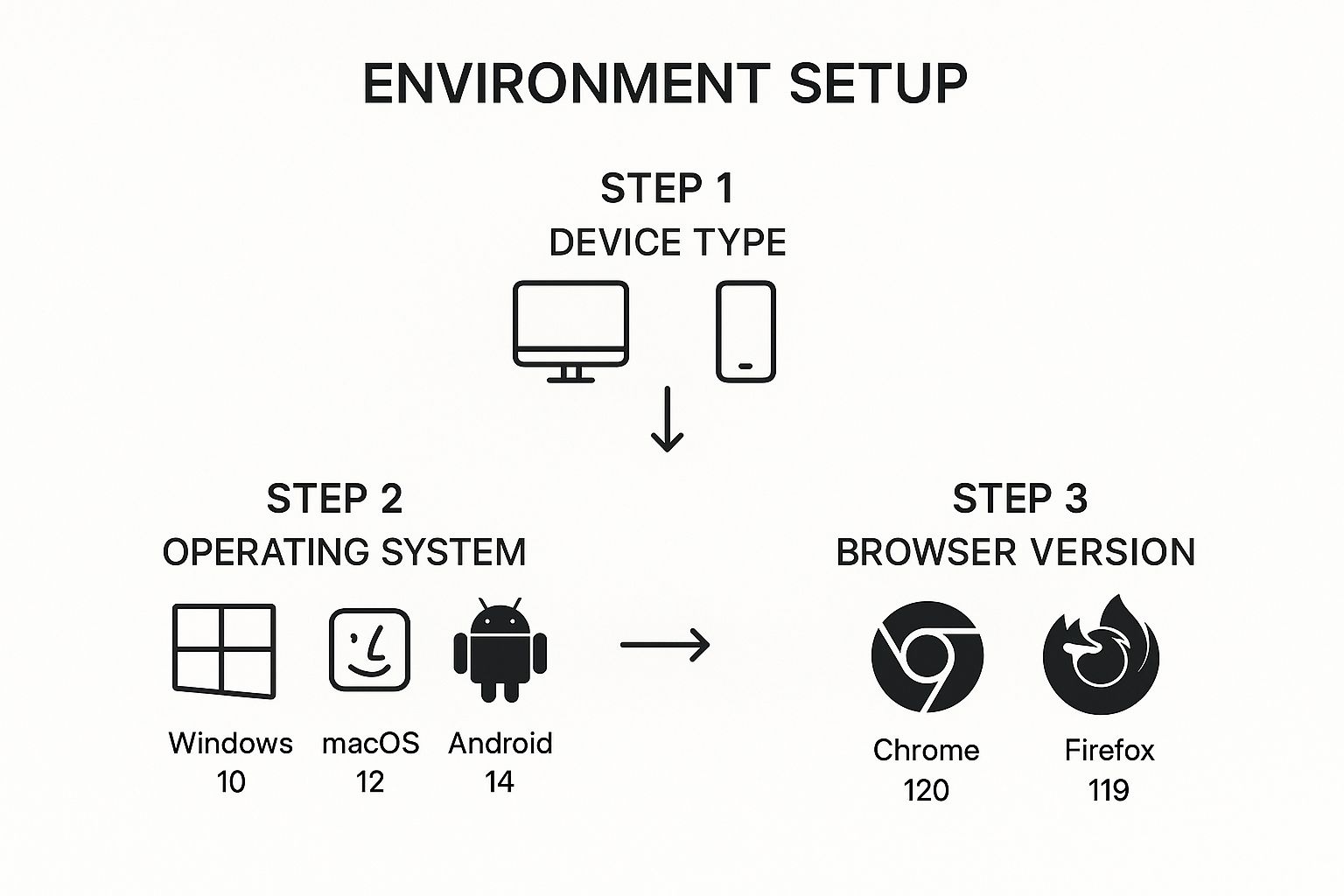
Starting with these details ensures the developer is recreating the exact same conditions you were in, which is absolutely critical for catching those tricky, environment-specific bugs.
Once you've listed your actions, the next crucial piece is framing the problem. This is where you show the developer the gap between what you expected and what actually happened.
The most powerful bug reports explicitly state the "Expected Result" versus the "Actual Result." This simple contrast immediately gets to the heart of the problem.
Don't just describe the issue; show the failure in black and white.
- Expected Result: "The 'Save Changes' button should become active and clickable after I enter text into the 'First Name' field."
- Actual Result: "The 'Save Changes' button remains greyed out and unclickable even after entering text into the 'First Name' field."
See? No ambiguity. The developer doesn't have to guess what you thought was supposed to happen.
Let's look at a mobile app example. Your report might look something like this:
- Open the app on an iPhone 14 running iOS 17.
- Tap on the 'Store' tab at the bottom of the screen.
- Add any three items to the cart.
- Tap the cart icon in the top right.
- Tap the 'X' icon next to the second item in the list.
Expected Result: The second item is removed from the cart, and the total price updates.
Actual Result: The app freezes for 5 seconds, then crashes and closes completely.
This is the kind of detail that turns a frustrating bug report into a fixed bug. It's the foundation of a report that gets results.
Providing Context with Environment Details
A bug that crashes an app on an old Android phone might work perfectly fine on a brand-new iPhone. Without knowing the specific environment where the bug happened, a developer is essentially flying blind. They can't see what you see, and that makes fixing the problem nearly impossible.
This is why a solid bug reporting format always includes context. Think of yourself as a detective gathering clues at a crime scene. A vague statement like "it doesn't work on the latest Chrome" doesn't help much because "latest" is a moving target. What's latest today is old news tomorrow. You need to provide the exact coordinates of the problem.

Getting this level of detail right from the start is a huge time-saver. In fact, providing specific environment data can slash the back-and-forth communication that often accounts for 15-20% of delays in getting a bug fixed. It's a small step that makes a massive difference.
Essential Details for Different Platforms
The exact information a developer needs will change depending on where you found the bug. Your goal is to give them a complete picture of the conditions that caused the issue to surface.
Here are the key details you should always try to include:
- For Web Apps: Specify the exact browser and version (e.g.,
Chrome 125.0.6422.112), your operating system (macOS 14.5), and even your screen resolution. - For Mobile Apps: Note the device model (
iPhone 15 Pro), the operating system version (iOS 17.5.1), and the specific app version (v2.3.4). - For Desktop Software: Include the OS and its version (
Windows 11 Pro, Version 23H2), the software version, and any relevant hardware specs like RAM or CPU if the bug seems related to performance.
Capturing the environment isn't just about filling in fields on a form. It's about building a precise replica of the crime scene so the developer can solve the mystery.
This meticulous approach is a cornerstone of effective issue tracking. For more tips on this, you can learn more about how to write good bug reports. By providing these specifics, you're not just flagging a problem; you're actively helping to solve it, saving everyone time and frustration. It’s the fastest way to get your issue from "reported" to "resolved."
Show, Don't Just Tell: Using Visuals and Logs
Sometimes, words just don't cut it. You can write paragraphs trying to describe a weird layout issue, but a single screenshot can explain it in a split second. This is where you can really help a developer see exactly what you're seeing.
But don't just send a plain screenshot. The best visual proof is annotated. A simple arrow pointing to a broken button or a box drawn around a misaligned element guides the developer’s eye right to the problem. It’s a core part of a good bug reporting format because it eliminates any guesswork.
Of course, static images have their limits. What if the bug only happens during an animation, or a drag-and-drop action fails halfway through? For issues involving movement or a sequence of steps, a screen recording is invaluable. It captures the dynamic nature of the bug in a way a picture never could.
Go Deeper with Technical Logs
Ready to give your developers a real gift? Go beyond the visuals and include technical logs from your browser. This is often where the "Aha!" moment happens for a developer. These logs can contain the exact error message that points to the root cause, turning what could have been a day of head-scratching into a quick fix.
You don't have to be a coder to do this. A quick keyboard shortcut can open your browser's console. Just look for any red text—that's usually a sign something went wrong—and copy-paste it into your report.
A bug report with a clear screenshot and a console log is a developer’s dream. It’s the perfect combination of visual context and hard evidence.
When you're digging for clues, keep an eye out for these:
- Console Logs: These track JavaScript errors happening in the background. Red text is your signal.
- Crash Reports: If the app or site completely crashes, it might generate a report file. Attaching that file can be incredibly helpful.
When you start including these elements, you're giving your development team everything they need to crush bugs efficiently. Some tools, like Screendesk, even capture this technical data for you automatically, making the whole process even simpler.
Why a Standardized Process Is a Game Changer
Inconsistency is the silent killer of an efficient development cycle. Think about it: when every bug report that lands on a developer's plate is formatted differently, they burn precious time just trying to decipher the problem. They're playing detective before they can even start fixing the code. This is where a single, team-wide bug reporting format becomes an absolute game changer.
This isn't some revolutionary new concept. It's the very foundation that tools like Jira and BugHerd were built on. Getting everyone to follow the same structure ensures all the critical details are captured, every single time. It seems like a small adjustment, but the positive ripple effect on your entire workflow is huge.
Boosting Speed and Clarity
When you standardize, you're not just creating a template; you're building a shared language between your QA team and your developers. It eliminates the guesswork and sets clear expectations for what a "complete" bug report actually is.
Take a look at how this plays out in a tool like BugHerd:

See how those structured fields—title, steps to reproduce, environment—leave no room for ambiguity? A developer can pick this up and immediately understand what’s wrong. That consistency is what streamlines bug triage, helps teams prioritize with confidence, and ultimately, lets you ship better software, faster.
The real magic of a standardized format is that it turns the chaos of bug reporting into a predictable, efficient workflow.
In fact, some studies have shown that teams using a structured reporting process can slash bug resolution times by as much as 30%. This is because the format forces everyone to provide the most important information right at the top.
Ultimately, this consistency saves time, cuts down on back-and-forth frustration, and frees up your team to focus on what they do best: building an amazing product. If you want to dive deeper into what these formats look like, our guide on bug report templates is a great place to start.
Answering Common Bug Reporting Questions
Even with the best template, you'll run into situations that feel a bit gray. Let's walk through a few common questions that pop up in the real world and how to handle them like a pro.
What If I Can’t Reproduce the Bug Every Time?
Ah, the intermittent bug. They're a developer's nightmare but crucial to report. The most important thing here is honesty.
State right upfront that the bug is inconsistent and you can't make it happen on demand. Then, do your best to describe the circumstances when it did happen. What were you doing? What else was running? Even if you think a detail is irrelevant, mention it.
When it comes to intermittent bugs, a single screenshot, screen recording, or console log from that one time it happened can be the only clue a developer has. This evidence is gold for hunting down those elusive issues.
How Do I Decide a Bug's Severity vs. Its Priority?
This is a classic point of confusion, but the distinction is actually pretty straightforward once you get it.
-
Severity is all about the technical impact. Think of it as how badly the bug breaks the software. A full system crash? That’s Critical severity. A minor typo in the footer? That's Low severity.
-
Priority is about the business urgency. It answers the question, "How quickly does this need to be fixed for our goals?"
Here's a real-world example: A small typo on the checkout page is a low-severity issue technically. But if your company is launching a massive marketing campaign tomorrow that points everyone to that page, fixing that typo becomes a High priority. Understanding both helps the development team plan their work much more effectively.
Should I Report Multiple Bugs in One Ticket?
This is an easy one: No.
It might seem efficient to lump a few related issues together, but it creates a logistical mess. Stick to the golden rule: one bug per report.
When you create a single ticket for a single issue, a developer can focus, track their progress clearly, and close the ticket when that one problem is solved. This keeps the entire workflow clean, manageable, and ultimately faster for everyone involved.
Stop the frustrating back-and-forth. Screendesk automatically captures screen recordings, console logs, and all the technical details developers need, turning any bug report into an actionable solution. See how much time you can save by visiting https://screendesk.io.
