


To really get team collaboration right, you have to nail three things: clear communication systems, the right digital tools, and a culture of psychological safety. This is what transforms a group of individuals working on their own islands into a cohesive unit that can solve problems and come up with brilliant ideas together.
Why Strong Team Collaboration Matters More Than Ever
Let's cut through the corporate-speak. At its core, great team collaboration is what makes a business tick. It’s the secret sauce that separates projects that limp across the finish line—riddled with rework and confusion—from those that sail smoothly from one milestone to the next.
When people truly collaborate, they do more than just work alongside each other. They amplify each other's strengths, spot potential issues before they become disasters, and crack tough problems much faster than anyone could alone.
This synergy isn't just some fluffy, feel-good perk; it's a critical driver of your bottom line and your ability to hang on to great people. A team that isn't connected ends up duplicating work, missing golden opportunities, and breeding frustration. On the flip side, a truly collaborative atmosphere builds a powerful sense of shared purpose and real accomplishment.
The Business Case for Better Collaboration
The numbers don't lie. Research shows that highly engaged teams—which are almost always the most collaborative ones—drive about 23% higher profitability. The same study found that teams with low engagement see 51% higher employee turnover, a massive and expensive headache for any company. Simple things like regular check-ins and making sure everyone feels included can make a world of difference for performance and well-being. You can find more stats on this over at Archieapp.co.
Ultimately, putting effort into how your teams work together is an investment in your company's resilience. It's what allows you to pivot when the market shifts, innovate consistently, and build a culture where people feel valued and empowered.
Collaboration is more than just a process; it's a cultural mindset. It’s about creating an environment where shared goals are prioritized over individual agendas, and open dialogue is the default, not the exception.
Foundational Pillars of Collaboration
Before we get into the specific "how-tos," it helps to understand the fundamental principles that every high-performing team is built on. Think of these as the bedrock of great teamwork. The table below breaks down these core pillars.
| Pillar | Key Action | Expected Outcome |
|---|---|---|
| Shared Understanding | Clearly define project goals, individual roles, and success metrics for everyone. | Everyone is aligned, knows what to do, and understands how their work fits in. |
| Open Communication | Establish channels for transparent feedback and regular, honest dialogue. | Misunderstandings are minimized, and problems are solved quickly and efficiently. |
| Mutual Trust | Cultivate an environment where it's safe to take risks and admit mistakes. | Team members feel secure enough to innovate, ask for help, and support each other. |
These aren't just abstract concepts; they are the active ingredients for building a team that truly clicks and gets things done.
-
Shared Understanding: It sounds simple, but you’d be surprised how often it's missed. Everyone on the team needs a crystal-clear picture of the end goal, their specific responsibilities, and how their piece of the puzzle contributes to the bigger picture.
-
Open Communication: You have to create ways for people to give honest, constructive feedback. It’s non-negotiable. Building solid communication skills is the essential first step to stopping small misunderstandings from turning into major roadblocks. If you need some ideas, check out our guide on how to improve team communication.
-
Mutual Trust: This might be the most important one. Team members have to feel safe enough to toss out a wild idea, ask for help when they're stuck, or even admit they messed up without fearing they'll be thrown under the bus. This psychological safety is the glue that holds it all together.
Build a Communication System That Actually Works

Miscommunication is a silent killer of productivity. I’ve seen it happen time and again: projects stall, deadlines are missed, and frustration mounts, all because nobody is on the same page. In fact, a staggering 86% of employees point to poor communication or a lack of collaboration as the root cause of workplace failures.
Without a clear game plan, your team is left wading through a flood of notifications, hunting down missed messages, and constantly guessing where to find crucial information. It’s a recipe for chaos. The key is to stop the madness before it starts.
The most effective way I've found to do this is by creating a team communication charter. This isn't some rigid corporate policy handbook. Think of it as a simple, powerful agreement that sets clear rules of engagement for how your team talks to each other. It’s about building a system that respects everyone's time and focus by deciding which channels to use for what.
Give Every Message a Home
First things first, you need to map out your communication channels. Take a look at all the tools your team currently uses and give each one a specific job. The goal is to create a predictable system where everyone knows exactly where to post a message and where to look for an answer.
For instance, a marketing team's charter might break it down like this:
- Slack: This is for urgent, time-sensitive questions only—the kind of thing that’s blocking you from moving forward. It’s the digital equivalent of tapping someone on the shoulder.
- Email: Reserve this for formal, external communication with clients or for official company-wide announcements that need to be documented.
- Asana: This is the single source of truth for projects. All updates, feedback, and task-related questions live here, directly tied to the work itself.
- Screendesk: Perfect for creating quick video walkthroughs to explain a complex workflow or to record a bug report. It beats writing a novel-length email every time.
This simple act of assigning roles to your tools immediately clears up confusion. No more digging through old email threads for a task update or getting sidetracked by a "quick question" on Slack that wasn't actually urgent.
Set Clear Expectations for Response Times
One of the biggest sources of workplace anxiety today is the unspoken pressure to be "always on." Your communication charter needs to tackle this head-on by setting reasonable expectations for how quickly people need to reply. This is especially critical for teams working across different time zones.
A communication charter isn’t about controlling conversations. It's about creating a system that frees your team from the constant pressure of notifications, allowing for deeper, more focused work.
When you clarify these norms, you give your team permission to disconnect. It helps prevent burnout, encourages a healthier work-life balance, and lets people sign off without worrying that they’re letting someone down.
Here’s a practical way to lay it all out:
| Channel | Expected Response Time | What It's Used For |
|---|---|---|
| Slack | 2-4 business hours | Quick questions and rapid-fire feedback. |
| 24 business hours | Non-urgent, formal messages. | |
| Asana | By end of workday | All comments and updates on project tasks. |
This kind of structure builds a foundation of mutual respect for everyone’s schedule. It shows your team you trust them to manage their time, which is the cornerstone of any truly collaborative culture. When communication is predictable and reliable, everyone can operate with more confidence and way less friction.
Choose Your Collaboration Tools Wisely
Picking the right technology isn't about chasing the latest shiny app. It's about finding tools that actually fit how your team works. I've seen it happen time and again: a poorly chosen tool doesn't just sit there unused—it actively creates friction, complicates simple tasks, and can torpedo the very collaboration it was meant to foster. The goal is to build a lean, integrated tech stack that makes working together feel effortless, not like a chore.
Before you even think about new subscriptions, start with a quick audit of your current process. Seriously, map out your team's core workflows from start to finish. Where do things slow down? Are people constantly hopping between apps just to find a single piece of information? This simple exercise will show you the real gaps, pointing you toward tools that solve actual problems.
Aligning Tools With Team Needs
The best tech stack is one that feels almost invisible. It should support your team's natural rhythm, not force them into a clunky, unnatural process.
When you're looking at different options, keep these key things in mind:
- Integration: How well does this new tool play with the software you already live in every day? A project management app that talks to your chat and file-sharing platforms creates one unified hub, which means less time wasted switching between tabs.
- Ease of Use: If a tool needs a week-long training course, your team will resist it. Look for intuitive interfaces that people can pick up and run with.
- Scalability: Will this tool grow with your company? A solution that's great for a five-person team should be just as effective when you hit fifty.
For teams invested in the Microsoft ecosystem, a detailed Microsoft Teams Success Guide can be invaluable for unlocking its full communication and teamwork potential.
The right tools can make a huge difference, leading to real, measurable wins in efficiency, fewer team conflicts, and faster project delivery.
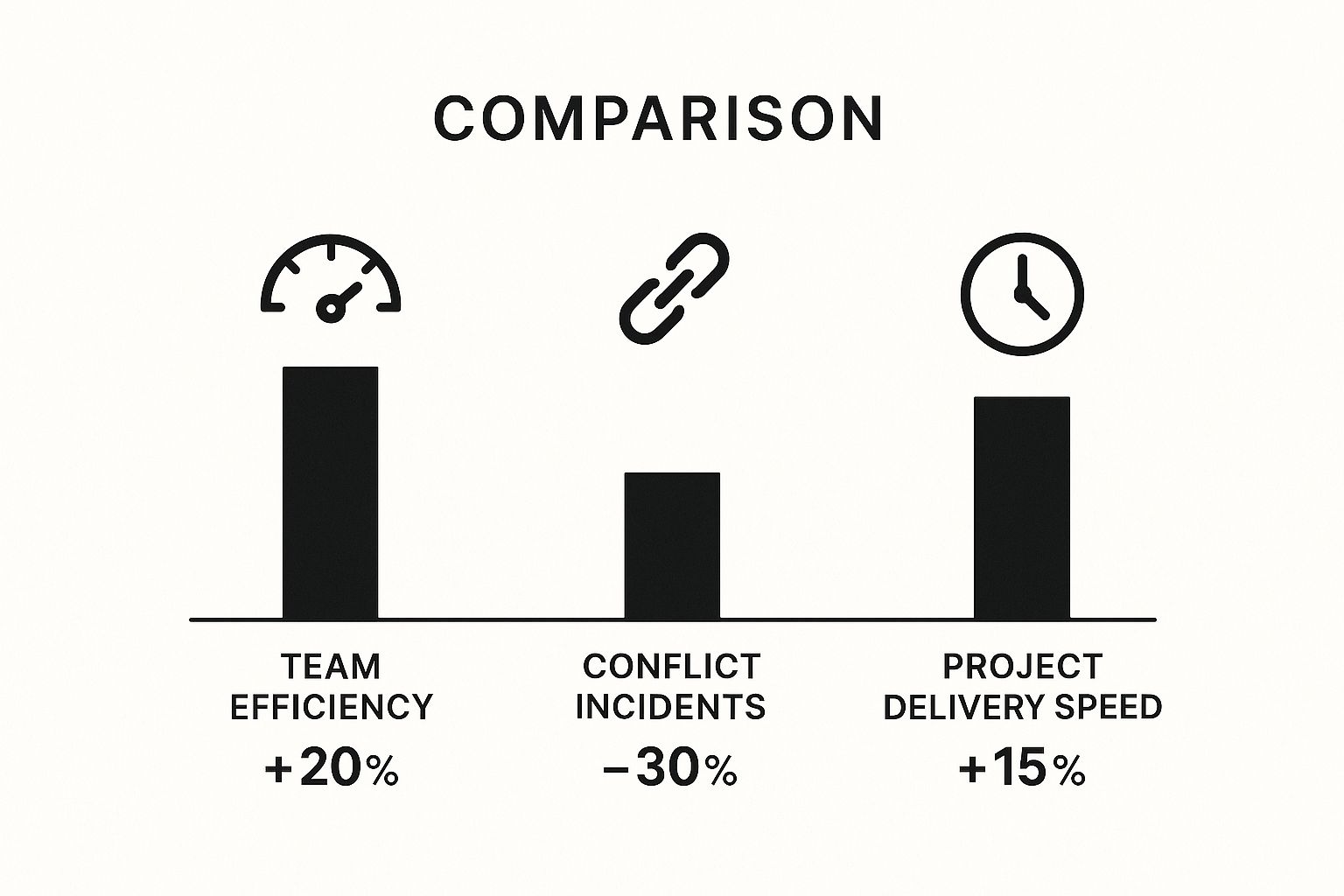
As you can see, a well-chosen tech stack isn't just an operational cost—it's a strategic investment that directly boosts your team's performance.
Selecting Your Collaboration Tech Stack
Choosing the right mix of tools can feel overwhelming. This table breaks down the main categories to help you decide what your team truly needs to thrive.
| Tool Category | When to Use It | Top Examples | Key Feature to Look For |
|---|---|---|---|
| Real-Time Chat | For quick questions, daily updates, and informal team bonding. The digital water cooler. | Slack, Microsoft Teams | Threaded conversations and robust notification controls to reduce noise. |
| Project Management | For organizing tasks, tracking progress on complex projects, and managing deadlines. | Asana, Trello, Monday.com | Customizable workflows and multiple project views (Kanban, Gantt, list). |
| Video Conferencing | For face-to-face meetings, team syncs, and detailed presentations with remote colleagues. | Zoom, Google Meet | High-quality video/audio, screen sharing, and recording capabilities. |
| Shared Documents | For co-creating documents, spreadsheets, and presentations in real time. | Google Workspace, Microsoft 365 | Version history and comment/suggestion features for seamless feedback. |
| Async Video | For walkthroughs, status updates, and feedback that don't require a live meeting. | Loom, Vidyard | Screen recording with webcam overlay and easy sharing via a link. |
Ultimately, the goal is to create a seamless environment where information flows freely between the tools your team relies on most.
The Real-World Impact of Modern Tools
The role technology plays in teamwork is undeniable. One survey found that 75% of leaders saw better collaboration after their teams started using AI-powered tools. But there's a flip side. The same research showed 30% of employees felt communication actually got harder, which pushed 75% of workers to find their own tools to bridge the gaps.
I saw this firsthand at a mid-sized design agency. They were a mess—tasks were in one app, files were in another, and client feedback was buried in endless email chains. By moving everything to a single, integrated platform, they didn't just cut their software costs by 40%; they shaved an entire week off their project revision cycles.
This drives home a critical point: the goal is tool consolidation, not accumulation. Fewer, better-connected tools reduce the mental load and let your team focus on their actual work, not on wrestling with software.
Create a Culture of Psychological Safety

You can have the fanciest tools and a perfectly crafted communication plan, but none of it will make a dent if your team is afraid to speak up. The real engine of collaboration is people, and that engine runs on psychological safety.
It’s that shared feeling in a room that you can take a risk—that you can ask a supposedly "dumb" question, challenge an idea everyone else loves, or just admit you don't know something.
Without this trust, you get silence. People swallow brilliant but off-the-wall ideas because they don't want to look foolish. Small mistakes get swept under the rug until they grow into huge problems. In a climate of fear, real collaboration just withers on the vine.
Leaders Have to Go First
Building this kind of safety has to start at the top. As a leader, you're the one setting the tone. If you're always projecting an image of perfection, never admitting you're wrong or unsure, you're sending a very clear signal: mistakes aren't welcome here.
The single most effective thing you can do is model a little vulnerability yourself.
- Own your mistakes. Kick off a meeting by saying something like, "You know, I was totally wrong about the timeline for that last project, and here’s what I learned from that." It instantly makes it okay for everyone else to be human, too.
- Admit what you don't know. Instead of faking it, try, "That's a great question. I honestly don't have the answer right now, but I'll find out."
- Actively ask for feedback. Don't just hope someone gives it to you. Ask directly: "What could I have done better in that client meeting?" And then, just listen. No defending.
True collaboration thrives not when everyone has the right answers, but when everyone feels safe enough to search for them together. It’s about celebrating the process of figuring things out, not just the final result.
Run Meetings That Invite Every Voice
Meetings are where psychological safety is often won or lost. It's so easy for one or two dominant personalities to hijack the conversation, leaving others feeling like their input isn't valued. If you want to get your teams working together better, you have to be deliberate about making space for everyone.
A simple but powerful technique I’ve seen work wonders is the round-robin brainstorm. Instead of a chaotic free-for-all, just go around the virtual room and give each person a minute or two to share their thoughts, completely uninterrupted. This guarantees your quieter, more reflective team members get a dedicated slot to contribute without having to fight for airtime.
Practices like this have a real impact. A Deloitte study found that 73% of employees in collaborative teams reported better performance, and 60% said it boosted their creativity. When people feel their voice is genuinely wanted, they bring their best thinking to the table.
Reframe Failure as a Chance to Learn
The way your team reacts to failure is a huge tell. If a new campaign flops and the immediate reaction is to find someone to blame, you’ve just taught everyone a very clear lesson: don't take risks.
Instead, you have to build a culture that sees the value in "intelligent failures." These are the thoughtful experiments that teach you something important, even when they don't work out. When a project goes sideways, hold a blameless post-mortem. The conversation shouldn't be about who messed up, but what we can learn to make our process stronger next time.
Making It Work Across Continents and Time Zones

When your team is spread out across the globe, the old playbook for collaboration goes right out the window. Suddenly, you're juggling different time zones, cultures, and communication styles, which requires a much more deliberate game plan. It's not just about having the right software anymore; it's about creating a smart strategy for working asynchronously and building real team cohesion from a distance.
And this shift to global teams isn't just a trend; it's happening at lightning speed. A recent survey found that 59% of employees who work with international colleagues only started doing so in the last two years.
So, what are the biggest headaches? The top culprits are unpredictable work hours (44%), language barriers (42%), and cultural misunderstandings (33%). If you want to dive deeper into these challenges, the full research on CSM.tech is worth a read.
Getting a Grip on Time Zones and Cultures
Let's start with the basics: scheduling. Trying to find a meeting time that doesn't force someone in another hemisphere to join at 11 PM is more than just polite—it's a fundamental sign of respect. Use a time zone visualization tool to find those precious few overlapping hours. Better yet, make live meetings the exception, not the default.
This is where asynchronous work becomes your superpower. Everything important—decisions, action items, feedback—needs to be written down and shared in a central place. This keeps everyone in the loop, no matter when they log on, and it also builds an invaluable knowledge base for the whole team. For more on this, check out these best practices for remote teams.
Empathy is your most valuable currency on a global team. Always assume positive intent. Before you hit send, take a second to think about how your message might land with someone from a different cultural background.
You also have to be intentional about building personal connections. Kick off meetings with a few minutes of casual, non-work chat. Set up a dedicated Slack channel for sharing hobbies or weekend plans. And turn on your camera! Seeing faces helps you pick up on all those non-verbal cues you miss in a text-only world. Mastering https://blog.screendesk.io/8-visual-support-strategies/ can be a game-changer here, cutting down on confusion and making communication much clearer.
Try Creating a "Team User Manual"
One of the most effective things I’ve ever seen a remote team do is create a team user manual. It’s a surprisingly simple document where each person answers a handful of questions about how they work best.
It's a cheat sheet for understanding your colleagues. Here are a few prompts to get you started:
- My typical working hours are… (and please, include the time zone!)
- For something urgent, the best way to reach me is… (e.g., Slack DM, text message)
- I prefer to get feedback via… (e.g., live on a call, in written comments)
- You'll know I'm in deep focus mode when… (e.g., my Slack status is a brain emoji)
- Something you might not know about me is…
This little exercise is pure gold. It builds empathy from day one, sets clear expectations, and smooths over all the little points of friction that can trip up a remote team.
Measure and Refine Your Collaboration Efforts
Improving how your team collaborates isn't a one-and-done project. It's a living process. You have to keep a finger on the pulse to see what’s working, what isn’t, and where you need to adjust course. After all, you can't fix what you don't measure.
The easiest way to get started is by simply asking your team for honest insights. This doesn't need to be a huge production. Short, anonymous pulse surveys sent out quarterly can give you a surprisingly accurate snapshot of your team’s collaborative health.
These surveys create a safe space for people to share what they’re really thinking without worrying about judgment. This is how you turn vague feelings into real data, helping you focus your energy where it’ll actually make a difference.
Running a Collaboration Health Check
To make this feedback more concrete, think about creating a quick "collaboration health check" with a few targeted questions. This gives you a baseline to track your progress over time. The goal here is to spot the friction points before they grow into major roadblocks.
Here are a few questions you can adapt for your next pulse survey:
- On a scale of 1-10, how easy is it to get the information you need from other team members to do your job?
- Do you feel our current tools help or hinder our ability to work together effectively? Please explain why.
- Do you feel comfortable sharing a different opinion or flagging a potential mistake during team meetings?
This kind of direct feedback is gold. It’s the same way product teams refine their user experience—you have to understand the user’s journey. For a closer look at applying these ideas, our guide on how to improve the customer onboarding process offers some great parallel insights.
"You have to have people who are flexible in their outlook, and they’ve got to communicate. [Organizations must be] very clear as to what you've done, what is working, and what is not working."
Beyond surveys, don't forget the power of project retrospectives. When you wrap up a big project, get the team together to talk about what went well and what could have gone better. This bakes learning and refinement right into your team’s workflow, turning every project into a lesson in better teamwork.
Even when you've got a solid collaboration plan, some tricky situations are bound to come up. Let's dig into a few of the questions I hear most often from leaders trying to get their teams working better together.
How Do We Handle Disagreements Without Hurting Team Morale?
It's a classic problem. First things first, we need to reframe conflict. A good debate isn't a bad thing; it's often where the best ideas come from. The trick is to build a culture of constructive disagreement.
Encourage your team to challenge ideas, not people. It’s all about creating a safe space for honest feedback that focuses on the work itself. When things get heated, a manager should step in, not to pick a side, but to mediate. The goal is to steer the conversation back to finding the best outcome for the project, not figuring out who "wins" the argument.
What’s The Best Way To Collaborate Across Different Time Zones?
This one’s simple: embrace asynchronous communication. You can't rely on everyone being online at the same time, so detailed documentation and clear handoffs are non-negotiable.
Tools that let people contribute on their own schedule are lifesavers. Think video messaging instead of another meeting request. It's a fantastic way to walk someone through a complex update without having to find a time that works for both of you.
By 2025, work environments have become increasingly complex with teamwork spanning multiple time zones, tools, and even partnerships involving AI.
And this isn't a niche issue. Research shows that nearly 30% of meetings now include people from different time zones. That’s a huge number, and it really drives home the need for more flexible ways of working. You can find more data on global collaboration trends on Archieapp.co.
Do We Really Need All These Collaboration Tools?
Honestly? Probably not. We've all felt the pain of "tool fatigue." Having too many apps can actually make things worse, not better. The idea is to build an integrated, streamlined system, not just keep adding new software to the mix.
Make a habit of auditing your tech stack. Get direct feedback from your team—they're the ones using this stuff every day. If a tool isn’t making someone’s job demonstrably easier, it might be time to let it go. Sometimes, a simpler, more focused toolkit is the most effective one.
Ready to make collaboration seamless? Screendesk provides the video tools your support team needs to resolve issues faster and communicate with clarity. Ditch the endless text threads and see how visual communication can transform your workflow at https://screendesk.io.
