


Ever had a phone call where you wished you could just see the other person?That’s exactly what video calling does. It’s a technology that transmits live video and audio over the internet, turning a standard phone call into a face-to-face conversation. It closes the gap between physical distances, letting you connect with people on smartphones, tablets, or computers as if you were in the same room.
What Is Video Calling in Simple Terms?
Forget the complex tech for a moment. Think of video calling as opening a digital window into someone else's world. You’re not just hearing a voice; you’re seeing their facial expressions, catching their body language, and sharing a moment together. This simple shift transforms a basic audio call into a personal, engaging, and genuinely human interaction.
It’s the technology that lets grandparents watch their grandkids open birthday presents from miles away. It’s also what allows a global team to brainstorm and collaborate on a project without ever setting foot in the same office. Video calling has become a cornerstone of how we connect, both personally and professionally.

The Essential Components
To get a video call up and running, you only need a few key ingredients. These pieces work together behind the scenes to create the smooth experience we’ve all come to expect.
- A Capable Device: This is your portal—a smartphone, laptop, tablet, or desktop computer with a camera and microphone.
- A Stable Internet Connection: Think of this as the highway for your conversation. A reliable connection is crucial for carrying all the video and audio data back and forth.
- Video Calling Software: You need an app or platform to make the magic happen. This could be a well-known tool like Zoom or Microsoft Teams, or a specialized solution like Screendesk.
When you start a call, these elements work in concert to capture, send, and receive tiny packets of data. Your device then reassembles them on your screen so quickly that it all feels like one seamless, real-time conversation.
At its heart, what is video calling? It's the simple act of using technology to restore the most fundamental element of communication—seeing the person you’re talking to. This visual context adds layers of meaning that audio alone can’t convey.
To really nail down the basics, here’s a quick summary of what makes video calling tick.
Video Calling at a Glance
This table breaks down the fundamental components and purpose of video calling into simple terms.
| Component | Description |
|---|---|
| Real-Time Video | A live visual feed sent from one device to another, letting you see everyone as they speak. |
| Simultaneous Audio | Voice communication that’s perfectly synced with the video, keeping the conversation natural. |
| Internet-Based | It runs entirely on an internet connection (like Wi-Fi or cellular data), not old-school phone lines. |
| Two-Way Interaction | Everyone can see and hear each other, which allows for a dynamic, interactive conversation. |
In short, it’s all about creating a shared space online where people can communicate more completely.
How Video Calling Actually Works
Ever wondered what’s really going on behind the scenes when you hop on a video call? It’s not magic, but it’s an incredibly fast and elegant process that zips your voice and face across the globe in a fraction of a second. The whole thing kicks off the moment you click "join."
First, your device's camera and microphone capture the light and sound around you. They translate this into raw digital information—a massive, continuous stream of ones and zeros. Trying to send all that raw data over the internet would be like trying to fit a river through a garden hose. It’s just too much.
That’s where compression comes in.
From Your Screen to Theirs
To get the data down to a manageable size, video call software uses something called a codec (short for coder-decoder). A codec’s job is to intelligently shrink your video and audio files without making them look or sound terrible. It’s smart enough to remove redundant data, like a background that isn’t moving.
Once the data is compressed, it’s chopped up into tiny digital packets.
You can think of these packets like a massive fleet of delivery trucks. Each one carries a tiny piece of the conversation, and they all race across the internet to get to their destination. When they arrive, the device on the other end uses the same codec to put them back together in the right order, recreating your face and voice on their screen.
This entire round-trip journey—capturing, compressing, sending, receiving, and decompressing—happens dozens of times every single second. It's this incredible speed that creates the illusion of a smooth, real-time conversation.
The infographic below walks through some of the key moments that took this technology from a sci-fi concept to an everyday tool.
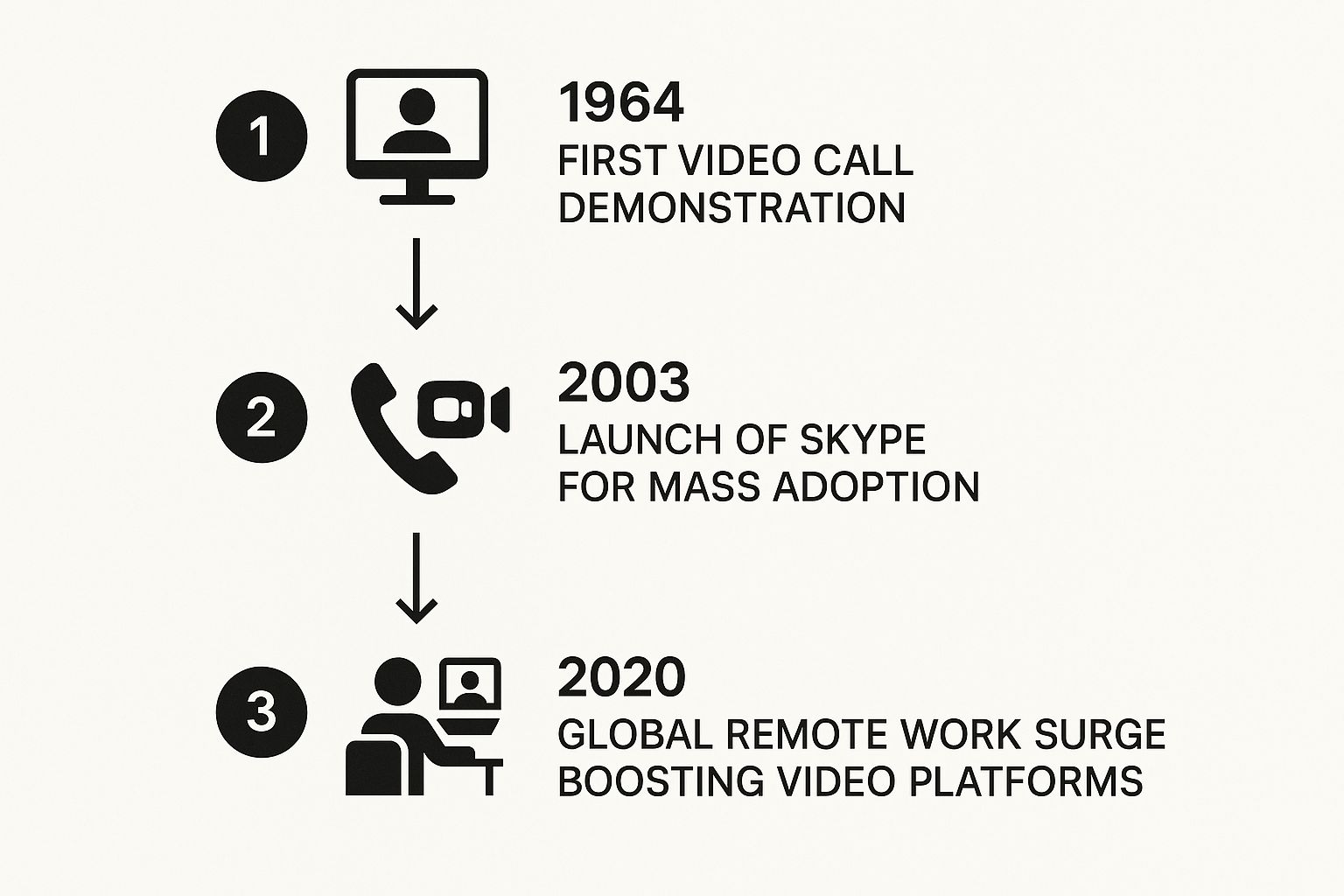
This visual timeline really highlights how a few foundational breakthroughs, followed by widespread access and major world events, paved the way for the modern video call we all know.
The Role of Your Internet Connection
Of course, how well this whole process works depends almost entirely on your internet connection. Two main factors make or break the quality of your call:
- Bandwidth: Think of this as the number of lanes on the digital highway your data packets are traveling on. More bandwidth means more data can travel at once, giving you a clearer picture and crisper audio.
- Latency: This is the time it takes for a single packet to get from your device to the other person's. High latency is what causes that annoying lag or delay where you speak, and there's a pause before they hear you.
For a good video call, network performance is everything. Learning how to test network latency accurately can help you pinpoint issues and get the most out of your connection. At the end of the day, a strong connection ensures those little data packets arrive on time and in order, making your conversation feel as natural as being in the same room.
The Rise of Video as an Essential Tool
Video calling wasn't always a feature we carried in our pockets. For a long time, it felt more like science fiction than a practical reality. Early attempts were clunky, expensive, and mostly hidden away in research labs, a far cry from the seamless experience we know today. The idea was always there, but the technology just hadn't caught up.
Everything started to shift with a couple of game-changing developments. First, high-speed internet gave us the bandwidth to send and receive huge amounts of video data. At the same time, powerful smartphones put a high-quality camera and microphone into almost everyone's hands. Suddenly, the perfect storm for video calling was brewing.

From Novelty to Necessity
The final piece of the puzzle was user-friendly software. When platforms made video calling as easy as tapping a button, the last technical barrier came crashing down. What started as a fun way to catch up with family across the country quickly became a tool we couldn't live without.
Of course, the massive shift to remote work supercharged this trend. Businesses everywhere needed a way to keep their teams connected and their company culture alive. Video calling stepped up, becoming the virtual boardroom, the brainstorming session, and the digital water cooler for millions.
This wasn't just a minor adjustment; it was a fundamental change in how we communicate. Video calling officially graduated from a "nice-to-have" feature to an essential part of our business and social lives.
The numbers back this up. The global video conferencing market, valued at $8.88 billion, was on track to jump to $9.99 billion the next year, largely thanks to the demand for better remote work solutions. This boom wasn't just about virtual meetings; it changed everything from customer support and telehealth to global collaboration.
Reshaping How We Connect
Today, video is a primary way we communicate. It connects families across oceans, lets support agents see a problem firsthand, and allows companies to build teams with talent from all over the world. As video solidifies its role, it’s also important to consider other essential remote work communication tools that help keep distributed teams in sync. The journey from a futuristic dream to an everyday tool is complete, and it has permanently changed the way we work and live.
Why Video Calling Is a Game Changer for Support

In customer support, clarity is everything. For years, teams have been stuck relying on phone calls and endless email chains, trying to decipher a customer’s problem from a fuzzy description. This back-and-forth is often a recipe for frustration and wasted time on both sides. But what if your agent could see the problem with their own eyes, right as it's happening?
This is the moment when understanding what is video calling goes from a simple idea to a serious business tool. It completely changes customer support from a frustrating guessing game into a real, collaborative problem-solving session. By adding that visual element, agents can diagnose issues in seconds, see the exact error message, and guide customers with absolute precision.
The effect is instant. Instead of asking a customer to "describe what you see on your screen," an agent just sees it. This shared visual context cuts down resolution times and practically eliminates the chance of a misunderstanding. The result is a much smoother, more effective support experience for everyone.
Faster Resolutions and Happier Customers
One of the biggest wins you get with video is a major spike in your First Contact Resolution (FCR) rate. When an agent can nail down and solve a problem on the very first try, customer satisfaction goes through the roof. Video calling makes this happen by giving agents all the visual clues they need to get to the heart of an issue right away.
Think about a classic support headache: a customer is stuck during a software installation. Over the phone, an agent could easily spend twenty minutes just trying to figure out which step the customer is on. With a quick video call, the agent can see their screen and say, "Oh, I see it. Just click that little checkbox on the left."
A problem that might have taken half an hour of back-and-forth is suddenly fixed in minutes. That kind of efficiency doesn't just save your company time and money—it leaves the customer feeling understood and genuinely impressed.
That's how you build a level of trust that you just can't get through text or a phone call.
Building a Human Connection
Beyond just solving problems faster, video calling brings a much-needed human touch back to customer support. Seeing a friendly face and a real expression builds empathy and trust, turning what could be a dry, transactional exchange into a positive, personal connection. This is a big deal for a few reasons:
- It De-escalates Tension: When a frustrated customer can see an agent is focused and actively working to help them, it can immediately cool down a tense situation.
- It Fosters Empathy: Agents are able to pick up on non-verbal cues, helping them adjust their tone and provide more compassionate, personalized service.
- It Strengthens Brand Loyalty: A great face-to-face interaction sticks with people. In fact, it makes customers 68% more likely to stick with a brand.
At the end of the day, video calling gives your support team the power to be more than just troubleshooters. It lets them become relationship-builders, creating memorable experiences that turn happy customers into your biggest fans.
Enhancing Customer Support with Screendesk
Generic video calling apps are great for a chat, but they just weren't built for the unique pressures of a customer support team. They lack the specific tools needed to guide a confused customer through a tricky problem. This is where a purpose-built platform like Screendesk comes in, transforming a standard video call into a powerful, hands-on troubleshooting session.
Screendesk isn't just another video tool; it's a complete customer engagement platform designed from the ground up for support. It takes the human connection of video and combines it with specialized features that make an agent's job easier and a customer's experience a whole lot smoother.
More Than Just a Video Call
The real magic of Screendesk is in the details—features created specifically for a support agent's daily grind. It’s not about just seeing a customer's face; it's about creating a shared, interactive space where you can solve problems together, and fast.
Here are a few key features that make this happen:
- Instant, No-Download Calls: Customers can join a call with one click, right from a chat or email. No downloads, no sign-ups, no friction. You get straight to the solution.
- Interactive Screen Sharing: Forget just watching. Agents can actually take control, click, and navigate on the customer's screen to show them exactly what to do.
- On-Screen Annotation Tools: Need to point something out? Agents can draw, highlight, or circle specific areas on the screen. This simple visual cue cuts through the confusion of "which button do I click?"
These tools aren't gimmicks; they're designed to bring absolute clarity to the conversation. A support session stops being about trying to describe a problem and starts being about fixing it together, right then and there.
By combining video, screen sharing, and interactive tools, Screendesk turns a potentially confusing conversation into a clear, actionable support experience. This shift helps boost first-contact resolution and dramatically improves customer satisfaction.
A Seamless and Integrated Workflow
One of the best parts is how neatly Screendesk fits into the tools your team already relies on. It’s designed to launch directly from helpdesks like Zendesk or Intercom. That means no more clunky app-switching or asking a customer to open a separate program.
This integrated approach keeps the entire conversation in one place, creating a fluid journey from start to finish. To get a better feel for how teams are using this, check out our guide on video customer support.
Ultimately, Screendesk gives your agents the power to deliver faster, more effective, and more personal support, turning every interaction into a positive experience that builds real customer loyalty.
The Future of Video Communication
Video communication is evolving at a breakneck pace. The next big leap isn't just about clearer video; it's about making our digital conversations smarter and more seamless than ever before. A huge part of this is the rollout of 5G networks, which promises to kill lag and bring crystal-clear HD video to our phones and tablets without a hitch.
This super-fast connectivity is laying the groundwork for some seriously intelligent applications. It's no surprise that the video conferencing market is expected to hit $12.32 billion, growing at 11.3% each year for the next four years. With 5G set to cover about 65% of the world, flawless video calls are about to become the new normal. You can dig into more of the numbers behind this growth over on Research and Markets.
The Rise of AI in Video Calling
This is where things get really interesting. Artificial intelligence (AI) is set to completely change what a video call can do. Instead of just being a window to another person, video platforms will start to understand the conversation and actively help out.
Think about what this could look like:
- Real-Time Language Translation: You could chat with a customer in another country, each speaking your own language, with instant subtitles making the conversation flow naturally.
- Automated Summaries: Imagine finishing a long support call and getting an instant, neatly summarized list of the main points and action items. No more frantic note-taking.
- Sentiment Analysis: An AI could give a support agent a quiet heads-up if a customer is getting frustrated, allowing them to shift their approach on the fly.
The future of video calling isn't just about better picture quality; it's about creating conversations that are more productive, accessible, and insightful.
This blend of AI and video will also make looking back at past conversations incredibly easy. For any team that needs to keep a record of their calls, knowing how to record a video call becomes a superpower when you can also get AI-powered summaries and analysis.
These smart features turn a simple video stream into a goldmine of useful information. Every call becomes a chance to learn, improve, and understand your customers on a much deeper level. The future is truly interactive.
Frequently Asked Questions About Video Calling
Even though video calling is pretty much second nature for most of us now, a few questions still come up all the time. Whether you're wondering about the tech behind it or how to keep your calls private, getting good answers is key. Let’s clear up some of the most common ones.
Is Video Calling Secure?
This is a big one, and for good reason. The short answer is: it really depends on the service you're using.
Most of the big names in video calling use what’s called end-to-end encryption. Think of it like sending a letter in a locked box where only you and the recipient have the key. Your conversation gets scrambled into a secret code that nobody else can decipher, not even the company that runs the service. That's the gold standard for security.
Of course, security is also in your hands. Simple things like using strong, unique passwords and being wary of suspicious links go a long way. If you’re using video for work, stick with platforms that are transparent about their security and privacy policies.
How Much Data Does a Video Call Use?
Data usage can be a bit of a moving target. As a rough guide, a standard one-on-one call will probably eat up about 500 MB per hour. Kick that up to a high-definition (HD) group call, and you could be looking at over 1.5 GB per hour.
If you're keeping an eye on your mobile data, most apps have a setting to lower the video quality, which will definitely help.
The bottom line is, better video quality means more data. If you don't want to worry about hitting your data cap, connecting to Wi-Fi is always the safest bet for a long and clear chat.
What Is the Difference Between Video Calling and Video Conferencing?
People often use these terms interchangeably, but there's a small distinction that's actually pretty useful.
Video calling is what you do when you ring up a friend or have a quick chat with a couple of colleagues. It's usually one-on-one, informal, and more like a regular phone call with a face attached.
Video conferencing, on the other hand, is built for business and bigger groups. These platforms are packed with features like screen sharing, breakout rooms for smaller discussions, and tools for scheduling meetings. It's less of a casual chat and more of a structured, virtual meeting room. Getting this communication right is essential for customer support, and can have a huge impact on customer satisfaction. For more on this, check out our guide on how to improve CSAT.
Ready to see how video can transform your customer support? With Screendesk, you can launch instant, no-download video calls and use interactive screen sharing to solve problems faster. Book a demo today and see the difference for yourself.
