


At its core, helpdesk integration is about getting your different business tools to talk to each other. It connects your main support platform—the helpdesk—with all the other software you use, like your CRM, project management tools, or billing systems.
Think of it this way: instead of your support agents having to jump between five different tabs to piece together a customer's story, all that crucial information flows directly into one place. This simple change stops the endless copy-pasting and gives your team a full 360-degree view of the customer, which means they can solve problems way faster.
Why Helpdesk Integration Is a Game Changer
Let's imagine your support team is a pit crew at a Formula 1 race. An un-integrated setup is like a pit crew with no headsets. The tire guy can't talk to the fueler, and the engineer is just shouting data into the wind. It’s pure chaos. You're slow, you make mistakes, and you lose the race.
Now, give that same crew a synchronized radio system. That's what helpdesk integration does. It connects your CRM, your bug tracker like Jira, and your team chat. Suddenly, everyone is on the same page. The disjointed, manual mess becomes a high-performance support machine.
From Disconnected Chaos to Connected Clarity
This shift isn't just theoretical; it has a real impact on your team's day-to-day work. Tasks that used to be a frustrating scavenger hunt across multiple apps become automatic. This frees up your agents to do what they're actually there for: helping customers. The difference is truly night and day.
The proof is in the numbers. When you connect your systems, you see tangible improvements across the board.
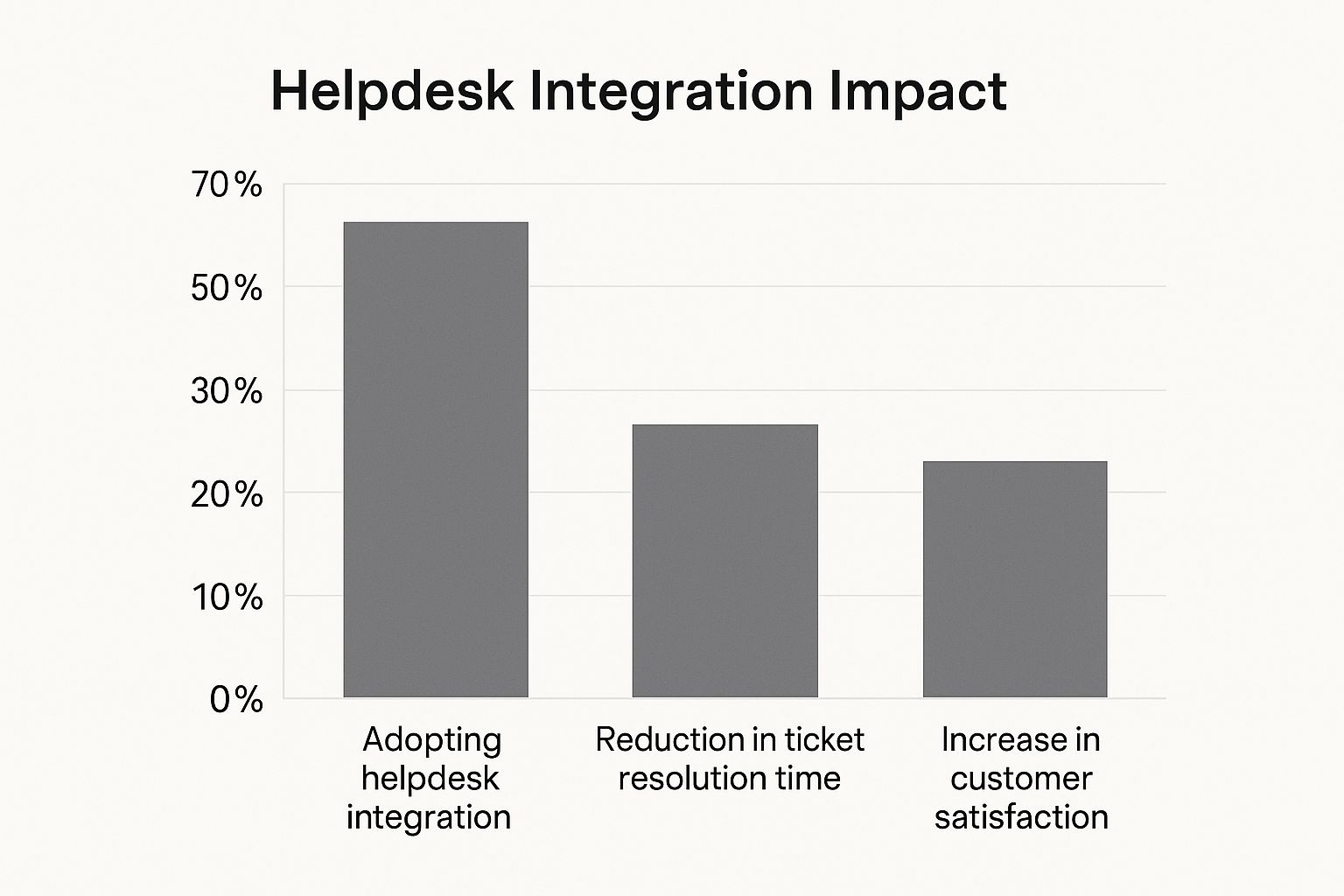
The data here doesn't lie. Connecting your helpdesk isn't just a "nice-to-have"—it directly leads to faster support and more satisfied customers. That’s a powerful recipe for growth.
A Day in the Life: With and Without Integration
To really see the difference, let’s look at how daily support tasks change. The table below shows the stark contrast between a disconnected support environment and a fully integrated one. It highlights just how much friction a connected system removes.
Daily Workflows With and Without Integration
| Support Task | Without Integration (Disconnected) | With Integration (Connected) |
|---|---|---|
| Viewing Customer History | Agent must open the CRM separately and search for the user. | Complete customer history and past purchases appear directly in the ticket. |
| Escalating a Bug | Agent manually copies details into a new task in the developer's project tool. | A new, detailed bug report is created in Jira or Asana with one click. |
| Checking an Invoice | Agent asks the finance team to look up payment status in another system. | Agent sees the customer's full billing status and history inside the helpdesk. |
| Sharing a Solution | Agent types out a long, repetitive explanation for a common issue. | Agent inserts a pre-made video tutorial or knowledge base article into the reply. |
This isn't just about saving a few seconds on each task. It fundamentally transforms an agent's role from a data-entry clerk into a true problem-solving specialist.
This push for greater efficiency is a big deal. The helpdesk automation market is expected to grow from $6.14 billion to $8.14 billion, a jump fueled by companies needing smarter ways to serve customers. For a deeper dive into these numbers, you can check out the market insights on TBRC.info.
The Real-World Impact of an Integrated Helpdesk
Sure, the technical side of connecting your software is important, but what really matters is what helpdesk integration does for your business. It's more than just a workflow fix. We're talking about a fundamental upgrade to how your company runs, connects with customers, and makes smart decisions.
This impact really shines in three key areas: how efficiently your team operates, how loyal your customers become, and the quality of your business intelligence.
An integrated helpdesk doesn't just make work feel easier; it makes your entire support operation more effective and less expensive. This value is why we're seeing such a massive surge in the market.
The helpdesk automation market was recently valued at USD 10.7 billion and is projected to hit a staggering USD 91.9 billion in the coming years. This explosive growth isn't just a trend; it's a clear signal that businesses are hungry for smarter, more cost-effective support powered by connected tech. You can learn more about the trends driving helpdesk automation market growth on imarcgroup.com.
What this tells us is that companies are investing serious money into integration because the return is undeniable. Let's dig into exactly how that happens.
Supercharge Your Operational Efficiency
Without integration, your support agents are forced to be professional data jugglers. They’re constantly flipping between tabs, copying and pasting information, and digging for customer history. This isn't just slow—it's a recipe for frustration and burnout.
Helpdesk integration puts an end to that grind by automating the repetitive, low-value work. For example, an email comes in, and a ticket is instantly created. A customer calls, and their entire purchase history from your CRM pops up right next to that ticket. No searching required.
This frees up your agents to focus on what humans do best: solving tricky problems and offering real, empathetic help. The results show up almost immediately.
- Faster Ticket Resolution: Agents have every piece of information they need in one place, cutting out the back-and-forth that drags down resolution times.
- Increased Agent Productivity: By eliminating manual tasks, agents can handle more conversations and spend their time on work that actually matters.
- Improved Employee Morale: Take away the daily frustrations, and you get agents who are more engaged, happier in their roles, and far more likely to stick around.
Build Unbreakable Customer Loyalty
Think about the last time you had to repeat your problem to three different people at the same company. It’s infuriating. It makes you feel like just another ticket number, not a valued customer. A disconnected support system makes that painful experience the norm.
With an integrated helpdesk, your agents greet every customer with the full story. They can see past conversations, recent orders, and previous issues without ever having to ask. It creates a seamless, personal experience that builds genuine trust and keeps people coming back.
Gain Actionable Strategic Insights
Finally, a helpdesk integration turns your support department from a simple cost center into a goldmine of business intelligence. When all your customer interaction data flows into one place, you can finally see the big picture.
Suddenly, leaders can track key performance indicators (KPIs) with ease. You can spot recurring customer complaints and pinpoint product weaknesses before they become full-blown crises. Are customers in Germany constantly reporting the same bug? Is that new feature causing a massive spike in support requests?
This data-driven approach allows you to make informed decisions that benefit the entire company. You can steer product development, fine-tune marketing campaigns, and proactively improve the customer journey. You’re no longer just putting out fires—you’re using data to prevent them from starting in the first place.
Essential Integrations Your Business Needs

Not all integrations are created equal. You could try connecting every single tool in your company's tech stack, but that often creates more noise than signal. A better approach is to be strategic. Think of it like building a bridge; you don't connect it to every side street, just the major highways that carry the most traffic. Your helpdesk integration strategy should focus on these critical highways first.
The real goal is to link your helpdesk with the systems that hold your most important customer and operational data. Doing this creates a central hub where your agents can see everything they need without constantly flipping between different tabs and apps. Let’s look at the integrations that deliver the biggest bang for your buck by solving the most common headaches.
Unifying Customer Data with CRM Integration
At the heart of any business that truly cares about its customers is the Customer Relationship Management (CRM) system. It’s the official record of your entire relationship with a customer, from their very first visit to their most recent purchase.
When your helpdesk and CRM are siloed, your support agents are essentially flying blind. They see a new ticket pop up, but they have no idea who the person is, their history with your company, or how valuable they are. This forces them to dig through the CRM manually, which wastes time and often leads to a generic, impersonal reply.
Integrating your helpdesk with a CRM like Salesforce or HubSpot completely changes the game.
- Complete Customer Context: When a ticket arrives, the agent instantly sees the customer's full story—contact info, past orders, and previous support conversations—all without leaving the helpdesk.
- Personalized Support: With this information at their fingertips, agents can provide service that feels personal, acknowledging a customer's loyalty or understanding their specific needs.
- Proactive Engagement: With a shared view, your sales and support teams can spot opportunities to help or address frustrations before they ever escalate.
By bridging the gap between support and sales, CRM integration ensures that every customer feels seen and understood. It transforms a simple support ticket into a meaningful, context-rich conversation.
Streamlining Internal Workflows with Communication Hubs
Let's face it: support is a team sport. Agents constantly need to collaborate with coworkers, ask for a second opinion, or get a quick approval. When these chats happen in a separate tool like Slack or Microsoft Teams, they create an invisible workflow that's impossible to track later.
When you integrate your helpdesk with your internal chat platform, those informal conversations become actionable, trackable tasks.
For instance, an agent can turn a Slack message into a new helpdesk ticket with a single click. This simple action captures the entire conversation and makes sure no customer request ever gets lost in a busy channel. It also helps with internal organization. As an example, a smooth Jira Outlook calendar integration connected to your helpdesk can make scheduling and response coordination way more efficient.
Accelerating Development with Project Management Tools
When a customer reports a software bug or a technical issue, that problem needs to get to your development team. Without an integration, this is a clunky, manual process. The support agent has to copy all the details from the helpdesk ticket and then paste them into a new task in the developers’ project management tool, like Jira or Asana.
This manual handoff is a recipe for errors and delays. Information gets lost in translation, key context is missed, and the customer is left waiting for an update.
A helpdesk integration with your project management tool automates this entire flow.
- Seamless Escalation: An agent can create a new Jira issue right from the helpdesk ticket, automatically pushing over all the important details, including logs and the customer's own words.
- Synced Status Updates: When the development team updates the bug's status in Jira (say, to "In Progress" or "Fixed"), that status automatically syncs back to the helpdesk ticket.
- Closed Communication Loop: The support agent gets an instant notification the moment the bug is resolved, so they can follow up with the customer right away.
This connection does more than just save time. It builds a transparent and efficient pipeline between your support and engineering teams, which ultimately means faster bug fixes and happier customers.
Your Blueprint for a Successful Integration

A successful helpdesk integration is built on strategy, not just technology. It’s less about flipping switches and more about having a smart, deliberate plan. You wouldn't build a house without a blueprint, and the same thinking applies here. This section is your blueprint—a practical guide to getting your integration right from day one.
The goal isn't to connect everything all at once. Instead, focus on making targeted connections that solve real problems. This way, you minimize headaches, build momentum, and ensure you're actually making things better, not more complicated.
Identify Your Biggest Bottlenecks
Before you touch a single setting, you have to know why you're doing this. The best place to start is by finding the biggest points of friction in your team's daily grind. Where are they losing the most time?
Get your support agents in a room (or on a call) and ask them some direct questions:
- What's that one repetitive task you wish you could automate away forever?
- Which apps are you constantly jumping between to solve one ticket?
- Where does crucial information fall through the cracks or become stale?
Maybe your IT crew wastes hours switching between the helpdesk and an asset management system just to find out which laptop a user has. Or perhaps your support agents are manually copying and pasting customer feedback into a spreadsheet for the product team. These are your prime targets for integration. Solving these specific, high-pain problems first guarantees a win your team will feel immediately.
Choose Tools Built for Connectivity
Let's be honest: not all software plays nicely together. When you're looking at a new helpdesk or any other tool, its ability to connect with your other systems should be a top priority. Look for platforms that have a robust, well-documented API and a healthy marketplace of native integrations.
A strong integration marketplace is a huge green flag. It shows the vendor gets that their tool is part of a bigger ecosystem. It means you can connect essentials—like your CRM or project management software—in just a few clicks, no developer needed.
This focus on connectivity saves you a ton of time and money down the road. It makes future projects much faster and simpler to get off the ground. For more on this, check out our complete guide on help desk integration for deeper insights into picking the right platforms.
Start Small With a Pilot Project
One of the most common mistakes is trying to launch a massive, company-wide integration all at once. It's a high-risk gamble that can cause chaos if anything goes sideways. A much smarter move is to start with a small, contained pilot project.
Pick one or two of those bottlenecks you identified and focus on solving just that one problem. For instance, integrate your helpdesk with Jira for a single support team to make bug reporting seamless. This approach has some major advantages:
- Prove Value Quickly: A successful pilot delivers a clear, measurable win. This builds excitement and helps you get buy-in from other teams and leadership.
- Iron Out Kinks: You can find and fix any technical glitches or workflow snags on a small scale, before they can impact the whole company.
- Gather Feedback: The pilot team becomes an invaluable source of feedback, helping you refine the process and create better training for a wider rollout.
Map Your Data and Prepare Your Team
A great integration needs more than just good technology; it needs good planning on the human side of things. Your team's ability to adopt the new process is what will ultimately make or break its success.
Data Mapping:
Before you flip the switch, map out exactly what information will flow between systems. If you're connecting your CRM, you might decide that the customer's name, email, and recent order history should sync to the helpdesk. Being crystal clear on this data flow prevents confusion and ensures agents see only what they need to see.
Team Preparation:
Change can be intimidating, so it's vital to prepare your team by showing them what's in it for them.
- Explain the "Why": Show them exactly how this new connection will eliminate their most annoying tasks and help them solve customer issues faster.
- Provide Hands-On Training: Walk them through the new workflow step-by-step. Don't just show them which buttons to click; explain how it improves their day-to-day.
- Establish Security Protocols: Train your team on any new security considerations. For example, social engineers might try to trick agents into resetting passwords or MFA for important accounts. Simple verification steps are your best defense against a major breach.
How Video Is Changing the Game for Helpdesk Support
Ever tried to explain a weird car noise to a mechanic over the phone? It's a frustrating guessing game. Traditional helpdesk support often feels the same way. A customer does their best to describe a problem in a long, confusing email, and your support agent has to try and piece it all together. This text-based back-and-forth is slow, often leads to misunderstandings, and is a big reason why ticket backlogs grow.
But what if your customer could just pop the hood and show you the problem? That’s exactly what video is doing for customer support. A helpdesk integration built around video doesn't just bolt on a new feature; it completely changes the support conversation from one of description to one of demonstration.
Show, Don't Tell: The Power of Visual Context
Think about the last time you reported a technical bug. You probably used vague terms like "the button is acting weird" or "it just looks broken." For a support agent or engineer, that kind of feedback isn't very helpful. This is where a video-first approach makes all the difference.
Instead of a wall of text, a customer can send a quick screen recording showing the exact moment an error pops up. That visual evidence cuts through the noise, eliminating the need for endless back-and-forth questions.
Here’s a look at how Screendesk embeds this visual context right into your support workflow.
This isn't just a link to a video. As you can see, the customer's screen recording is part of the support ticket itself, sitting alongside all the technical data an engineer needs. It's a complete, integrated bug report that combines visual proof with actionable data, all in one place.
More Than a Recording: Automatic Data Capture
A smart video helpdesk integration does more than just let you see what your customer sees. Tools like Screendesk automatically capture critical diagnostic information right along with the video. This transforms a simple screen recording into a rich, data-packed ticket from the get-go.
Imagine a new ticket landing in your queue that already includes the customer’s video, a full console log of errors, their browser version, operating system, and screen resolution. Your support agent doesn't have to ask for a single thing. That’s the power of a video-first approach.
This level of detail means tickets arrive "pre-diagnosed," giving your technical team everything they need to start working on a fix right away.
- Zero Guesswork: Engineers see the exact sequence of events that triggered the error, making it much easier to replicate and solve the problem.
- Faster Escalations: When a bug needs to be passed to the development team, the ticket already has all the necessary technical information attached.
- Less Customer Effort: Customers appreciate being able to report a complex issue in under a minute without needing any technical know-how.
This approach dramatically cuts down on resolution times. The whole process becomes more efficient for your team and far less of a headache for your customers. To learn more about this, you can explore the benefits of using video for customer support and see how it reshapes the user experience. By moving from text-based guessing games to clear, visual evidence, you’re not just improving a single metric—you’re building a better, more effective support engine from the ground up.
Navigating Common Integration Hurdles
While a powerful helpdesk integration promises a world of efficiency, the road to getting there isn't always straight. It’s a bit like assembling a complex piece of furniture—the instructions might look simple, but you can bet there will be a few tricky spots along the way. Knowing what to watch for helps you steer clear of the common pitfalls that can derail these projects.
The challenges usually fall into two buckets. You've got the technical stuff, like getting different systems to talk to each other securely and making sure data lines up correctly. Then you have the people part—managing change and getting your team excited about a new way of working.
Overcoming Technical and Security Challenges
One of the first technical snags teams run into is data mapping. This is simply the process of telling your systems where information belongs. For example, you need to ensure the "Customer Name" field in your CRM matches the right field in your helpdesk. If you don't map this out carefully beforehand, you’ll end up with a jumbled mess of mismatched or missing data, which only creates more problems.
Security is another huge piece of the puzzle. Connecting systems opens up new channels for data to flow, and if those channels aren't secured, they can become vulnerabilities. We’re seeing a rise in social engineering attacks, where a fraudster might impersonate a customer to trick an agent into resetting a password or multi-factor authentication. A few simple verification steps are your best line of defense.
Here’s how to tackle these issues head-on:
- Plan Your Data Flow: Before you write a single line of code, sketch out what information needs to go where. A little planning here saves a lot of headaches later.
- Choose Secure Tools: Opt for platforms with solid, built-in security features and well-documented APIs.
- Create Verification Protocols: Train your team to always verify identities before taking sensitive actions. This is a crucial step we cover in our guide to help desk best practices.
Managing Team Adoption and Training
Let's be honest: even the most elegant technical solution is useless if your team won't use it. People are naturally resistant to change, so it's critical to guide your team through the transition. Your job is to show them how this new integration makes their lives easier, turning skeptics into advocates.
Good training isn't a one-and-done demo. It needs to be an ongoing effort with clear documentation, hands-on practice, and a safe place for agents to ask questions and share feedback. The moment your team sees the integration eliminating their most repetitive tasks is the moment you start building real momentum.
The global helpdesk automation market was valued at around $26.8 billion and is projected to hit $130.9 billion. This staggering growth highlights just how essential efficient, integrated systems are for keeping customers happy. Discover more insights about this rapidly growing market on globenewswire.com.
This massive industry investment really drives home the point: getting adoption right is non-negotiable. By paying close attention to both the technical and human sides of your helpdesk integration, you’re paving the way for a smooth rollout and lasting success.
Your Helpdesk Integration Questions Answered
Diving into helpdesk integration can feel like a huge technical hurdle, but it's usually more straightforward than people imagine. Most of the common worries about cost, complexity, and whether it's all worth it have simple answers. Let's break down the biggest questions we hear from teams just starting out.
The secret isn't to connect everything all at once. It's about making smart, practical changes that deliver a real impact right away, without getting lost in the technical weeds.
Where Should I Start My Integration Journey?
Start with the single biggest time-waster your team complains about. Seriously, what’s the most obvious, repetitive task that drives everyone crazy?
Is it the soul-crushing copy-and-paste of customer details from your CRM into a new helpdesk ticket? Maybe it's the constant need to manually create tickets from customer emails. Pinpoint that one high-friction task and tackle it first. Scoring a quick win that solves a daily headache proves the value of integration immediately. That success is what builds the momentum you need for bigger projects down the road.
Do I Need a Developer to Connect My Tools?
Probably not, at least not at first. Most modern helpdesk platforms are built for the rest of us. They come with native, no-code integrations that you can set up with just a few clicks. Think of them as pre-built bridges that do all the heavy lifting for you.
For really unique or complex workflows, you might eventually need a developer to work with an API. But you can get an incredible amount of automation and efficiency long before you ever have to think about writing a single line of code.
How does integration actually help my customers? It helps in two huge ways. First, they get faster answers because your agents aren't fumbling around in different tabs to find the information they need. Second, they get much more personal support. When your helpdesk talks to your CRM, your agents see the customer's entire history, which leads to a more informed and empathetic conversation. No more making customers repeat themselves.
Transform your support workflows from confusing text threads to clear, actionable video reports. With Screendesk, you can see exactly what your customers see, cutting resolution times and eliminating guesswork. Get started for free.
