


Why Video Call Recording Changed Everything for Remote Teams
The move to remote work did more than just change our office addresses; it completely changed how we talk to each other and keep track of important information. All those quick chats by the water cooler and impromptu whiteboard sessions disappeared, leaving a huge gap where important ideas and decisions used to be made. This is where video call recording made its entrance, shifting from a simple feature to a critical tool for any team working from different locations. It's not just for record-keeping anymore—it's about creating a single source of truth that you can always go back to.
You can see this shift reflected in the market's incredible growth. In 2024, the global video conferencing market hit a revenue of about $14.2 billion, showing just how essential these tools have become. A big part of this trend is video call recording, as more companies realize its power to capture knowledge that would otherwise be lost. To get a deeper look at these numbers, you can check out some fascinating video conferencing statistics.
Beyond Meeting Minutes: The New Reality
Think about the last time a crucial project detail slipped through the cracks. Did someone just forget, or was it never written down properly? I recently talked to a product development team that avoided a major, expensive mistake thanks to a single recorded brainstorming session. A developer, who was on leave during the original call, watched the recording later. He spotted a critical dependency that everyone else had missed, saving them weeks of extra work. This isn't a one-off story; it’s how top-performing teams operate now. They don’t just have meetings; they build a searchable library of them.
Of course, recording calls is just one piece of the puzzle. If you're looking for more ways to boost collaboration, it's worth exploring other effective meeting management tips as well.
Unlocking Team Potential with Recordings
The advantages of recording calls go way beyond just catching mistakes. Smart organizations are using their video archives in some really clever ways:
- Faster Onboarding: Instead of having a new team member shadow call after call, you can give them a curated playlist. They can watch key kickoff meetings, client demos, and team stand-ups to get fully up to speed in a matter of days, not weeks.
- Clearer Accountability: When action items and commitments are captured on video, there’s no room for confusion. Teams find that follow-through improves significantly because anyone can refer back to the exact moment a decision was made.
- True Asynchronous Collaboration: For teams spread across the globe, video call recording is a game-changer for working across time zones. A colleague in Tokyo can catch up on a meeting that happened in New York, watch the discussion, and add their thoughts later. This ensures everyone's voice is heard, no matter where they are.
Creating Your Perfect Recording Setup Without Breaking the Bank
You might assume that creating a professional video call recording means shelling out for a Hollywood-style studio, but that’s really not the case. The secret isn't about having the deepest pockets; it’s about making smart choices with your gear and your space. A few key tweaks can transform your setup, helping you produce clear, engaging recordings that hold your audience's attention.
Let's dive into the two areas that give you the most bang for your buck: audio and lighting.
Audio: The Unsung Hero of Good Recordings
If there's one thing that will make viewers click away faster than anything else, it's bad audio. Your laptop's built-in microphone might seem good enough, but it’s notorious for picking up echoes, keyboard clicks, and that annoying muffled sound. People are surprisingly forgiving of so-so video, but poor audio is an instant deal-breaker. That's why investing in a dedicated microphone is the single most important upgrade you can make.
-
Entry-Level Excellence: A simple USB microphone from a brand like Blue or Audio-Technica provides a huge leap in quality. Look for models with a cardioid pickup pattern. This design focuses on sound coming from directly in front of the mic, which helps tune out distracting room noise and keeps your voice front and center.
-
Acoustic Treatment on a Budget: You don’t need to cover your walls in expensive foam panels. The trick is to use soft surfaces to absorb sound waves and kill echo. Recording in a room with a rug, curtains, or even just a few pillows strategically placed can make a world of difference in your sound clarity.
Lighting: Making a Visual Impact
Right after audio, lighting has the biggest effect on your video quality. Even a top-of-the-line webcam will produce a grainy, unprofessional image in a poorly lit room. The aim is to get soft, even light on your face to get rid of any harsh shadows. And no, you don't need a complicated three-point lighting kit to get there.
A simple ring light is a fantastic, affordable tool that bathes your face in flattering light. If you're looking for a zero-cost option, just set up your desk so you're facing a window. Natural light is your best friend! Just make sure the window isn't behind you, or you’ll end up as a dark silhouette. This small change in your environment can dramatically improve every video call recording you make.
To help you decide what level of investment is right for you, here’s a quick comparison of a basic versus a more professional setup.
Recording Setup Comparison: Essential vs Professional
| Setup Level | Audio Solution | Video Quality | Storage Requirements | Total Investment |
|---|---|---|---|---|
| Essential (Good) | USB Microphone (~$50-$100) | Built-in or 1080p Webcam | 1-2 GB per hour | ~$100 – $200 |
| Professional (Great) | XLR Mic with Audio Interface (~$200-$400) | DSLR/Mirrorless Camera | 5-10 GB per hour (higher bitrate) | ~$500 – $1,500+ |
The table shows that you can achieve a "Good" setup for a relatively small investment, mainly by upgrading your audio. The jump to a "Great" setup is more significant but offers broadcast-level quality if that's what your project demands.
For a deeper dive into the technical side, check out our guide on how to record your screen and video with perfect clarity. By mastering these basics, you ensure your recordings look and sound polished, making your content more effective and respected by your audience.
Mastering Platform-Specific Recording Like a Pro
Every video conferencing platform has its own personality when it comes to recording. Understanding their unique quirks can be the difference between a smooth experience and a major headache. While most offer a basic video call recording feature, their capabilities for storage, quality, and sharing can vary a lot.
For example, a marketing agency I know relies heavily on Zoom for their client kick-off calls. They love its straightforward cloud recording and automatic transcription, which makes it easy to pull out key client quotes and action items. However, when it comes to internal training, they switch to Microsoft Teams. Its deep integration with SharePoint allows them to build a permanent, searchable video library that new hires can access during their onboarding. This two-platform approach shows something important: the best platform often depends on the specific job at hand.
Know Your Tool's Limits
The major players in this space each have their own set of useful features and frustrating limitations that you often only discover through experience.
-
Zoom: It's known for being user-friendly and offers separate audio tracks for each participant—a lifesaver for podcast-style editing. The biggest downside is that local recordings can easily fill up your hard drive, and cloud storage costs can add up quickly for heavy users.
-
Microsoft Teams: Its main strength is its smooth integration into the Microsoft 365 ecosystem. Recordings are automatically saved to OneDrive or SharePoint, making them secure and easy to manage within an organization. However, guests and external users often face trouble accessing recordings due to strict permission settings.
-
Google Meet: This tool is simple and accessible, especially for businesses already using Google Workspace. Recordings save directly to the meeting organizer’s Google Drive. The main catch is that recording is a premium feature, unavailable on free personal accounts, which can catch some users by surprise.
To give you a clearer picture, I've put together a table that breaks down the recording features of these popular platforms.
| Platform | Max Recording Quality | Storage Solutions | Sharing Options | Pricing Model |
|---|---|---|---|---|
| Zoom | 1080p | Local & Cloud (Tiered) | Direct Link, Password Protected | Freemium with Paid Tiers for advanced features/storage |
| Microsoft Teams | 1080p | OneDrive & SharePoint | Internal, External Guest Access (with permissions) | Bundled with Microsoft 365 Subscriptions |
| Google Meet | 1080p | Google Drive | Direct Link (within Google ecosystem) | Included in paid Google Workspace plans only |
This table highlights that while all three offer high-quality recording, the real differences are in how they handle storage and sharing, which are often tied to their pricing.
The chart below shows the current market dominance of these key platforms.
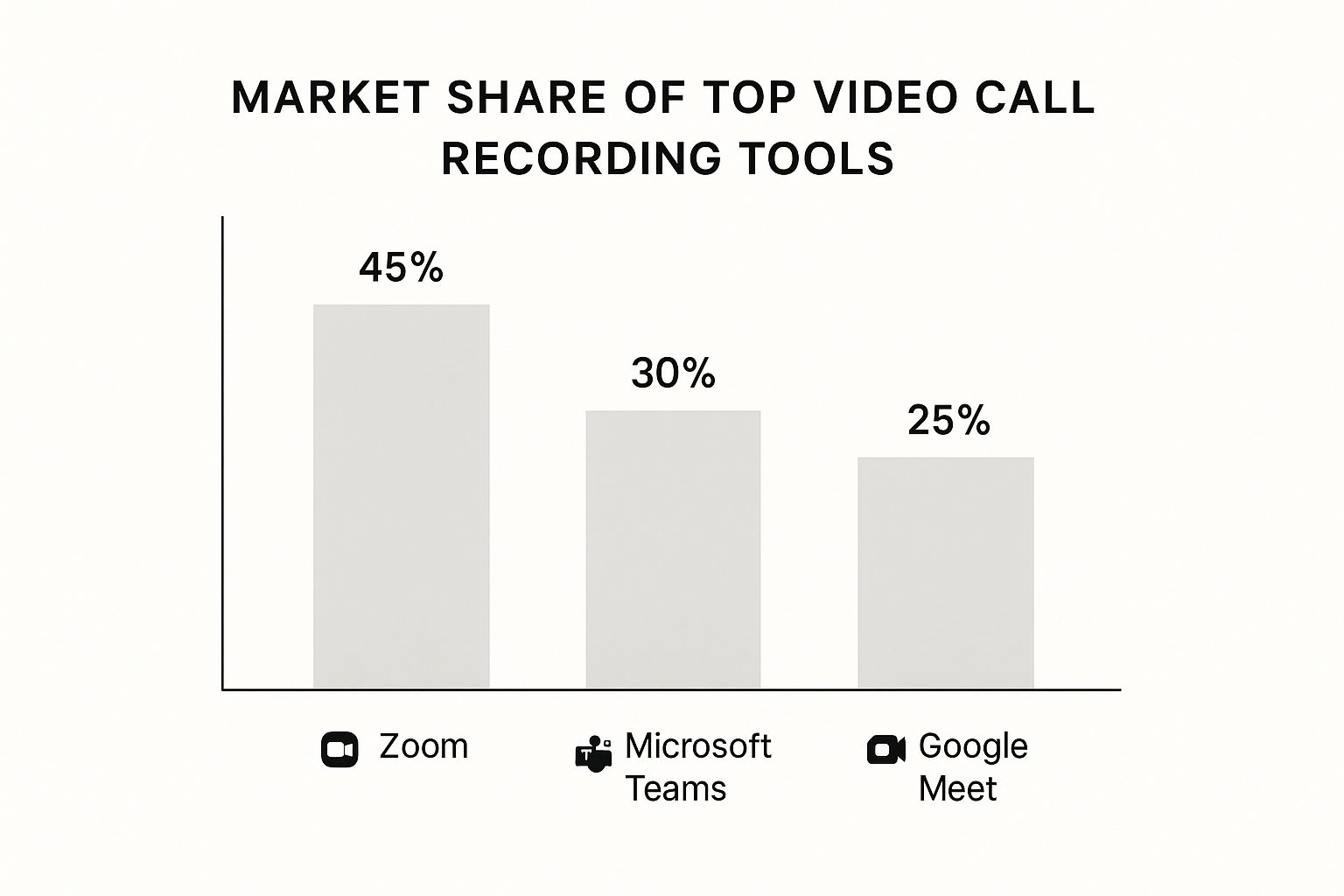
This visual clearly shows that while Zoom leads, Teams and Meet have a significant presence, making it crucial to understand how each one works. When a platform’s built-in recorder doesn’t meet your needs, it’s time to explore dedicated tools. If you’re looking for a more powerful solution, you can find helpful advice in our guide on how to record a video call for any situation.
Navigating Legal Requirements Without the Lawyer Speak
The moment you hit the record button, you step into a world of legal considerations. But don't worry, you don’t need a law degree to handle it. The most important concept to understand is consent. The rules about who needs to agree to a video call recording change depending on where you and your participants are located. These regulations generally fall into two categories.
Understanding Consent: One-Party vs. Two-Party
- One-Party Consent: In these locations, only one person on the call needs to know it's being recorded. If you're the one hitting record, you've already met this requirement. This is the law in the majority of U.S. states.
- Two-Party (or All-Party) Consent: In other areas, everyone on the call must be informed and agree to the recording. States like California, Florida, and Pennsylvania follow this rule. When in doubt, always act as if you're in a two-party consent state. It’s the safest approach and ensures you’re covered no matter what.
A simple, clear announcement at the start of the call is all you need. Something like, "Just to let everyone know, I'll be recording this call for our records," works perfectly. It’s polite, transparent, and legally sound.
Beyond Consent: Data Protection and Storage
Remember that your recordings contain personal data, so you need to handle them responsibly. This means storing them securely and having a clear policy on who can access them and for how long. For example, industries like healthcare (HIPAA) and finance have strict data retention rules, often requiring records to be kept for many years. Always refer to comprehensive resources, like a site's detailed privacy policy guidelines, to ensure you're compliant with data handling laws for your recorded meetings.
The importance of getting this right is reflected in the market’s growth; the call recording solutions segment, including video call recording, generated around $369.5 million in 2024. This figure is projected to hit $1.02 billion by 2030. With this expansion comes greater scrutiny on compliance. You can explore more about these projections for the call recording market to understand the trends.
Tailoring Your Recording Approach for Different Meeting Styles
When it comes to **video call recording**, a universal strategy just doesn’t cut it. How you record a casual team brainstorm should feel completely different from how you capture a formal presentation for a major client. The most successful teams I’ve seen understand this distinction and adjust their methods to fit the moment, turning a simple recording into a truly useful asset.
This kind of flexibility is becoming more important as recording technology improves. The whole video recorder market, which includes all the software we use daily, is set to grow steadily through 2031. This growth is fueled by new features and a rising need for better ways to record and store our conversations. You can explore the data behind the growth of the video recorder market to see how these tools are changing. For us, it means we have more options than ever to get the perfect recording for any situation.
Capturing Different Conversations Effectively
Let's see how this plays out in a real-world setting. I once worked with a sales team that used the same stiff, formal recording settings for every single client call. The problem? It made initial discovery calls feel like an interrogation, and potential customers became guarded. They quickly learned to change their approach based on the meeting type.
- For Sales Discovery Calls: They switched to a much more relaxed recording style. The focus was on capturing the core of the conversation, not making the client feel like they were on stage. They'd often mention the recording was just for internal notes, which helped everyone relax and maintain a natural conversational flow.
- For Formal Client Presentations: This is when they pulled out all the stops. They made sure screen shares were captured in high resolution and enabled multi-speaker views to clearly show who was speaking. This produced a professional, polished video that could be confidently shared with stakeholders who missed the live meeting.
Handling Training and Multi-Speaker Sessions
Your recording strategy also needs to shift for sessions that are more about learning or group collaboration.
- Training Sessions: When you're recording a training session, your top priorities should be clarity and reusability. Pinning the presenter’s video and making sure their screen share is the main focus is key. This ensures the final video is easy for anyone to follow, even if they're watching it for the first time.
- Multi-Speaker Discussions: For a lively team huddle with lots of people chiming in, capturing a dynamic speaker view is the way to go. This allows anyone reviewing the video call recording to easily follow the back-and-forth and pick up on non-verbal cues. It adds a layer of context that a simple transcript would completely miss.
Turning Recorded Meetings Into Organizational Gold
The real value of a video call recording isn't unlocked when you hit "record," but long after you press "stop." Let’s be honest, a raw video file sitting in a random folder is just digital clutter. The magic happens when you turn that recording into something searchable, shareable, and genuinely useful for your entire organization. Without a system, your library of recorded knowledge quickly becomes a digital graveyard.
I once worked with a team whose "archive" was a shared drive filled with files named Zoom_Meeting_0.mp4. Finding anything was impossible. The solution wasn't some complex new software, but a simple, disciplined process for managing their recordings.
Building a Searchable Video Library
Creating a functional archive starts with a logical structure. The goal is to make it easy for someone six months from now to find exactly what they need without having to ask for help.
Here’s a practical folder structure that has worked well for many teams I've seen:
- Department (e.g., Sales, Marketing, Product)
- Meeting Type (e.g., Client Demos, Team Standups, Project Kickoffs)
- Year-Month (e.g., 2024-05)
YYYY-MM-DD_ProjectName_MeetingTopic.mp4
- Year-Month (e.g., 2024-05)
- Meeting Type (e.g., Client Demos, Team Standups, Project Kickoffs)
This tiered approach, combined with a consistent naming convention, makes browsing and searching much more efficient. It turns a chaotic collection into a predictable, organized library. These recordings can also become an incredible resource for creating thorough business process documentation, which helps with training and compliance.
From Raw Footage to Actionable Insights
No busy stakeholder wants to watch an hour-long recording. The key is to break it down into its most valuable moments. This is where AI-powered tools like Screendesk really shine. Automatic transcription is the first step, making the entire conversation searchable by keyword. For instance, instead of scrubbing through a 45-minute call, a support manager can instantly find the five minutes where a customer described a critical bug.
This dashboard shows how you can manage and review your library of recordings all in one place.
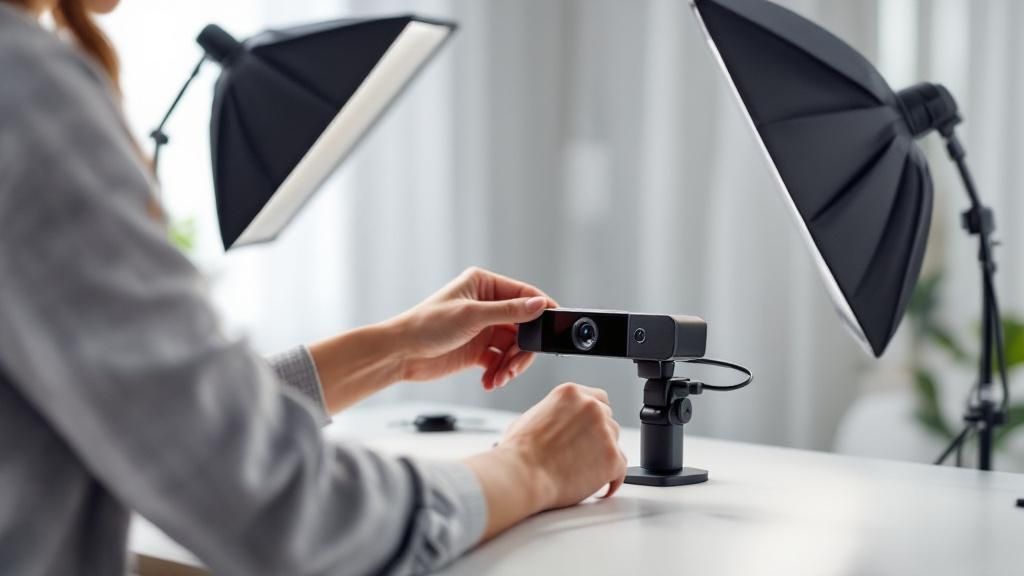
Having a centralized and visual system like this prevents recordings from getting lost and encourages teams to actually use them as a resource.
From there, you can create highlight reels or short clips. Think about these scenarios:
- For Sales: Clip a 2-minute segment where a client shares positive feedback to use in team training.
- For Support: Isolate a 30-second clip that shows a common user error. As our guide on leveraging video for customer support explains, these short, targeted videos can resolve tickets faster.
- For Product Teams: Share the exact moment a user expresses frustration with a feature during a feedback session.
This approach respects everyone's time and ensures the powerful insights captured in your video call recording actually get seen and put to good use.
Solving Recording Problems Before They Ruin Important Meetings
We’ve all been there. That sinking feeling when you realize a critical client meeting wasn't recorded properly. Even with the best preparation, a video call recording can fail at the worst possible time. But with a bit of foresight and some quick thinking, you can prevent most issues before they start and handle the ones that slip through.
The trick is to switch from a reactive to a proactive mindset. Don't just wait for something to go wrong; expect that it might. For instance, before any important call, I always run a quick, 30-second test recording. I check my audio, my video, and make sure the file actually saves. It sounds almost too simple, but this one little habit has saved me from some major headaches.
Quick Fixes for Common Recording Glitches
When trouble strikes mid-call, you need solutions that work immediately. Let's walk through some of the most common issues that can throw your meetings off course.
-
Audio and Video Are Out of Sync: This is a classic sign of a strained CPU or a spotty internet connection. If you notice a lag, the first thing to do is shut down any extra applications or browser tabs you have open. This often frees up enough resources to fix the problem. If it continues, try turning your video off and on again. This can often force the stream to resynchronize without you having to stop the recording.
-
The Recording Fails to Save or Upload: A sudden computer crash or a dropped internet connection can make it seem like your recording is gone for good. Before you hit the panic button, check the temporary files folder for your recording software. Many tools save a local, temporary version during the call. You might be ableto recover a nearly complete file from there.
Building Your Recording Safety Net
For those truly can't-miss meetings, you can't afford to leave anything to chance. This is where a backup plan becomes essential. The most reliable strategy is to have a second person record the call at the same time. Ideally, they should use a different device and, if possible, a different internet connection. This creates redundancy, meaning if one recording fails, you have another one ready.
It's also a smart move to establish a clear emergency protocol. If the main recording goes down, who’s responsible for starting the backup? Defining these roles ahead of time avoids confusion and frantic messages during an important conversation. Think of it as a fire drill for your meetings—you practice it so everyone knows exactly what to do when it counts.
By preparing for the worst-case scenario, you can confidently navigate any technical hiccup. Instead of letting recording issues derail your meeting, you’ll have the strategies in place to keep everything moving forward.
Ready to eliminate recording problems for good? Discover how Screendesk provides reliable, high-quality video call recording that your team can count on every time.
